What to look for in a shared bedroom
First decide who will use voice chat, then compare microphone controls, how considerate it is for others in the room and which connection you need.
| Priority |
What to check before buying |
Who is it important to? |
| Clear explanations |
Microphone position and an easy-to-reach mute control; test voice chat with both people. |
When I’m explaining how to play, I want my voice to come through without accidentally picking up the person beside me. Around 31% of consumers prioritise clear explanations and easy-to-control muting. |
| Being considerate in the bedroom |
Test the volume controls and, if you want it, Sidetone on the specific model. |
If someone else is sleeping or playing in the same room, I want to keep an eye on the game audio and how loudly I’m speaking. Around 25% of consumers are particularly mindful of others in a shared room. |
| Connections and features |
Check that the gaming device, connection and microphone or chat features you need are supported by the exact variant. |
If I switch between gaming devices, the connection needs to fit and the feature I want must be available on my platform. Around 19% of consumers prioritise device compatibility. |
| Comfort during longer sessions |
Check for pressure on your head and ears, and how the headset fits with glasses. |
If I’m explaining things and playing for longer, I want the headset to be comfortable, even with my glasses on. Around 13% of consumers put comfort first. |
| Easy to get started |
Weigh up the connection you need against how much freedom of movement you want. |
If I only play together occasionally, I want as little set-up and charging as possible. Around 12% of consumers prefer an easy set-up to greater freedom of movement. |
Joybuy picks for gaming together
The models below have been selected as wired options for voice chat and explaining things while gaming together; some also offer wireless connections.
 No image available
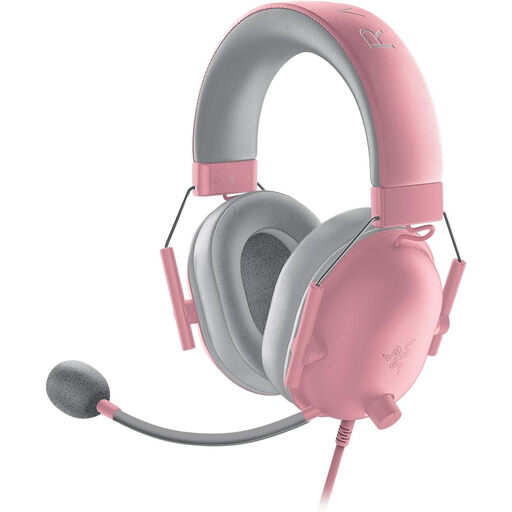
Razer BlackShark V2 X Quartz
A wired option if you want to mute the microphone directly on the cable while explaining something.
Closed-back earcups and a 3.5 mm connection; weight: 240 g. The product description lists a flexible cardioid boom microphone and an in-line mute control.
View at Joybuy
 No image available
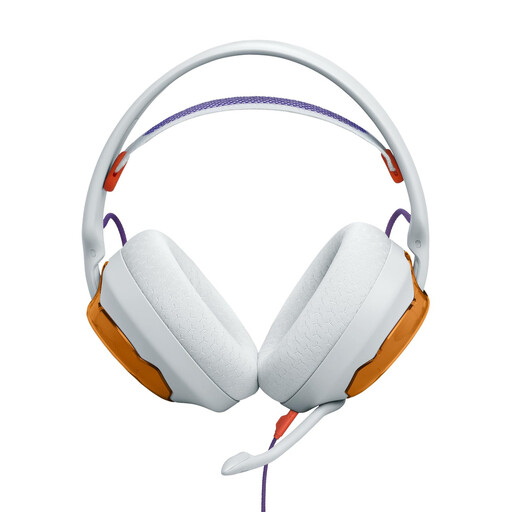
JBL Quantum 250, Light Teal and Orange
A wired option if a detachable microphone and replaceable parts matter to you.
The product description lists a 3.5 mm connection, a unidirectional cardioid microphone and replaceable components including the microphone, cable and ear cushions. It also mentions software to reduce keyboard noise; this doesn’t prove that it can distinguish between human voices.
View at Joybuy
 No image available
HyperX Cloud Alpha
An option if you’re looking for a detachable microphone and in-line volume and mute controls.
The product description lists a 3.5 mm connection, closed-back earcups, memory foam ear cushions and an adjustable headband. Compatible devices include PC, PlayStation, Xbox and Switch.
View at Joybuy
 No image available
ONIKUMA GT889
An option if you want to choose between wired and wireless connections, with the ability to mute the microphone on the headset.
The product description lists 2.4 GHz wireless, Bluetooth 5.4 and wired use, as well as a detachable noise-cancelling microphone. A physical mute button and volume control are also listed. These details don’t prove that the headset can block out a second person’s voice.
View at Joybuy
 No image available
Logitech G PRO X Gaming Headset
A wired option if you want a detachable boom microphone and a choice of connection types.
The product description lists a USB sound card adapter and a 3.5 mm cable for mobile devices and consoles. The cardioid microphone is detachable; according to the description, advanced Blue VO!CE features require a PC and USB. Memory foam ear pads in leatherette and fabric are also listed.
View at Joybuy
Frequently asked questions
Do two people in the same room automatically need two headsets?
No. What matters is whether both people need to hear separate game audio or join voice chat on their own devices. If only one person is explaining something online, start by testing that voice chat set-up. If both microphones are live, test both inputs and how they sound in the room itself. A single headset won’t provide separate audio output for two devices.
Will Discord reliably filter out the voice of the person beside me?
You shouldn’t rely on it to. Discord describes Krisp as a filter for background noise that isn’t human speech, and notes that it may affect voice quality. Test voice chat with both people speaking and use mute if needed.
What is Sidetone, and where do I adjust it?
Sidetone plays your microphone voice back through your own headphones. On the models SteelSeries lists as compatible with the Arctis Companion App, you can adjust it there using a slider. For other models, check the relevant instructions.
How loud should I listen during longer gaming sessions?
The World Health Organization recommends keeping the volume low, taking regular breaks and, as a simple guide, setting your device to no more than 60% of its maximum volume. This doesn’t guarantee that the same volume setting will produce the same sound pressure level on every headset.
What are my rights when buying online in Germany?
When you buy online from a business in Germany, you generally have a 14-day right to cancel, starting from the day you receive the goods. Exceptions may apply, and return costs should be checked separately. If the goods are faulty, you also have statutory rights. The European Union’s Your Europe website explains that EU purchases come with a minimum two-year legal guarantee from the date you receive the goods. These rights are separate from a voluntary manufacturer’s warranty.


