Who is this selection for?

Shooter players focused on in-game sounds

If you practise the same situation repeatedly, using comparable audio settings can help you make sense of in-game sounds. PlayStation Support explains how to configure separate 3D audio settings for TV speakers and headphones on PS5.

Team players who use voice chat

If you give call-outs while practising, the microphone should work with your gaming device and be easy to mute reliably. HyperX lists a mute indicator for the Cloud III; still, check that the connection works with your specific setup.

Players who sit further away

If you sit further from your gaming device, the actual connection route and the exact model’s wireless compatibility matter. Xbox Support explains how to connect a compatible headset to the 3.5 mm jack on an Xbox controller; SteelSeries lists a USB-C dongle for PC and PlayStation with the Arctis Nova 5 Wireless.

What should you look for when buying?

Wired connection

A good fit if: You usually practise in one spot and the cable is long enough to reach from the port to where you sit. HyperX lists 3.5 mm, USB-C and USB-A connections for the Cloud III.

Trade-off: The cable can get in the way if you sit a long way from the device. Having the right plugs doesn’t prove that every connection type supports game audio and the microphone on every console.

Wireless with a compatible receiver

A good fit if: You want more freedom to move and the exact model, including its microphone, is compatible with your platform. SteelSeries lists a USB-C dongle for PC and PlayStation with the Arctis Nova 5 Wireless, but not Xbox.

Trade-off: The receiver, platform and battery charge all need to suit your setup. A wireless connection is no proof of better positional audio.

Bluetooth or an additional connection

A good fit if: Your gaming device supports the specific Bluetooth connection, or you want to use it with a mobile phone as well. SteelSeries describes switching between a 2.4 GHz gaming connection and Bluetooth on the Arctis Nova 5 Wireless.

Trade-off: Bluetooth support for a phone doesn’t automatically mean you can use Bluetooth for game audio on a console. beyerdynamic lists the MMX 150 wireless as compatible with Xbox via a wired connection, not Bluetooth.

Priority What to check before buying Who is this important to?
Comparing in-game sounds Audio output and settings on your gaming device; listen to the same scene at a comparable volume. If I’m assessing the same gaming situation repeatedly, I want to hear in-game sounds using comparable settings rather than relying on a surround-sound claim. Around 33% of consumers say gaming audio is their top buying priority.
Connection and seating distance Check the actual controller or device port, and the cable length or explicitly supported wireless receiver. If I sit a long way from the screen, I need a connection that reaches where I sit and carries both game audio and microphone sound. Around 27% of consumers put device connections and seating distance first.
Team voice chat Test the microphone and mute function in the chat you use and on your own gaming device. If I give call-outs while practising with others, I want to be heard clearly and be able to check easily when I’m muted. Around 20% of consumers prioritise team call-outs and microphone controls.
Comfort during longer sessions Check the fit on your own head; if needed, see whether replacement ear cushions are available for the exact model. For repeated, longer practice sessions, I want to avoid pressure points and find a fit I can wear comfortably. Around 20% of consumers put wearing comfort first.

Common misconceptions

  • Bluetooth doesn’t automatically mean wireless gaming on a console

    Supported connections can vary depending on the platform and headset version. beyerdynamic lists the MMX 150 wireless as compatible with Xbox via a wired connection, not Bluetooth; Audeze also distinguishes between the console versions of the Maxwell.

    Check whether game audio and the microphone work on your console via your preferred connection with the exact version you’re considering.

  • Measure the cable route to where you sit, not just to the screen

    The audio port may be on your controller rather than the screen. Xbox Support explains how to connect a compatible headset to a controller with a 3.5 mm jack.

    First, work out where the port is and where you’ll sit. Then decide whether a suitable cable length or compatible wireless connection works better for your setup.

  • Audio features don’t prove better aim

    Manufacturer descriptions and audio features don’t prove that you’ll improve with practice. Even a review may point out different strengths and weaknesses in a particular model.

    Compare recurring in-game sounds and how the headset fits with your own setup, rather than assuming that sound or ANC claims will improve your aim.

Key brands at a glance

HyperX

The wired Cloud III is a useful point of comparison if you value a choice of connection types and a microphone mute indicator.

  • HyperX lists 3.5 mm, USB-C and USB-A connections for the Cloud III.
  • These connections don’t guarantee that the cable will reach where you sit or that every connection will work with every console.

SteelSeries

The Arctis Nova 5 Wireless is a useful comparison model for a USB-C wireless connection and additional Bluetooth use.

  • SteelSeries describes a USB-C dongle for PC and PlayStation, as well as switching between 2.4 GHz and Bluetooth.
  • These model details don’t prove Xbox compatibility or a measurable improvement in aim.

beyerdynamic

The MMX 150 wireless shows why you should check platform compatibility separately for each connection type.

  • beyerdynamic lists replaceable ear and headband pads, as well as battery life of up to 50 hours according to the manufacturer.
  • Xbox is listed for wired use, not Bluetooth; the battery-life figure is not an independent measurement.

Sony

The INZONE H9 II is a useful comparison point for wireless use, microphone quality, noise cancelling and fit during longer shooter sessions.

  • Sony lists a weight of 260 g and a detachable microphone for the INZONE H9 II.
  • COMPUTER BILD praised the soundstage on this particular model but criticised its microphone on PS5. This is a review of this model, not a statement about the entire INZONE range.

Audeze

The Maxwell shows why the PlayStation or Xbox version can matter when choosing a wireless console headset.

  • Audeze explains that both versions can be used via 3.5 mm.
  • According to Audeze, the PlayStation version doesn’t work wirelessly or via USB on Xbox. COMPUTER BILD rated positional audio and the microphone positively on the versions it tested, but noted the high weight and limited adjustment options.

Joybuy products for wireless gaming

The models below use wireless gaming connections. Before choosing, check that the connection listed is suitable for your console or PC and supports both game audio and the microphone.
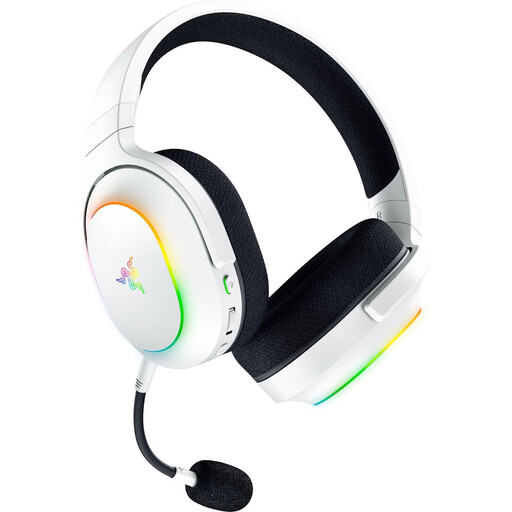
Razer Barracuda X Chroma Wireless gaming headset in white

Razer Barracuda X Chroma Wireless, White

Worth considering if you’re looking for a wireless model with a detachable microphone; check that the wireless connection works with your specific gaming device.

Listed in the product name: Dual Wireless with 2.4 GHz and Bluetooth 5.3, 40 mm drivers and battery life of up to 70 hours. The stated weight is 285 g.

The USB-C wireless receiver is listed for PC, PS4, PS5 and Switch; Bluetooth is described for mobile devices.

Joybuy
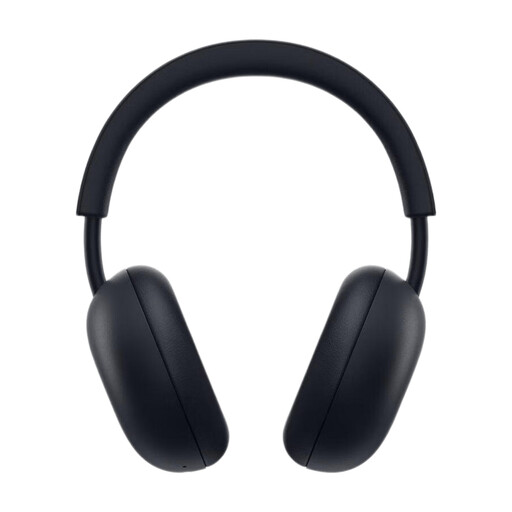
PlayStation PULSE Wireless Headset Midnight Black

PlayStation PULSE Wireless Headset, Midnight Black

Could be a good fit if you’re looking for a wireless headset for PS5; the stated console compatibility is for PlayStation 5.

Listed in the product name: PlayStation Link and Bluetooth, 3D Audio for PS5 and battery life of up to 30 hours. The earcups are described as folding flat.

The built-in microphone is listed with AI-powered noise cancellation.

Joybuy
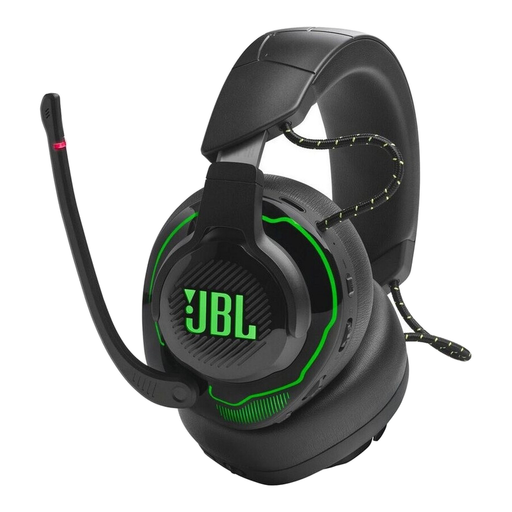
JBL over-ear 2.4G and BT dual wireless gaming headset

JBL Over-Ear 2.4G and BT Dual Wireless Gaming Headset

Worth considering if you’re comparing an over-ear model with 2.4 GHz wireless and Bluetooth. Check that the connection and microphone work with your exact platform.

Listed in the product name: Active Noise Cancelling and QuantumSPHERE 360.

A USB-C dongle or adapter is required for the 2.4 GHz gaming connection described.

Joybuy

Logitech G G535 Lightspeed wireless gaming headset in black and blue

Logitech G G535 Lightspeed Wireless, Black/Blue

Could be suitable for wireless gaming on PS5, PS4, PC or Mac; check that the connection works with your specific device.

Listed in the product name: battery life of up to 33 hours, USB-C charging and a microphone with a mute function.

Compatible platforms listed are PS5, PS4, PC and Mac.

Joybuy
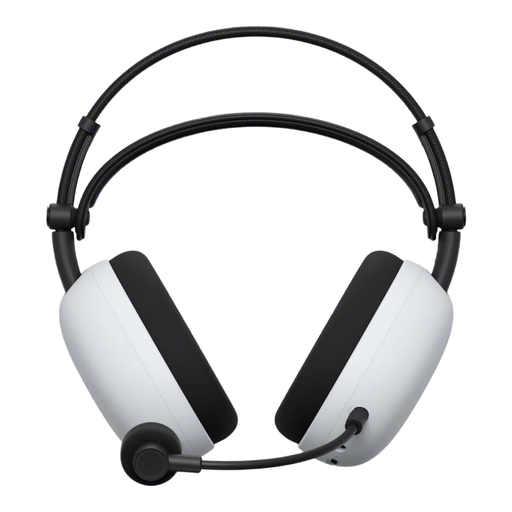
Sony INZONE H9 II wireless gaming headset

Sony INZONE H9 II

Could be a good fit if you’re looking for wireless use on PC or PS5; the stated compatibility for the 2.4 GHz adapter applies to these platforms.

The product details list ANC, Bluetooth 5.3 and 2.4 GHz wireless via a USB-C adapter, as well as wired use via 3.5 mm.

Sony lists a weight of 260 g and a detachable microphone for the INZONE H9 II. Battery life is stated as up to 30 hours.

Joybuy

Frequently asked questions

Do I need a headset advertised with 7.1 sound for shooters on a large TV?

No. That label alone doesn’t prove that you’ll be better at pinpointing sounds or aiming in your game. On PS5, you can configure separate 3D audio settings for TV speakers and headphones. Compare the settings you can use with the same in-game scene.

How do I connect a headset if I sit a long way from the screen?

First, check where the audio port is actually located. Xbox Support explains how to use the 3.5 mm port on a compatible controller; with a wireless model, check that it’s supported by your exact console and find out whether it needs a USB receiver. Test game audio and the microphone separately.

What should I bear in mind during longer practice sessions?

Keep the volume moderate and take listening breaks, as prolonged exposure to loud sounds can damage your hearing, as gesund.bund.de explains. Also check whether replacement ear cushions are available for the exact model.

What are my rights when shopping online in Germany if the fit or device isn’t right?

When you buy as a consumer online, you generally have a 14-day right to cancel; you must tell the retailer that you’re cancelling. Verbraucherzentrale distinguishes statutory rights against the seller from a voluntary guarantee. Check the requirements and return conditions for your specific purchase.

What should I check to make sure a wireless headset complies with requirements in Germany?

For market surveillance, the Bundesnetzagentur lists factors including the CE marking, product and manufacturer details, German-language instructions and the declaration of conformity. These checks don’t replace confirming that the specific model works with your gaming device.