What to look for when buying
Start by checking the fit and cable routing, then make sure the connection works with your gaming device. The microphone becomes a priority if you play using voice chat.
| What matters |
What to check before buying |
Who it matters most to |
| Comfort during longer gaming sessions |
Cushioning and headband adjustment; if relevant, check how it fits with your glasses. |
If I play for longer, I don’t want the headband or ear cushions to press uncomfortably. Around 36 % of consumers prioritise wearing comfort. |
| Space and cable routing |
Wired: the route to your gaming device. Wireless: space for the receiver and charging cable. |
If my desk is small, I want to keep the writing and mouse areas clear. Around 29 % of consumers mainly want to keep their desk space clear. |
| Connection and gaming device |
Make a note of your gaming device and available connections; check the connection for the exact model variant. |
If I play on a particular device, I need to know the connection will actually work for me. Around 21 % of consumers prioritise having the right connection. |
| Microphone and mute control |
Check whether you’d prefer a detachable microphone or a mute control on the headset. |
If I regularly play with others, I want to be able to use the microphone as needed and make myself understood. Around 14 % of consumers mainly prioritise voice chat. |
Wireless headsets at Joybuy
The models listed here are wireless gaming headsets for anyone who wants to keep an audio cable off a small desk. Before buying, check that the connection works with your gaming device and remember to factor in battery charging.
 No image available
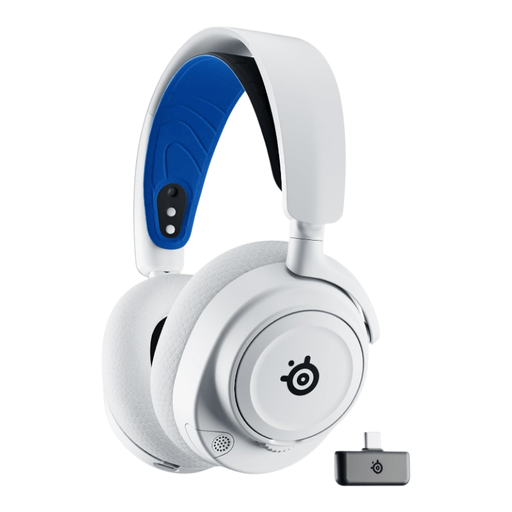
SteelSeries Arctis Nova 7P – White
A wireless option if you don’t want an audio cable running across your small desk.
Wireless use requires the battery to be charged.
View at Joybuy
 No image available
ONIKUMA GT889 Wireless
A wireless option if you want to keep an audio cable off your desk.
Wireless use requires charging; a USB receiver is listed as an accessory.
View at Joybuy
 No image available
Logitech G G535 Lightspeed
A wireless option if you want to keep the audio cable out of your writing and mouse areas.
Wireless use requires charging; USB-C is listed as the charging connection.
View at Joybuy
 No image available
Razer Barracuda Wireless
A wireless option if you don’t want an audio cable on your small desk.
Wireless use requires charging; USB-C is listed as the charging connection.
View at Joybuy
 No image available
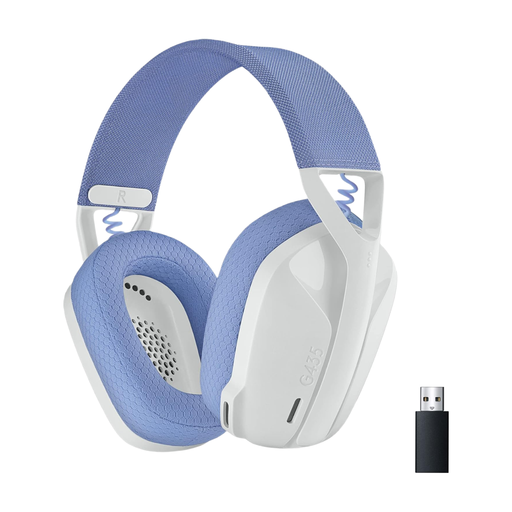
Logitech G435 LIGHTSPEED
A wireless option if you want to avoid an audio cable on your small desk.
Logitech lists LIGHTSPEED and Bluetooth connectivity, as well as 18 hours of playback time, for this model. The battery needs charging.
View at Joybuy
Frequently asked questions
Which connection should I check before buying?
First, check your gaming device and its available ports or supported wireless connections. HyperX lists 3.5 mm, USB-A and USB-C for the Cloud III; Logitech G lists LIGHTSPEED and Bluetooth for the G435 LIGHTSPEED. What matters is whether the connection works with your specific device.
How should I use a headset during longer gaming sessions?
Adjust the headband to fit and keep the volume at a moderate level. The German Environment Agency notes that both the intensity and duration of noise exposure can damage your hearing; workplace exposure limits aren’t a general volume recommendation for gaming headsets.
Who should I contact if an item bought online is faulty?
In Germany, your statutory consumer rights for faulty goods are generally against the seller. Verbraucherzentrale states that newly purchased goods are covered for two years from delivery or receipt. This is separate from the generally 14-day right to cancel an online purchase, which is subject to legal conditions and exceptions.
What product information should I check for a wireless headset?
For the specific model variant, look for manufacturer details, clear product identification, instructions in German and a declaration of conformity. The German Federal Network Agency lists these as part of its market surveillance; checking a listing doesn’t replace an assessment of an individual product.
Can I put an old headset in household waste?
No. The German Environment Agency advises that electrical and electronic equipment must be disposed of separately from household waste. A recycling centre or an appropriate take-back point are possible options.


