What should you look for when buying?
Wireless with a 2.4 GHz receiver
A good fit if: You don’t want an audio cable running across your small desk and your gaming device supports the receiver.
Bear in mind: The receiver uses a compatible port, and you’ll also need to charge the headset.
Wired
A good fit if: You don’t want to charge a headset battery or use a wireless receiver, and you can route the cable safely.
Bear in mind: The cable’s length and route can limit the space available on your desk.
The percentages refer to consumers choosing a headset for this scenario; each person is grouped according to their main buying priority.
| Buying priority |
What to check |
Who considers this important? |
| Dialogue, music and effects |
Compare reviews of the specific model’s sound and the audio features available on your platform. |
If I want to appreciate voices and the soundtrack in cinematic games, I don’t rely solely on the term ‘spatial sound’. Around 31% of consumers focus primarily on sound. |
| Comfort during long sessions |
Consider the fit, design and ear cushions; don’t use weight as your only measure of comfort. |
During longer gaming sessions, I want the cushions and fit to feel comfortable for me. Around 25% of consumers put wearing comfort first. |
| A tidy desk |
Allow space for a receiver or cable route, and check that the required port is available. |
If I want to avoid having an audio cable running across my small desk, cable management is my top priority. Around 25% of consumers prioritise keeping their desk tidy. |
| Connection to your gaming platform |
Check the manufacturer’s information against your device, connection and exact model variant. |
I want to make sure the headset can connect to my existing platform before weighing up sound or cable management. Around 19% of consumers focus on compatibility. |
Gaming headsets at Joybuy
This selection includes wired and wireless gaming headsets for a small desk. The key considerations are a suitable connection and space for a cable or wireless receiver.
 No image available
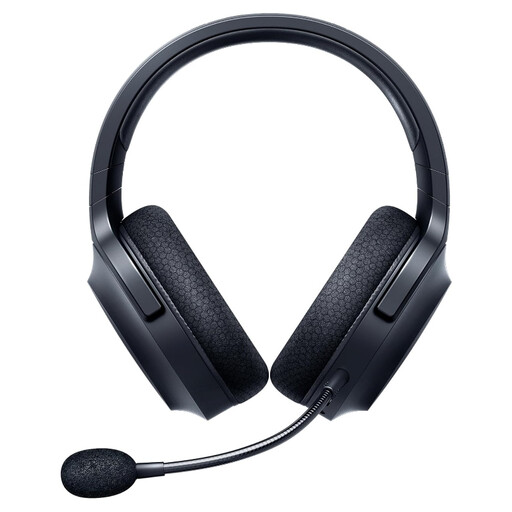
Razer Barracuda X Wireless Headset Black
The 2.4 GHz wireless connection is worth considering if you don’t want an audio cable running from your headset while you play.
2.4 GHz HyperSpeed Wireless; 250 g; detachable microphone; memory foam ear cushions; USB-C charging.
View at Joybuy
 No image available
JBL Quantum 350 Wireless Over-Ear Gaming Headset
The wireless 2.4 GHz connection is an option if you want to avoid an audio cable across your desk.
2.4 GHz connection; detachable boom microphone; memory foam ear cushions; 252 g. A USB dongle is required for the 2.4 GHz connection.
View at Joybuy
 No image available
HyperX Cloud Alpha Gaming Headset
The wired connection is a good fit if you don’t want to charge a headset battery or use a wireless receiver, and you can route the cable safely.
3.5 mm connection; detachable microphone; memory foam ear cushions; in-line audio controls. A 1.3 m cable and a 2 m extension are listed.
View at Joybuy
 No image available
ONIKUMA GT889 Wireless Headband Headphones
The listed connection options give you a choice if you want to switch between wireless, Bluetooth and wired use depending on what you’re doing.
2.4 GHz wireless with USB receiver; Bluetooth; wired use; detachable microphone; up to 60 hours of battery life. The USB receiver is required for 2.4 GHz use.
View at Joybuy
 No image available
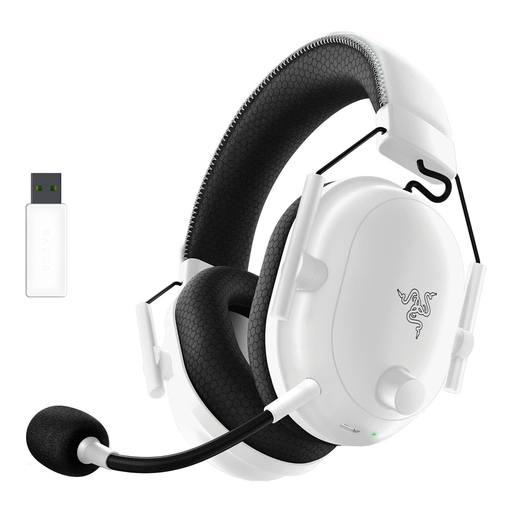
Razer BlackShark V2 Pro (2023) Wireless Gaming Headset, White
The wireless connection is an option if you don’t want an audio cable running from your headset while you play.
Razer HyperSpeed Wireless; up to 70 hours of battery life; memory foam ear cushions; HyperClear microphone; USB-C charging.
View at Joybuy
Frequently asked questions
Is Bluetooth alone enough for gaming?
Not necessarily: CHIP points out that Bluetooth-only headsets can have noticeable audio delay. Check that your gaming device supports the connection you intend to use. For the SteelSeries Arctis Nova 5 Wireless, the manufacturer lists a separate 2.4 GHz USB-C receiver and Bluetooth, with the option to switch between them.
Can I use a headset with a 3.5 mm plug on a PC and a console?
That depends on your device’s connections and the specific headset variant. beyerdynamic lists two 3.5 mm stereo plugs and a console adapter for the MMX 300 PRO; USB-C and USB-A are also listed for the HyperX Cloud III Wired. Check that the microphone and the features you want work with your device.
How should I care for the ear cushions and cable?
Sony recommends cleaning over-ear headphone cushions with a soft, dry cloth and advises against using solvents. With a wired headset, pull on the plug rather than the cable. Also follow the care instructions for your specific model.
What rights apply when shopping online in Germany?
For a qualifying distance contract with a business seller, you generally have a 14-day cancellation period from delivery; exceptions and return costs should be considered. Faulty goods are also covered by a statutory guarantee lasting at least two years from receipt. This is not the same as a voluntary manufacturer’s warranty.
What should I check for compliance when buying a wireless headset?
As part of its market surveillance, the German Federal Network Agency lists the CE marking, manufacturer details, German-language instructions and a declaration of conformity among the points to check. A CE marking is not a mark of origin or an indication of sound quality; check the information for the specific product.


