For dialogue-heavy visual novels at a small desk, a lightweight wired headset or a pair of in-ear headphones may be all you need, as long as they fit comfortably and work with you and your gaming device. Wireless models are an option if a cable gets in the way on your desk, but remember to consider charging, connectivity and device compatibility. For solo reading, you don’t need a dedicated chat microphone or surround sound.
Who these headsets may suit
Long-session readers who use a headset
If you’re planning longer sessions with text and voiced dialogue, first check that the headset feels comfortable. Weight and padding details can be useful guides, but they can’t tell you how it will fit your head.
Players with a small desk
If there’s little room for cables or storage, compare in-ear and over-ear models based on how easy they are to use and put away at your desk. A wireless model removes the audio cable while you listen, but you’ll need somewhere to charge it.
Players in shared spaces
If you want to hear dialogue over background noise or chat now and then, consider the fit around your ears, microphone controls and volume separately. A snug fit doesn’t guarantee that voices will be equally easy to understand in every setting.
What to look for when buying
| What matters to you |
What to look for |
Who may find this especially important |
| Comfort during long sessions |
Check the headband, ear cushions or ear tips. With over-ear models, also make sure there’s room for your glasses’ arms. |
When I’m reading and listening for a long time, a comfortable fit matters more to me than extra features. Around 28% of consumers put comfort first. |
| Desk space |
Plan for the cable route, somewhere to put the headset and, for wireless models, a place to charge it. |
When there’s not much room on my desk, I want to keep the cable and headset out of the way. Around 22% of consumers prioritise tidiness and the space a product takes up. |
| Clear dialogue |
Listen to voice samples if possible and choose a comfortable volume. The WHO notes that volume and listening time affect the risk. |
When background noise makes it harder to listen, I want to understand the dialogue without turning the volume up unnecessarily. Around 22% of consumers prioritise dialogue clarity. |
| Connection to your gaming device |
Check the available ports and make sure they support audio and microphone use with your preferred connection. |
If my gaming device requires specific connections, my headset needs to match them. Around 17% of consumers focus primarily on device connectivity when buying. |
| Voice chat and microphone |
Consider whether you want to chat and which type of microphone and mute control would suit you. |
When I’m playing with others, I want the microphone to be easy to use or move out of the way when needed. Around 11% of consumers prioritise voice chat and microphone controls. |
Common buying misconceptions
-
‘Wireless’ automatically means compatible with every gaming device
For the beyerdynamic MMX 150 wireless, the manufacturer lists different supported platforms for wired and Bluetooth connections. Support for a wired connection doesn’t automatically mean Bluetooth is supported too.
Check that the connection you actually want to use is supported by your specific gaming device.
-
A wireless model solves every space problem
A wireless over-ear headset removes the audio cable while you listen, but it still needs charging and storage. Wired in-ear headphones take up little storage space, but they still have a cable and need to fit your ears.
Consider the cable route, where you’ll store the headset and, if necessary, where you’ll charge it, rather than looking at the design alone.
-
A microphone and surround sound automatically improve solo play
Chat and positional audio features are designed for other uses. That doesn’t mean they’ll make voiced dialogue any easier to understand.
For solo sessions, you can prioritise a comfortable fit and the right connection. Choose microphone features based on whether you actually use voice chat.
Brands and models at a glance
Logitech G
The G335 and G333 models featured here are wired options in over-ear and in-ear designs respectively.
- Logitech G lists the G335 as weighing 240 g and having a flip-up microphone. According to the manufacturer, the G333 comes with three pairs of ear tips and a USB-C adapter.
- Both models have a cable. You’ll need to decide for yourself whether the over-ear or in-ear fit suits you.
SteelSeries
The Arctis Nova 1 is a wired over-ear headset with a 3.5 mm connection and a retractable microphone.
- SteelSeries lists the model as weighing 253 g and offering four adjustment options.
- The manufacturer’s claim about microphone noise cancellation doesn’t automatically mean it will help you hear voiced dialogue more clearly when reading solo.
HyperX
The wired Cloud III may suit buyers who need to choose between several connection types.
- HyperX lists 3.5 mm, USB-C and USB-A connections for the model, as well as a microphone mute indicator.
- Check which connection suits your device and how you plan to use the headset. Manufacturer descriptions of sound and comfort aren’t a substitute for trying the sound or fit for yourself.
beyerdynamic
According to the manufacturer, the MMX 150 wireless supports both wired and wireless use and has a detachable microphone.
- beyerdynamic lists up to 50 hours of battery life and a weight of 336 g without the cable. F.A.Z. Kaufkompass rated this model positively for comfort, but that doesn’t predict how it will fit you.
- The battery needs charging. The platforms listed by the manufacturer differ depending on whether you connect via cable or Bluetooth.
Razer
The BlackShark V2 X is a wired, closed-back over-ear model.
- Razer lists the headset as weighing 240 g and describes it as offering passive noise isolation.
- Its noise-isolating performance hasn’t been independently measured for this particular use. The fixed microphone and advertised positional audio features aren’t automatically useful for solo reading.
Joybuy products for visual novels at a small desk
The Joybuy products below are wireless gaming headsets for anyone who wants to keep the audio cable off a small desk while listening.
 No image available
ONIKUMA GT889 Wireless Gaming Headset with LED Lighting
The listed wireless and wired options may suit a desk where you’d rather not have an audio cable in the way while listening.
2.4 GHz wireless, Bluetooth 5.4 and wired operation; detachable microphone boom; 50 mm drivers.
The battery needs charging; the stated charging time is around two hours.
View at Joybuy
 No image available
Logitech G G535 LIGHTSPEED Wireless
This wireless on-ear model may suit longer sessions, provided the connection and fit work for your device and you.
236 g; USB-C charging; up to 33 hours of battery life; flip-up mute microphone.
The battery needs charging.
View at Joybuy
 No image available
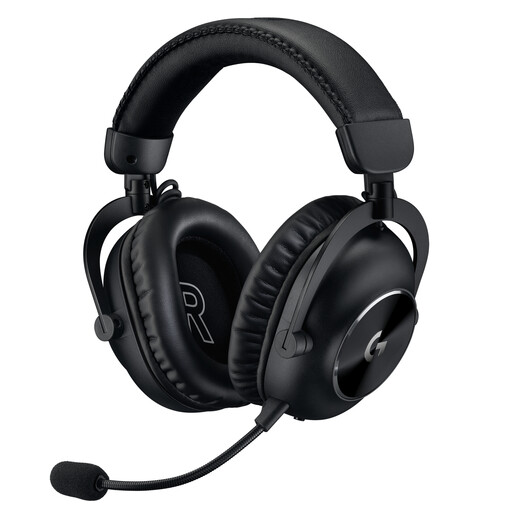
Logitech G PRO X 2 LIGHTSPEED Wireless
Choosing between wireless, Bluetooth and wired connections can be useful if you want to match the connection to your device.
LIGHTSPEED wireless, Bluetooth and 3.5 mm cable; detachable microphone; up to 50 hours of battery life; 345 g.
The battery needs charging for wireless use.
View at Joybuy
 No image available
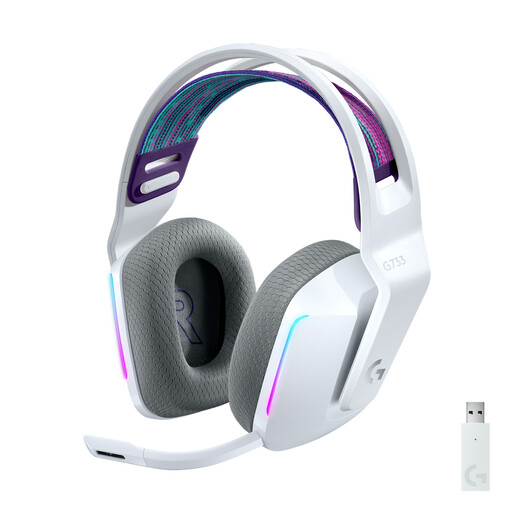
Logitech G733 LIGHTSPEED Wireless
This wireless model may suit you if you don’t want an audio cable on your desk while listening and can plan for charging.
40 mm drivers; detachable microphone; USB-C charging; up to 29 hours of battery life.
The battery needs charging.
View at Joybuy
 No image available
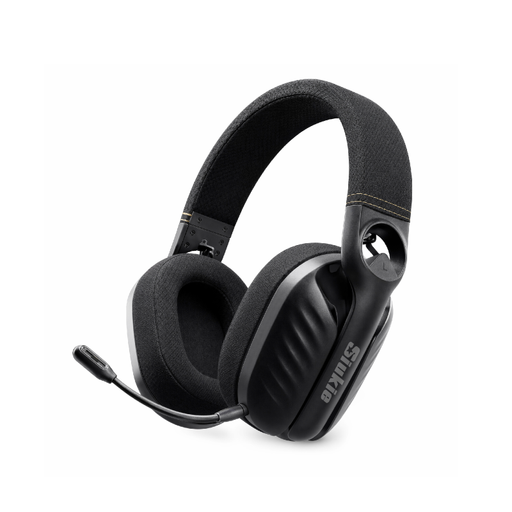
Siukie I600 Wireless 3MODE Headset
The three listed connection types give you options for connecting the headset to your gaming device.
Bluetooth 5.0, 2.4 GHz USB wireless and wired 3.5 mm connection; omnidirectional microphone; up to 40 hours of music playback.
The battery needs charging for wireless use.
View at Joybuy
Frequently asked questions
Do I need a microphone or surround sound for visual novels?
You don’t need a microphone for solo play without voice chat. Choose microphone controls based on whether you also use chat; advertised positional audio features don’t automatically make dialogue easier to understand.
How can I check whether a headset works with my PC or console?
Compare your device’s connections with the specific headset version and the connection type you want to use. HyperX lists 3.5 mm, USB-C and USB-A for the wired Cloud III; beyerdynamic lists wired and Bluetooth compatibility separately for the MMX 150 wireless.
What should I bear in mind during long listening sessions?
Avoid listening at unnecessarily high volumes and take breaks. The WHO notes that volume and the duration of sound exposure affect the risk; the actual impact depends on how you use your headset.
What are my rights when shopping online in Germany?
For a qualifying distance purchase from a trader, you generally have 14 days from delivery to withdraw from the contract; exceptions and return costs may apply. Separately, for faulty goods, you generally have a statutory right to claim against the seller for at least two years. This is different from a voluntary manufacturer’s warranty.
How should I dispose of an old headset?
In Germany, electrical and electronic waste must not be put in household rubbish. The Federal Environment Agency lists recycling centres and suitable take-back points. If batteries can be removed easily by hand, return them separately.


