Walkthrough creators focused on audio
If you’re recording your voice and gameplay together, check the microphone position, levels and playback. OBS explains how to monitor audio and record separate tracks for editing later.


For a permanent recording set-up in a guest room where some background noise is audible, a closed-back wired headset is a sensible place to start. It doesn’t need a battery, and its closed design is intended to help block out sound. Check the microphone position, connection and fit with your own device, and make a short test recording. Wireless models give you more freedom to move, while open-back designs are more suited to a quiet room.
If you’re recording your voice and gameplay together, check the microphone position, levels and playback. OBS explains how to monitor audio and record separate tracks for editing later.
If game audio or mild room noise could end up in your commentary, use headphones rather than speakers and make a test recording in the room you’ll actually use. RØDE covers audio bleed in microphone and speaker set-ups, while OBS explains the limits of noise suppression when dealing with louder sounds.
If you record for longer periods or want to move around while recording, check the fit, connection and operating mode with the device you’ll actually use. HyperX, beyerdynamic and Logitech G describe different wired and wireless models; their specifications apply to the models named.
First, check that the microphone and connection suit your recording set-up. Then consider the level of background noise in the room and whether the headset will be comfortable for the planned recording session.
| What matters | What to check before buying | Who should consider this? |
|---|---|---|
| Clear commentary | Microphone position, mute function and a test recording with game audio; check the levels in your recording software. | If I’m recording my voice and gameplay together, I want my commentary to be clear and easy to edit if needed. Around 33% of consumers prioritise clear spoken commentary. |
| Audio bleed and room noise | Try closed-back or open-back earcups and record in the room you’ll actually use; don’t assume that noise-cancelling headphones mean clean microphone audio. | If game audio or mild room noise could end up on my commentary track, I want to check before starting a longer recording. Around 27% of consumers focus primarily on audio bleed and room noise. |
| Comfort | Try the fit of the ear pads and headband for the planned duration; check that replacement parts are available for the exact model. | For a longer recording, I want a headset that feels comfortable to wear rather than relying on product specifications alone. Around 20% of consumers prioritise comfort. |
| Connection and operation | Check that the sockets, adapters and, where applicable, wireless receiver work with your recording device; for wireless models, also check the microphone function and charging requirements. | If I switch between devices or record for longer periods, I want a suitable connection and an operating mode that works for my session. Around 20% of consumers prioritise connection and uninterrupted operation. |
Noise cancellation for the person wearing the headset doesn’t mean the recorded voice will be free from room noise.
Check the microphone separately from any ANC claims, and listen to a test recording made in the room you’ll actually use.
A receiver and cable may be important for the connection you need. Sony lists a USB-C transceiver and headphone cable as included with the INZONE H9 II.
Check the exact model variant and everything included before placing your order.
A missing or different receiver could mean extra time spent sorting things out or finding a replacement.
OBS points out that levels which look similar can sound different in volume to listeners. Playback of individual audio tracks can also vary between players.
Listen to a test file in the player or editing software you plan to use, and check that the tracks are assigned correctly before recording.
The Cloud III is wired, while the Cloud III Wireless is a separate wireless model. Connections and compatibility vary by model.
The MMX 300 PRO is closed-back and wired; the MMX 330 PRO is an open-back, wired alternative.
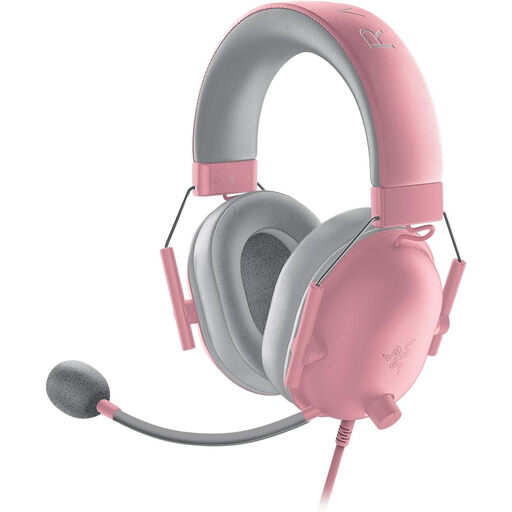
The BlackShark V2 X is a closed-back, wired headset with an adjustable microphone.
The PRO X 2 LIGHTSPEED is a wireless model. Logitech lists a USB-A receiver and an additional 3.5-mm cable.
The INZONE H9 II is a wireless headset with a boom microphone and noise cancellation for playback.
This selection includes wired and wireless gaming headsets for recording walkthroughs. Check that the connection, microphone function and fit work with your recording device and surroundings.
 No image available
This closed-back, wired model could suit a permanent recording set-up. Position the microphone correctly and check your commentary with a test recording.
Check that the 3.5-mm connection works with the socket on your recording device.
 No image available
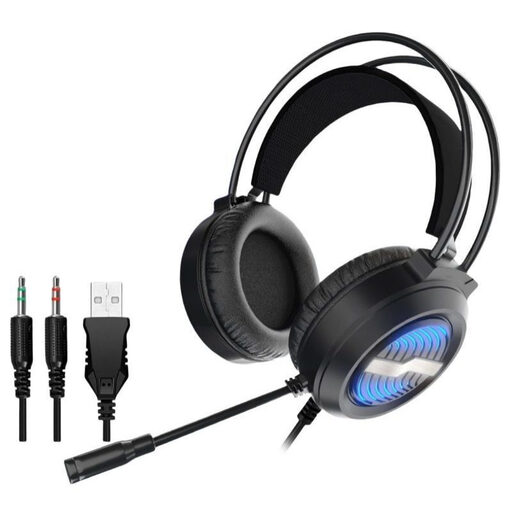
If you’re recording at a fixed set-up, test the microphone level and connection with your device.
Check that the USB or 3.5-mm sockets suit your set-up and that the microphone works as expected in your recording software.
 No image available
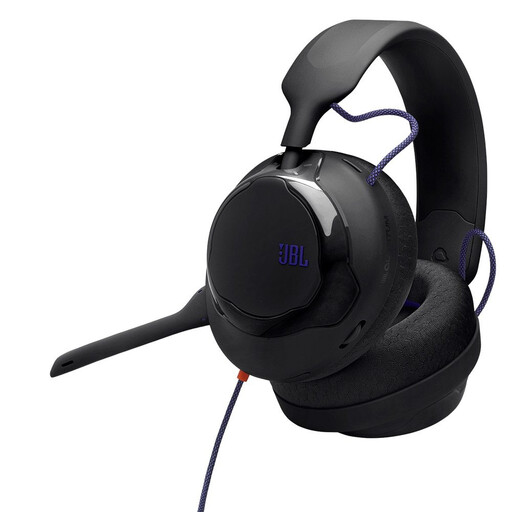
The detachable microphone and 3,5-m cable make this model worth considering for a permanent recording set-up; check your commentary before a longer session.
Check that the 3.5-mm connection works with your device, and test the microphone level while game audio is playing.
 No image available
This wired headset could suit a permanent recording set-up. Check the fit and how your voice sounds alongside your game audio.
Check that the 3.5-mm connection works with your recording device, and test the detachable microphone in your recording software.
 No image available
This model may suit buyers who want to choose between wireless and wired operation; check the microphone audio in the mode you plan to use.
Check that the USB receiver and wireless connection work with your recording device, and factor in charging for longer sessions.
Record a short section using your normal speaking voice with the game audio on, then listen back. OBS explains level meters and audio monitoring; for editing later, you can put your voice and the game on separate tracks. First, check that your player can play the track you want to hear.
A noise filter isn’t suitable for every type of loud room noise. OBS gives light sounds such as fan noise as a possible use case, so test the microphone position and make a recording in the room you’ll actually use.
The statutory warranty is the seller’s responsibility and is separate from any voluntary guarantee. According to the Verbraucherzentrale, sellers are generally responsible for new goods being free from defects for two years; many online purchases also usually come with a 14-day right to cancel, subject to specific exceptions and contract terms.
Not in every case: § 201 StGB covers, among other things, recording another person’s private conversation without permission and sharing such a recording without permission. If your walkthrough could capture conversations like these, check that you have permission before recording. The law doesn’t provide a blanket answer for every situation involving public game chat.
Listen to the test file and, if there’s a problem, first check the input source, mute setting and levels. If the ear pads or cable wear out, check whether replacement parts are available for your exact model; beyerdynamic lists these for the MMX 300 PRO, for example.