For a walkthrough recorded in your home studio, your headset should suit your recording setup. What matters is how your voice sounds in the actual recording, not just how the headphones sound. A closed-back wired model could be a good choice if you want to work at a fixed desk without worrying about battery life. A wireless headset with a dongle may suit recordings where freedom of movement is important. In either case, check the microphone, monitoring and recording source. OBS Project explains how you can assign audio sources to separate tracks for editing.
Which setup is right for you?
Creators recording commentary through a headset
If you record your voice directly through your headset, listen to a voice sample at your usual speaking volume. OBS Project explains how to put your commentary and game audio on separate tracks for editing.
Creators recording long sessions
For longer recordings, comfort and a setup that works with your connection are key. If you choose a wireless model, remember to plan when you’ll charge it too.
Creators using multiple audio sources
If you switch between a computer, console or other audio sources, check that the specific headset model’s connections work with your devices. Then set up the recording sources you need in your software.
What to look for when buying
First, decide whether the finished voice track or monitoring while you record matters more to you. Then check that the connection and fit suit your setup.
| Priority |
What to check when buying |
Who is it important to? |
| Clear commentary |
Check the microphone position with a voice sample; set up separate OBS tracks for editing. |
If I want to edit my commentary later and keep it clear, my voice needs to be easy to hear in the saved file. Around 33% of consumers put clear, editable commentary first. |
| Keeping voice and game audio in check |
Check the monitoring and levels, then listen to the test file. |
If I want to keep an eye on my voice and the game audio while playing, I don’t want to rely on the monitoring signal alone. Around 27% of consumers prioritise monitoring and balancing audio levels. |
| Comfort throughout the session |
Consider the fit and materials for how long you’ll wear it; factor in charging if you choose a wireless model. |
If I record long walkthroughs, my headset needs to feel comfortable and shouldn’t interrupt the recording for charging. Around 20% of consumers pay particular attention to long-term comfort. |
| Connecting to your gaming device and computer |
Check the connections on the exact model against your devices; set the input and output devices in your recording software. |
If I connect my gaming device to my recording computer, I want to know that the microphone and game audio are coming through the right sources. Around 20% of consumers prioritise connection flexibility. |
Common buying mistakes
-
Assuming good headphone sound means good commentary recordings
Product details about the microphone and headphones won’t tell you how your voice will sound in your room and through your recording setup.
Test the microphone position and speaking volume with a short recording. Listen to the saved file before you start a longer session.
If the voice track isn’t suitable, you may need to record again or spend more time editing.
-
Confusing sidetone with the final recording mix
Being able to hear your voice through the headset doesn’t tell you which signals and levels will end up in the finished recording.
Check the levels in OBS and listen to a test file. If you’re planning to use separate tracks for editing, set them up deliberately.
-
Assuming wired, dongle and Bluetooth versions are interchangeable
Connections and supported devices vary by model and version.
Check the exact model against your gaming device, recording computer and available ports. Select the input and output devices you need in OBS to avoid capturing the same source twice.
Depending on the connections available, you may need a suitable adapter.
Key brands at a glance
beyerdynamic
The models mentioned here include a closed-back wired headset and a model that the manufacturer says can be used over Bluetooth or with a cable.
- beyerdynamic lists replaceable ear pads and cables for the MMX 300 PRO. For the MMX 150 wireless, the manufacturer lists a detachable microphone and sidetone.
- These features won’t tell you how your commentary track will sound in your home studio. Test a voice recording and check that the connections you need work with your setup.
SteelSeries
The Arctis Nova 7 Wireless Gen 2 is a wireless option with a USB-C dongle and additional Bluetooth audio.
- SteelSeries says the model can play game audio through the dongle and Bluetooth audio from a phone at the same time. The manufacturer also lists battery life of over 50 hours.
- These manufacturer claims don’t prove how your recorded voice will sound or that every feature will work with your recording setup. Check the audio tracks that are actually saved.
Razer
The BlackShark V2 X is a closed-back wired headset option with an adjustable microphone boom.
- Razer lists a cardioid microphone, closed-back ear cups and a weight of 240 g for this model.
- Manufacturer claims about voice quality and comfort are no substitute for trying it out in your room. Listen to the saved voice track before making a longer recording.
Joybuy products for recording walkthroughs
This selection features gaming headsets for wired recording with a headset microphone. Before buying, check the connection and recording sources for your specific setup.
 No image available
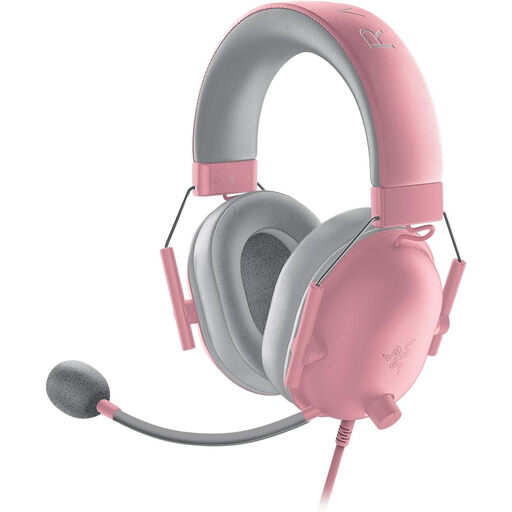
Razer BlackShark V2 X Quartz
Worth considering if you’re looking for a closed-back wired headset with a microphone for your recording setup.
Features listed include a flexible HyperClear cardioid microphone, a 3.5 mm connection and a weight of 240 g.
View at Joybuy
 No image available
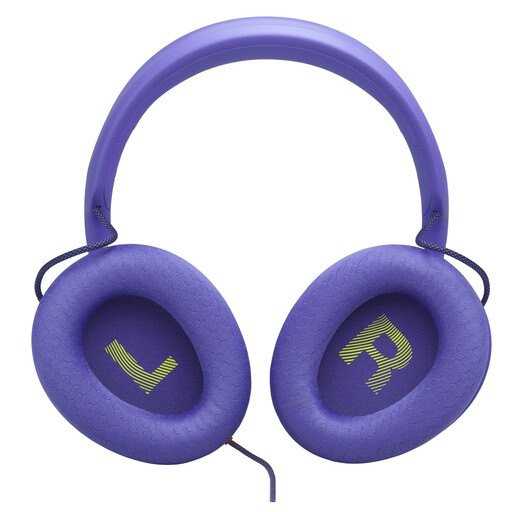
JBL Quantum 120, Purple
A wired option if you want to use the headset microphone for your walkthrough.
The model is described as having a 3.5 mm connection and a detachable, unidirectional 6 mm cardioid boom microphone with noise cancellation. Compatible devices listed include PCs and gaming consoles.
View at Joybuy
 No image available
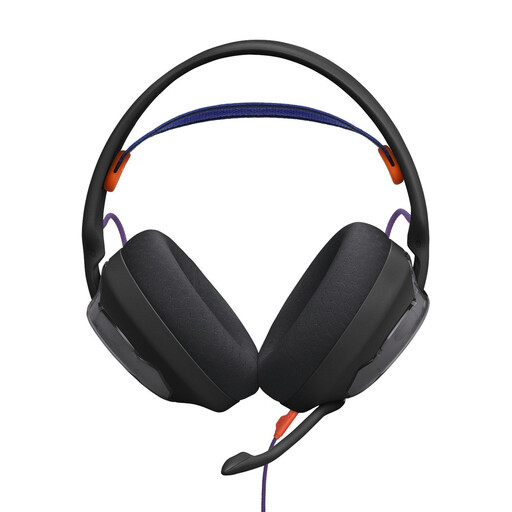
JBL Quantum 250, Black
Could suit a wired setup if you want to adjust microphone settings on your PC.
Features listed include a 3.5 mm connection, a detachable cable and a detachable 6 mm cardioid boom microphone. JBL QuantumENGINE is listed for adjusting microphone settings. According to the product details, a Y-splitter is needed for PCs with separate headphone and microphone sockets; it isn’t included.
View at Joybuy
 No image available
HyperX Cloud Alpha
A wired option if you want to use a detachable microphone for your commentary.
Features listed include a 3.5 mm connection, a detachable noise-cancelling microphone, an external USB sound card and a Y-splitter. According to the product details, the advanced Blue VO!CE and surround sound features require a USB connection and a PC.
View at Joybuy
 No image available
Logitech G PRO X, Black
Could be a good fit if you want to set up your headset microphone on a PC using the software features listed for it.
The model is described as having a detachable cardioid condenser microphone, an external USB sound card and Blue VO!CE filters. According to the product details, the advanced Blue VO!CE features require a PC and Logitech G HUB.
View at Joybuy
Frequently asked questions
How can I check that my voice and game audio are being recorded before a long walkthrough?
Make a short test recording, check both levels in the OBS mixer, then listen to the file. If you use separate tracks for editing, also check which track is selected for playback.
Can setting up the same audio source twice cause an echo?
Yes. OBS Project warns that using the same audio device as both a global source and a scene source can cause an echo. Check your source settings before assuming the headset is the problem.
What should I know about returns and faults when buying in Germany?
According to the Verbraucherzentrale, online purchases in Germany generally come with a 14-day right to cancel from the date you receive the goods. You must notify the seller that you wish to cancel. Your statutory warranty rights against the seller are separate from any voluntary manufacturer’s guarantee. Check the terms of your specific purchase.
Am I allowed to record other people speaking in a private game chat?
Recording another person’s non-public speech without permission may be a criminal offence under § 201 StGB. The legislation published by the Federal Ministry of Justice and the Federal Office of Justice specifically refers to this type of recording. If you’re planning to record, check with the other participants beforehand.


