What should you look for when buying?
First, check how clearly your voice comes through in a realistic test recording. Then consider how the game audio affects others in the shared room, followed by fit, connections and your recording setup.
| What matters |
What to check when buying |
Who is it important to? |
| Clear voice audio |
Position the boom microphone correctly and listen to a test recording made with your usual room noise. |
If I comment while playing, I want my voice to come through clearly despite fan noise or everyday sounds. Around 29% of consumers put clear voice audio first. |
| Less disruptive game audio |
Consider a closed-back design as a starting point and check how much sound actually leaks out at your usual volume. |
If I share a room, I want to play without disturbing the other person with audible game audio. Around 23% of consumers put minimising disturbance from game audio first. |
| Comfort during long recording sessions |
Assess the padding, clamping force and fit over the length of time you expect to wear the headset. |
When I’m playing and recording for long periods, comfort matters. Around 18% of consumers prioritise comfort over long sessions. |
| Connection and post-production |
Check your gaming device, exact console variant, connection type and audio sources in your recording software. |
If I switch between gaming devices or want to edit my voice and game audio separately later, the connection needs to suit my setup. Around 18% of consumers prioritise connection and post-production. |
| Cost of the equipment you need |
Consider only the features you need, and check the specific model for its cable, wireless options and any replacement parts. |
If I don’t need extra features, I want to pay for equipment that suits my recording and platform. Around 12% of consumers put the purchase cost first. |
OBS Project describes its noise suppression filter as useful for mild background noise; it may have little effect in a noisy environment, and stronger filtering can alter your voice. A test recording lets you assess the microphone position and filter settings together.
Joybuy product options
These product options include wired and wireless gaming headsets for voice commentary and recording in a shared room.
 No image available
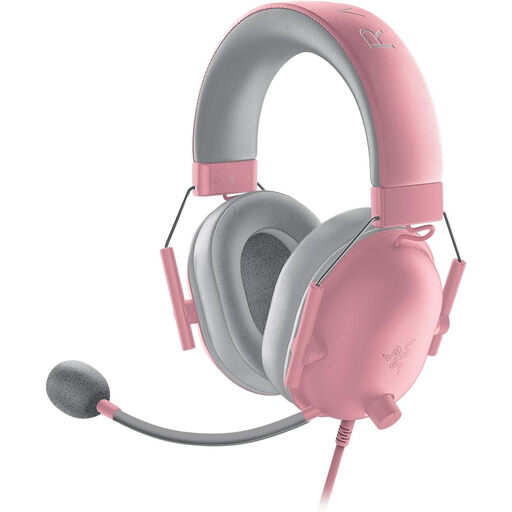
Razer BlackShark V2 X Quartz
An option if you’re looking for a flexible boom microphone and closed-back earcups for commentary in a shared room.
The product name specifies the Quartz variant.
View on Joybuy
 No image available
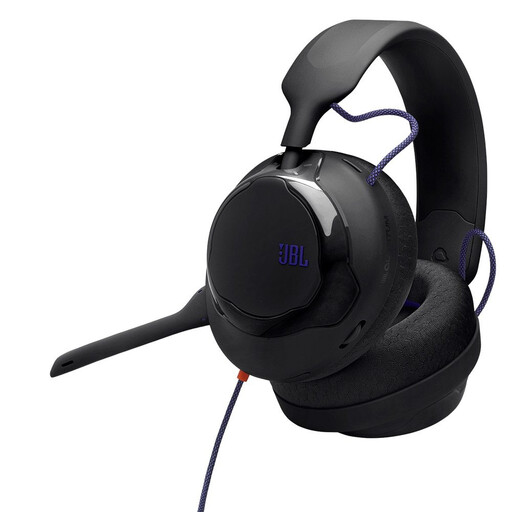
JBL Quantum 120, wired
A wired option if you’re looking for a boom microphone for your walkthrough and want to check the connection against your recording device.
The product name specifies a wired over-ear headset.
View on Joybuy
 No image available
JBL Quantum 350, 2.4 GHz wireless and USB-C
A wireless option for voice commentary, if your recording device supports the connection listed.
The product name specifies 2.4 GHz wireless, USB-C and a detachable boom microphone.
View on Joybuy
 No image available
Razer Barracuda wireless multiplatform headset
A wireless option if you want to switch between gaming and mobile devices; check that the connection suits your specific setup.
The product name specifies SmartSwitch Dual Wireless and a USB-C cable.
View on Joybuy
 No image available
Logitech G PRO X, USB
A wired option for voice commentary, if you match the connection listed to your recording device.
The product name specifies the USB variant.
View on Joybuy
Frequently asked questions
Will noise suppression reliably remove another person’s voice?
No, you shouldn’t rely on it to do that. OBS Project describes its filter as useful for mild background noise and generally ineffective when there’s a lot of unwanted noise. Stronger filtering can also distort your own voice. Make a test recording in the actual room.
How can I record game audio and commentary separately for editing later?
In OBS, you can assign audio sources to separate recording tracks, keeping game audio and microphone audio apart for post-production. OBS notes that standard video players usually play only one track, so check the combined playback too, as well as a finished test file.
What can I do if I hear an echo or constant room noise?
First, check whether the same audio device is being captured in OBS both globally and as a scene source; OBS Project warns that this can cause an echo. A noise gate can cut background sound during pauses in speech, but it won’t automatically remove noise while you’re speaking.
Am I allowed to record another person’s conversations in the bedroom?
Section 201 of the German Criminal Code (StGB) concerns the unauthorised recording of another person’s private conversations, as well as certain forms of use or disclosure. If a conversation could be picked up in your recording, discuss this with the person beforehand and avoid recording them unintentionally. The assessment of a specific case depends on the circumstances.
How can I tell whether a headset works with multiple gaming platforms?
Check the exact model variant and the connection you actually plan to use. Audeze says the Xbox and PlayStation versions of the Maxwell aren’t interchangeable for wireless and USB connections; the requirements for 3.5 mm are different.


