What should you look for when buying?
Measure the space available alongside the area you need for mouse movement, then decide which keys you need to reach directly.
| Buying priority |
What to check |
Who is this most important to? |
| Mouse space and keyboard size |
Measure your desk space and mouse movement area; check which secondary key functions you need. |
If I need room for wide mouse movements at a small desk, a compact footprint matters to me. Around 36% of consumers put mouse space first. |
| Controlled actuation |
Check the actuation range and Rapid Trigger for the exact model; assess automation features against your game’s rules. |
If I want to fine-tune frequent movement commands, I need settings I can control. Around 29% of consumers prioritise adjustable movement inputs. |
| Keys within easy reach |
Check the layout, including the arrow, function and navigation keys on the specific model. |
If I often type or use navigation keys as well as gaming, I want to reach them without using a function layer. Around 21% of consumers prioritise these keys. |
| Connectivity and everyday use |
Check the connection type and what’s included; if the model offers several connection options, confirm your preferred mode. |
If I want a straightforward connection without unnecessary extras, I look for the right connection type. Around 14% of consumers prioritise ease of use and purchase. |
Joybuy products for compact setups
The Joybuy products below include compact gaming keyboards for desks with limited space. Check the layout and which keys are within easy reach on each variant.
 No product image available
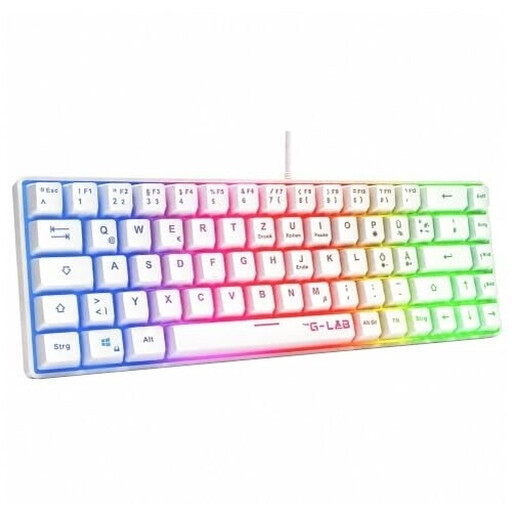
The G-Lab KEYZ-HYDROGEN-W/DE, 60%, White
The 60% layout could be a good fit if you want more potential mouse space on a small desk.
Described as a membrane keyboard with rainbow lighting; check the layout of your chosen variant before buying.
View at Joybuy
 No product image available
CHERRY MX-LP 2.1 Wireless, 65%, German QWERTZ, White
The 65% layout could suit a compact setup if you’re looking for a variant specifically listed with a German QWERTZ layout.
Low Profile MX Speed switches; wired USB-C, 2.4 GHz wireless and Bluetooth are listed in the product name. For ranked matches, RTINGS recommends using a cable or wireless receiver rather than Bluetooth.
View at Joybuy
 No product image available
AULA WIN60HE, 60%, Black/Graywood
The compact layout could suit a small desk if you’re happy with having fewer keys within easy reach.
The product name lists magnetic, hot-swappable switches, adjustable actuation, Rapid Trigger, RGB and an 8000 Hz polling rate. Check the layout of the exact variant.
View at Joybuy
 No product image available
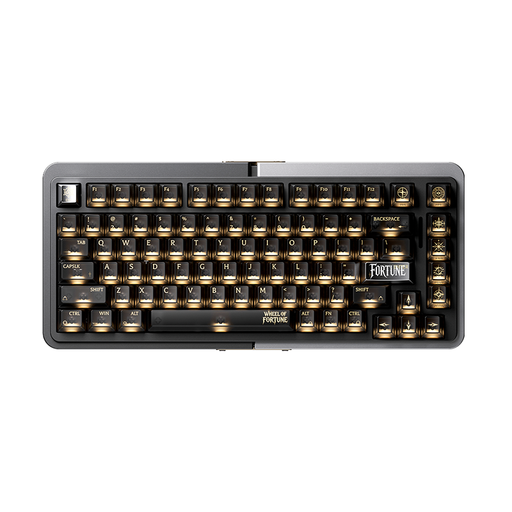
Royalaxe E75, 75%, TTC Magnetic Switch, Silver-Black
The 75% layout is a compact option, provided you check that its footprint and key arrangement suit your setup before buying.
The product name lists TTC magnetic switches, an RT mode, a Type-C interface and an aluminium case. Check the layout before ordering.
View at Joybuy
 No product image available
Royalaxe X68 Esports Magnetic Switch Keyboard
This model may be worth considering if you’re looking for magnetic switches and Rapid Trigger in a compact gaming keyboard.
The product name lists Hall effect magnetic switches, Rapid Trigger and an aluminium frame. Check the keyboard layout and exact variant name before buying.
View at Joybuy
Frequently asked questions
Is Rapid Trigger the same as automatic directional prioritisation?
No. Rapid Trigger resets a key based on its movement; a feature that prioritises simultaneously pressed direction keys is a separate matter. On 19 August 2024, Valve announced that it would detect certain hardware-assisted movement automation on official Counter-Strike 2 servers and remove affected players from the match. This doesn’t mean the feature is automatically allowed in other games or on other servers.
Which connection is best for competitive matches?
RTINGS recommends using a cable or wireless receiver; Bluetooth is considered less suitable for competitive gaming because of its higher latency. Check which connection modes your specific model supports.
What should I set up after connecting a 60% keyboard?
First, check the secondary functions for the keys you need in games and everyday use, then test your movement inputs with an actuation setting you can control. On the documented HyperX model, secondary functions are marked on the sides of the keycaps and the USB-C cable is detachable.
What are my rights if a product is faulty or I return an online order in Germany?
For consumer purchases from a business seller, the statutory warranty generally lasts for at least two years from receipt of the goods; a voluntary manufacturer’s warranty does not replace it. Online purchases generally come with a 14-day right to cancel, subject to the relevant statutory exceptions.


