
Lieferung heute & morgen

Qualitätsgarantie

Willkommens-Angebote freischalten: KOSTENLOSE Lieferung | Bis zu 80 % RABATT | Kostenlose 30-Tage-JoyPlus-Testphase
App herunterladen
The search for a keyboard that excels in both competitive gaming and a productive work environment often leads to a dilemma. On one hand, you need maximum responsiveness; on the other, a clean, wireless desk setup. Many products promise to deliver both, but in practice, hidden pitfalls can lead to poor purchasing decisions. Before you make a choice, it's crucial to distinguish between typical marketing promises and the performance features that truly matter.
A common issue is the "gaming" label, which often adorns keyboards with high latency or subpar switches, negating any real in-game advantage. Another pitfall involves wireless models that advertise impressive RGB effects but whose battery life plummets when the lighting is active, or whose connection is unstable. Finally, ill-conceived compact layouts often omit essential keys, like the arrow keys, making everyday use difficult.
This guide will help you navigate these hurdles by breaking down the key technical specifications and highlighting what truly counts when selecting a high-performance, versatile keyboard.
To make an informed decision, you should closely examine three core areas: switch technology, connectivity options, and form factor. These elements are the primary determinants of your future keyboard's performance, versatility, and ergonomics.
The typing feel and response time of a mechanical keyboard are defined by its switches. For gamers who need lightning-fast reactions, linear switches are a popular choice, as they provide a smooth keystroke without a tactile bump or audible click.
A standout feature here are the CHERRY MX Speed Switches in a low-profile variant. Unlike standard switches, these have a lower height and a shorter actuation distance. This means keystrokes are registered faster, which can provide a measurable advantage in fast-paced games (e.g., FPS or MOBAs). A low-profile gaming keyboard also promotes a flatter, more ergonomic hand posture, reminiscent of laptop keyboards but with the precise feel of a mechanical one.
A modern wireless RGB keyboard must offer more than just the absence of cables. The connection type directly impacts latency—the delay between a keypress and the on-screen reaction. In this regard, a tri-mode keyboard is the most flexible solution.
A good multi-device keyboard, whether in white or another colour, should support all three modes to ensure maximum flexibility for both gaming and work.
The form factor describes the size and key layout. A compact gaming keyboard creates more desk space for wide mouse sweeps—a critical factor for gamers who play with low DPI settings.
The 65% layout represents a sensible compromise. Compared to a full-size keyboard, it omits the number pad and the dedicated F-key row. However, unlike even smaller 60% layouts, it retains the essential arrow keys, which significantly simplifies navigation in documents and games. For users in specific regions, it is also essential to choose the correct regional QWERTZ layout (or QWERTY/AZERTY) to have all familiar characters and symbols readily available.
Based on the criteria above, we have identified a few models suited for specific user profiles.

Why It's a Match: This model is tailored to the needs of gamers who refuse to compromise on speed. The combination of low-profile speed switches and a low-latency 2.4 GHz mode is optimized for fast-paced games. The compact 65% layout with a German QWERTZ scheme creates maximum space for the mouse without sacrificing the arrow keys.
The keyboard backs up its "gaming" label with proven technology (CHERRY MX Speed Switches, <1ms latency). Its tri-mode connectivity provides a stable gaming mode and flexible Bluetooth options, avoiding the typical weaknesses of Bluetooth-only keyboards.
CHERRY MX Low Profile Speed Switches for extremely fast actuation. Tri-mode connectivity for maximum flexibility between a gaming PC, laptop, and tablet.
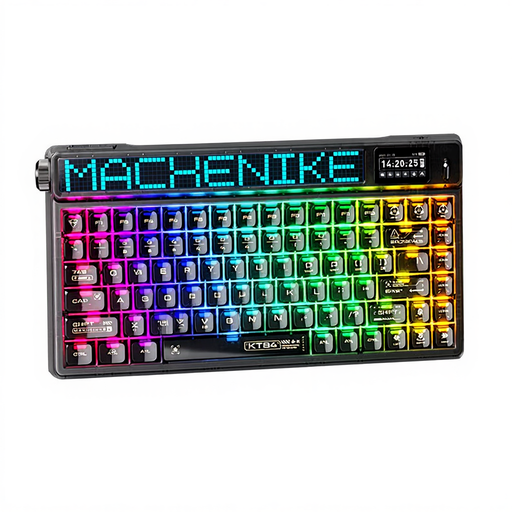
Why It's a Match: For users who appreciate a clean setup with a technological edge. The integrated smart display is a standout feature for showing system info or GIFs. Tri-mode connectivity allows for seamless switching between a work PC and personal devices. The 75% layout is compact but still offers a separate F-key row.
This model also offers a stable 2.4 GHz connection for lag-free work or casual gaming. The 75% layout is a thoughtful compromise that provides more function keys than a 65% layout without sacrificing compactness. However, note the US QWERTY layout.
Integrated smart display for personalized visuals. Tri-mode connectivity and a compact 75% layout for a clean and functional desk.
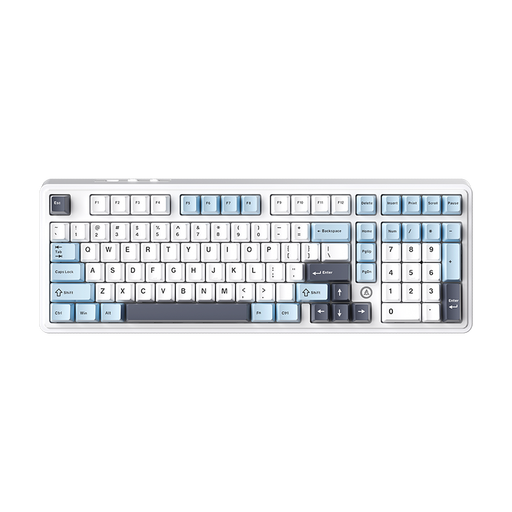
Why It's a Match: This model offers a comprehensive feature set for users looking to enter the world of mechanical keyboards or customize their own. The hot-swappable capability allows for easy switch replacement without soldering. With tri-mode connectivity and a large battery, it is highly versatile. The 98% layout retains the number pad in a compressed format.
The keyboard provides a solid technical foundation (tri-mode, gasket-mount structure) and sidesteps the pitfall of subpar components by offering a hot-swap option that allows for future upgrades. The large battery addresses concerns about short runtimes on wireless models. Note the QWERTY layout.
Hot-swappable PCB for easy switch customization. Large battery capacity and tri-mode connectivity for long-lasting, flexible use.
If the models featured here don't perfectly match your requirements, you can find more keyboards designed for performance and versatility in our comprehensive category.
1. How long does the battery of the CHERRY MX-LP 2.1 last with RGB lighting activated? The battery life heavily depends on the brightness and the selected RGB lighting effect. According to the manufacturer, the 2800 mAh battery allows for several days of use with moderate lighting. For maximum runtime, the lighting can be dimmed or turned off completely. In wired USB-C mode, the battery charges during use.
2. Is a 65% keyboard like the MX-LP 2.1 suitable for programming or daily writing? Yes, for many users, a 65% layout is very well-suited. It retains the most important keys, including the arrow keys, which are essential for code navigation and text editing. The F-keys (F1-F12) are accessible via an Fn secondary layer. The compact size can improve ergonomics by allowing the mouse to be positioned closer to the keyboard, reducing shoulder strain.
3. What is the difference between CHERRY MX Speed and MX Red switches? Both switch types are linear, meaning they do not have a tactile "bump" or an audible click. The main difference is the actuation path. CHERRY MX Speed (Silver) switches have a shorter actuation distance, typically 1.2 mm, whereas standard CHERRY MX Red switches actuate at 2.0 mm. The shorter path of the Speed switches results in faster keypress registration, which is preferred by competitive gamers.