
Lieferung heute & morgen

Qualitätsgarantie

Willkommens-Angebote freischalten: KOSTENLOSE Lieferung | Bis zu 80 % RABATT | Kostenlose 30-Tage-JoyPlus-Testphase
App herunterladen
A gaming keyboard needs to be more than just backlit. For gamers, keen typists, programmers and anyone with a small desk, the key things to consider are layout, connectivity, switches, noise and expandability. Many disappointing purchases happen because product names featuring terms such as ‘High Speed’, ‘Pro’ or ‘Wireless’ get more attention than the technical specifications.
A compact keyboard from an international range may have a QWERTY layout. The letter arrangement differs from the German layout: ‘Y’ and ‘Z’ are in different positions, for example, and special characters and umlauts may also differ. For German-speaking users who regularly write, programme or study, a QWERTZ keyboard is usually easier to use.
Changing the operating system settings can partly compensate for the layout, but it won’t change the labels on the keycaps. Before buying, check that the product photos, technical details and stated keyboard language all match.
A 60% keyboard saves a lot of space, but usually does without separate arrow, function and navigation keys. These functions are often accessed using the Fn key. A 75% keyboard, on the other hand, usually retains the arrow keys, a function key row and some additional navigation keys. A TKL keyboard mainly does without the number pad.
The right format depends on your workspace. If you need plenty of room for mouse movements in FPS games, a compact model could be a good choice. For spreadsheets, programming or frequent number entry, a keyboard with more keys may be more practical.
A wireless gaming keyboard can connect via Bluetooth, 2.4 GHz wireless or USB-C. Bluetooth is often a good choice for laptops, tablets and connecting to multiple devices. 2.4 GHz is often preferred for gaming, while a wired connection means you don’t need to worry about battery charge.
A tri-mode keyboard typically combines USB-C, Bluetooth and 2.4 GHz wireless. Also check the battery capacity, charging port, receiver storage and battery life with RGB lighting switched on. Manufacturers don’t always use the same lighting settings when stating battery life.
For German desks, it’s important to choose a QWERTZ layout, the right key size and sufficient key coverage. Here’s an overview of the most common formats:
A mechanical gaming keyboard has individual switches beneath the keycaps. Linear switches offer a smooth keystroke, tactile switches have a noticeable bump, and clicky switches produce an audible click. The right option depends on how you like to type, your noise environment and how you want the keys to respond.
A hot-swap keyboard lets you replace compatible 3- or 5-pin switches without soldering. Make sure the sockets and switch types are actually compatible. A gasket-mount keyboard suspends the positioning plate using cushioning materials. This can affect the feel and sound of typing, but it’s still worth checking the case, stabilisers and keycaps.
On Hall effect models, a keyboard with Rapid Trigger lets you adjust the actuation and reset points in software. This feature is mainly aimed at FPS players who want to configure short, repeated inputs. Figures such as an 8000 Hz polling rate or a stated latency should be treated as manufacturer specifications; they don’t automatically guarantee a practical advantage in every application.
PBT keycaps are common on many mechanical keyboards and differ from ABS keycaps in terms of material. Also consider the profile, legends, compatibility and long-term availability of replacements.
An RGB keyboard can illuminate individual keys or zones. Check whether you can control the effects directly using key combinations or need software. A dial is handy for media controls on a keyboard with a volume control, but check whether it’s clearly described as a volume, mute or programmable control.
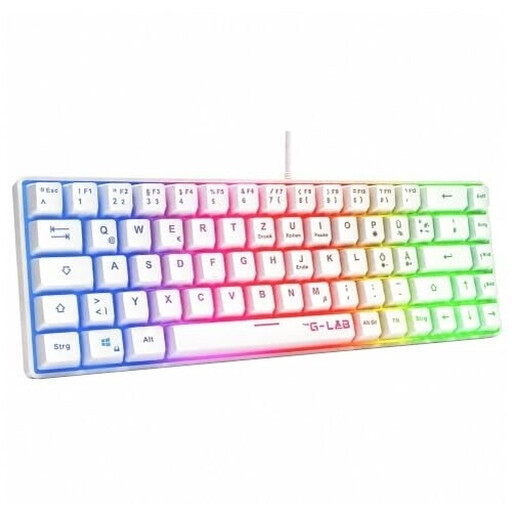
Why this product suits this user: This wired 60% keyboard has a German QWERTZ layout, RGB rainbow lighting and USB plug-and-play connectivity for PC, PS4, PS5 and Xbox.
The stated QWERTZ layout reduces the risk of ending up with an unsuitable US layout. The USB connection needs no wireless setup.
60% format, QWERTZ layout, RGB lighting and compatibility with multiple platforms.

Why this product suits this user: This 65% model combines a German QWERTZ layout, CHERRY MX Low Profile Speed switches, RGB lighting and tri-mode connectivity.
The three connection options are clearly listed. The German layout means the compact design won’t be mistaken for a US layout.
2.4 GHz wireless, Bluetooth and USB-C; N-key rollover; connects to up to three Bluetooth devices, according to the product details.

Why this product suits this user: This compact 68-key model is aimed at FPS players looking for magnetic switches, Rapid Trigger and adjustable actuation points.
The product details explicitly name the switch type, adjustable actuation range and Rapid Trigger, rather than making a vague promise of fast input.
Magnetic linear switches, adjustable actuation from 0.2 to 4.0 mm and a stated 8000 Hz polling rate.
We’ve put together a complete, regularly updated list of products that meet these strict selection criteria and fully comply with the safety regulations in force in the EU.
A compact keyboard in a 60%, 65% or 75% format frees up more room for your mouse. If you still need arrow keys and a function key row, a 75% keyboard often offers a good balance of features. Before buying, compare the dimensions of the specific model with the space available on your desk.
Lifespan depends on the switch type, how often you use it, dust, spills and the material of the keycaps. Manufacturers often quote figures such as 50 million or more keystrokes. These are technical ratings, not a guarantee of how long the keyboard will actually last. Hot-swap functionality can make maintenance easier, as individual compatible switches can be replaced.
Power consumption usually increases if RGB lighting is left on continuously and wireless activity is high. Battery life is the main factor to consider for day-to-day use. A model with a USB-C cable can still be used in wired mode, while Bluetooth and 2.4 GHz wireless offer more flexibility. So check battery life figures separately for lighting switched off and switched on.