
Lieferung heute & morgen

Qualitätsgarantie

Willkommens-Angebote freischalten: KOSTENLOSE Lieferung | Bis zu 80 % RABATT | Kostenlose 30-Tage-JoyPlus-Testphase
App herunterladen
A gaming keyboard needs to be more than just brightly lit. For PC gamers in Germany, the most important things are a suitable layout, reliable input and a design that fits their desk. Particularly in FPS and MOBA games, missing keys, an unfamiliar US layout or an impractical wireless connection can make everyday use more difficult.
That’s why it’s worth looking beyond the product description before you buy. Marketing terms such as “ultra-fast”, “mechanical feel” or “gaming RGB” don’t tell you much on their own about how well a keyboard will actually suit your needs.
An RGB keyboard or gaming keyboard with RGB lighting can make it easier to find your way around in low light and complement the look of your setup. However, lighting won’t automatically improve response time, durability or typing feel. Check whether you can actually adjust the brightness and effects, and customise individual keys if needed.
Membrane models can have a clearly defined keystroke, but they aren’t technically the same as a mechanical gaming keyboard. For mechanical models, details such as switch type, actuation distance and replacement switch compatibility should be listed. Terms such as “mechanical-feel”, on the other hand, usually describe only how the keys feel when pressed.
A 60% keyboard often does away with separate function keys, arrow keys and navigation keys. This leaves more room for your mouse, but you’ll often need to use the Fn key. A 65% keyboard usually adds arrow keys, while a 75% keyboard also includes a function-key row. This can make a real difference when working from home or getting things done.
If you regularly type in German, look specifically for a QWERTZ gaming keyboard. With a US layout, for example, Z and Y are in unfamiliar positions and German special characters are missing. Replacing the keycaps later won’t always change the actual key assignments.
Also look out for:
Linear switches offer a smooth keystroke with no tactile bump. Tactile switches provide noticeable feedback when they actuate. Clicky switches also make a distinct sound, so they may not be practical in every office or shared home.
With magnetic Hall Effect switches, you can sometimes adjust the actuation point using software. A shorter actuation distance won’t necessarily feel more comfortable for everyone. Check whether the keyboard lets you avoid accidental key presses caused by settings that are too sensitive.
A hot-swappable keyboard lets you replace compatible switches without soldering. Check whether it supports 3-pin, 5-pin or specialist magnetic switches. These systems aren’t necessarily interchangeable.
A wired keyboard doesn’t need battery maintenance and offers a stable connection. A USB-C cable with a detachable connection makes the keyboard easier to carry and replace.
A wireless gaming keyboard can connect via Bluetooth, 2.4 GHz or both. For fast-paced PC games, 2.4 GHz is generally designed to offer lower latency than Bluetooth; check the manufacturer’s specifications for exact figures. Also check the battery capacity, charging port, included receiver and compatibility with Windows, macOS or consoles.
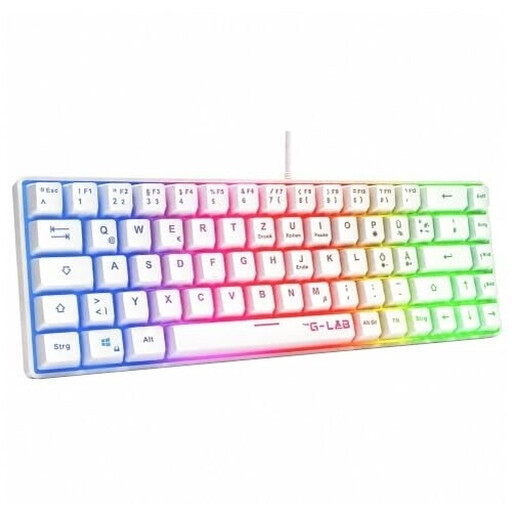
Why it suits this profile: According to the product details, this 60% model is wired, has a German QWERTZ layout and doesn’t need any additional drivers for basic functionality.
The German key layout avoids the common mistake of opting for an unfamiliar US layout. The product details also clearly specify membrane technology rather than mechanical switches.
60% form factor, USB connection, rainbow RGB lighting and compatibility with PC, PS4, PS5 and Xbox, according to the product description.

Why it suits this profile: According to the product details, this 65% model combines a German QWERTZ layout, low-profile MX Speed switches and three connection options.
The specifications clearly list the layout, switch type, connection options and software. This makes it easier to check whether the keyboard meets your requirements.
2.4 GHz wireless, Bluetooth and USB-C, plus per-key RGB, N-key rollover and anti-ghosting, according to the manufacturer.

Why it suits this profile: The 98% layout is aimed at users who need a number pad, function keys and wireless flexibility for work, streaming and gaming.
The three modes — Bluetooth, 2.4 GHz and USB-C — are clearly listed. The product details also specify hot-swap compatibility with 3- and 5-pin switches.
Spacious layout, rotary dial, TFT display, RGB lighting and a built-in 10,000 mAh battery, according to the product description.

Why it suits this profile: According to the product description, this 65% keyboard is designed for players of FPS titles such as Valorant, CS2 and Apex Legends who want a compact design and adjustable actuation.
The specifications list Hall Effect switches, an adjustable actuation range of 0.2 to 4.0 mm and Rapid Trigger. This gives you more concrete details than vague claims about speed.
An 8000 Hz polling rate according to the product details, detachable USB-C cable, aluminium top plate and dynamic RGB lighting.
We’ve put together a complete, regularly updated list of products that meet these strict selection criteria and fully comply with the safety regulations applicable in the EU.
A 60% or 65% keyboard leaves extra room for broad mouse movements. If you need arrow keys, a 65% keyboard is often more versatile. A 75% keyboard also retains the function-key row, making it a more common choice for both gaming and office work.
Lifespan depends on the switches, keycaps, case, how often you use it and how well you look after it. Some manufacturers state a certain number of keystrokes, but this doesn’t automatically indicate how long the whole device will last. Dust, spills, damaged cables and heavy-handed typing can all shorten its lifespan.
Power consumption mainly depends on the wireless standard, battery capacity, lighting and how long you use it. RGB lighting can reduce battery life. For long gaming or work sessions, compare the stated battery life with and without lighting, and check whether you can use the keyboard while it’s charging.