
Lieferung heute & morgen

Qualitätsgarantie

Willkommens-Angebote freischalten: KOSTENLOSE Lieferung | Bis zu 80 % RABATT | Kostenlose 30-Tage-JoyPlus-Testphase
App herunterladen
A gaming keyboard should register your keystrokes reliably and suit your workspace. Product pages often focus on RGB lighting, high polling rates or eye-catching designs. But other factors are often more important when choosing a keyboard: German QWERTZ layout, size, switch type, connection and compatibility.
Three common pitfalls can lead to the wrong purchase:
A QWERTZ keyboard with German key legends makes it easier to type umlauts and special characters. If you regularly switch between gaming, working from home and writing longer pieces, check the product description for “DE”, “German” or “QWERTZ”. Terms such as “US Layout” or “QWERTY” indicate a different keyboard layout.
Keyboard sizes are often given as a percentage:
A mechanical keyboard has individual switches beneath the keycaps. Depending on the model, these may be linear, tactile or clicky. Linear switches have a consistent keystroke and are often chosen for fast input. Tactile switches provide noticeable feedback when activated. Clicky switches also make a distinct sound.
Membrane and scissor-switch keyboards are often slimmer and can be quieter. So a membrane gaming keyboard isn’t necessarily the wrong choice. If you want to swap switches or customise the typing feel, look for a hot-swap keyboard. These models let you replace compatible switches without soldering. Make sure the pin count and socket standard match.
A wired keyboard doesn’t need you to keep track of battery life and transfers keystrokes via USB-C or USB. A wireless keyboard gives you more freedom to move. With gaming models, it’s worth distinguishing between Bluetooth and 2.4 GHz wireless. Bluetooth is often a good choice for laptops, tablets and connecting to multiple devices. A 2.4 GHz receiver is designed for a desktop gaming PC and needs a free USB port.
Models with a tri-mode connection are particularly practical, as they can be used wired, via Bluetooth or over 2.4 GHz. If the keyboard has a built-in lithium battery, follow the manufacturer’s charging instructions. Damaged cables, liquid and unsuitable chargers can affect the electronics and battery.
An RGB keyboard mainly changes the lighting. It can make the keys easier to see in a dark room and complement your setup, but it can’t make up for a poor key layout. A volume dial or dedicated media keys, on the other hand, can be useful while gaming or working.
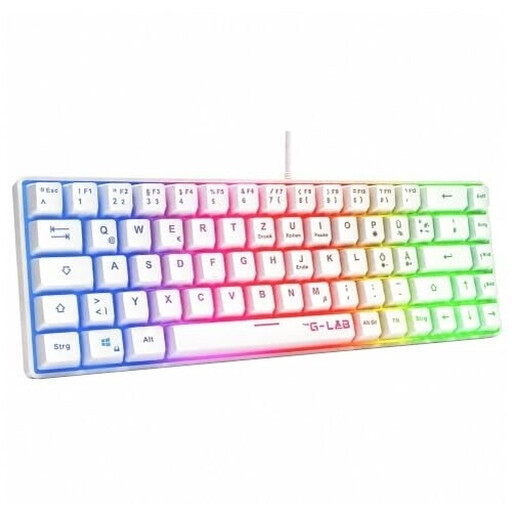
Why this product suits this user: This 60% model is designed for anyone looking for a compact gaming keyboard with a German layout and a simple USB connection.
The QWERTZ layout is clearly specified. The wired plug-and-play connection means no pairing or battery concerns.
60% form factor, RGB rainbow lighting, USB connection and compatibility with PC, PS4, PS5 and Xbox.

Why this product suits this user: This 75% keyboard combines a mechanical design with German key legends, hot-swap sockets and a volume dial.
The German 82-key layout is clearly specified, reducing the risk of ending up with an unsuitable US layout. The USB-C connection means you don’t need a wireless connection.
Hot-swap sockets for compatible 3-pin switches, RGB lighting, a volume dial and five layers of sound-dampening material.

Why this product suits this user: Its compact 68-key design leaves more room for your mouse and features magnetic switches with an adjustable actuation point.
The technical features are clearly specified: magnetic switches, Rapid Trigger and an adjustable actuation point from 0.2 to 4.0 mm.
Aluminium top plate, detachable USB-C cable, RGB lighting and a stated 8,000 Hz polling rate.

Why this product suits this user: This model is designed for anyone who needs a compact QWERTZ keyboard for a PC, laptop and multiple Bluetooth devices.
You’re not limited to one connection mode: 2.4 GHz, Bluetooth and USB-C are all available. The German layout is clearly specified.
65% form factor, CHERRY MX Low Profile Speed switches, per-key RGB, N-key rollover and connectivity with up to three Bluetooth devices.
We’ve put together a complete, regularly updated list of products that meet these strict selection criteria and fully comply with the safety regulations in force in the EU.
For German users, a QWERTZ keyboard clearly marked DE or German is the best place to start. The operating system and keyboard layout should also match. You can set Windows to German when using a US keyboard, but the key legends and physical key positions will still be different.
It depends on the connection mode. For a gaming PC, a 2.4 GHz connection with a USB receiver is usually more practical than Bluetooth. Bluetooth is particularly useful for tablets, laptops and multiple devices. If you want to avoid charging breaks, choose a wired gaming keyboard or use a tri-mode model via USB-C while it charges.
Its lifespan depends on the switch type, how often you use it, how well you clean it and the amount of mechanical stress it’s subjected to. Manufacturers often specify a number of keystrokes as a technical guide. With a hot-swap keyboard, you can replace compatible switches when needed. Liquids, dust and pulling switches out at an angle can damage the circuit board or sockets.