
Lieferung heute & morgen

Qualitätsgarantie

Willkommens-Angebote freischalten: KOSTENLOSE Lieferung | Bis zu 80 % RABATT | Kostenlose 30-Tage-JoyPlus-Testphase
App herunterladen
A gaming keyboard does not have to be covered in flashy lighting. For PC gamers, FPS enthusiasts, streamers and home-office users, the key considerations are layout, switches, connectivity and customisation. Focusing solely on terms such as “8K”, “Rapid Trigger” or “mechanical” can easily mean overlooking important details.
A polling rate of 8,000 Hz means that the keyboard can theoretically report its inputs to the computer very frequently. This may reduce transmission latency, but it requires a compatible USB port, suitable software and a system capable of processing the additional polling load. For many everyday users, the difference compared with 1,000 Hz will not be clearly noticeable in every situation.
The essentials therefore remain a stable wired keyboard, reliable firmware and a layout that makes the desired key position easy to reach.
Some compact models use membrane technology or so-called “mechanical-feel” constructions. These may feel more tactile than basic, low-profile office keyboards, but they are not equivalent to a mechanical gaming keyboard. Anyone wanting to replace switches or adjust the actuation point needs a genuinely mechanical or magnetic construction.
Look for specific details in the product description, such as hot-swap, the switch type, supported 3- or 5-pin switches and USB-C connectivity.
A 60% keyboard typically omits dedicated arrow, navigation and function keys. These functions are often accessed via the Fn key. This leaves more room for the mouse, but may require some adjustment when writing, working or using software shortcuts.
A 75% keyboard generally retains the function and arrow keys, while a TKL keyboard also omits the number pad. Before buying, it should therefore be clear whether the keyboard will primarily be used for FPS games or also for spreadsheets, programming and office work.
For users in Germany, a QWERTZ keyboard is usually the more straightforward choice. The key legends, special characters and positions of Z and Y match the German keyboard layout. Many compact gaming keyboards from international product ranges, however, use a US layout. Although the keyboard layout can be changed in Windows, the key legends may no longer match the actual input.
Be sure to check the following:
A classic mechanical keyboard uses individual mechanical switches. Linear switches move smoothly, while tactile or clicky variants provide a more pronounced tactile bump or an audible signal.
Magnetic-switch keyboards with Hall Effect technology detect the key’s position without physical contact. Depending on the model, the actuation point can be adjusted in software. A Rapid Trigger keyboard resets the key based on its return movement instead of waiting for a fixed reset point. This is particularly interesting for fast directional changes in FPS games. However, it does not eliminate the need to tailor the settings to your own playing style.
The following objective specifications are relevant for everyday use:
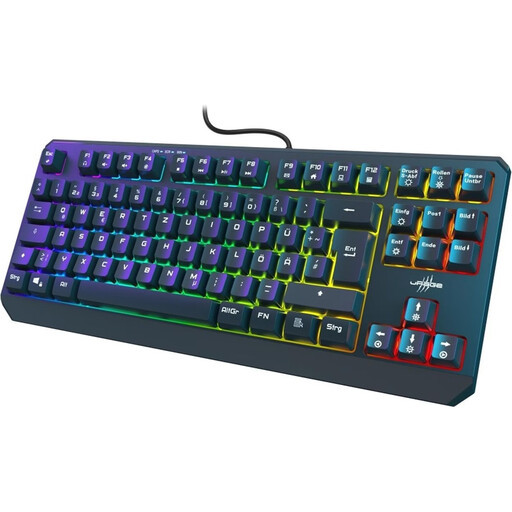
Why This Fits Their Persona: This TKL keyboard with a German QWERTZ layout is ideal for users who want to save desk space while retaining arrow and function keys.
The product specifications explicitly state that it has 88 keys, a German QWERTZ layout and membrane technology rather than an undefined mechanical feel.
USB-C cable, WIN Lock, RGB lighting, anti-ghosting for up to 26 keys and 12 media keys.

Why This Fits Their Persona: This model combines a German 82-key layout with mechanical switches, making it suitable for gaming, writing and everyday computer work.
The QWERTZ version reduces the risk of mismatched key legends. Hot-swap supports replacing compatible 3-pin switches without soldering.
75% layout with arrow and function keys, volume control, RGB lighting, USB-C and a gasket-mount construction.

Why This Fits Their Persona: This compact 68-key model is designed for players who need plenty of mouse space and prefer magnetic switches with Rapid Trigger.
The product data specifies an adjustable actuation range of 0.2 to 4.0 mm, as well as Rapid Trigger. The US layout should be checked carefully before purchase.
Magnetic linear switches, an 8,000 Hz polling rate according to the supplier, a 68-key layout, aluminium top plate and detachable USB-C cable.
The complete selection includes gaming accessories for PC, organised by layout, connectivity, form factor and features.
Yes, provided the switch type, noise level and layout are right for you. Linear switches are often perceived as smooth and consistent, while tactile variants offer a noticeable bump. A German QWERTZ layout is also practical for office work, studying and gaming.
A 60% keyboard is worthwhile if maximum mouse space and a compact desk setup are priorities. Anyone who regularly works with arrow keys, F keys or navigation keys will usually find a 75% or TKL form factor more convenient.
Lifespan depends on the switches, usage, dust, liquids and mechanical stress. On hot-swap models, a defective compatible switch can be replaced. Regardless of the model, disconnect the keyboard before cleaning, keep it dry and do not disassemble it beyond the replacement options intended by the manufacturer.