
Lieferung heute & morgen

Qualitätsgarantie

Willkommens-Angebote freischalten: KOSTENLOSE Lieferung | Bis zu 80 % RABATT | Kostenlose 30-Tage-JoyPlus-Testphase
App herunterladen
A gaming keyboard does not have to be covered in eye-catching lighting. The key factors are the layout, key mechanism, connection type and whether it suits your everyday needs. A keyboard for fast-paced PC gaming has different requirements from a model for working from home, programming or mobile use.
Before buying, three common and avoidable problems often arise:
For users in Germany, a QWERTZ keyboard is generally the simplest choice. The German layout makes it easier to write texts and switch between gaming, office work and programming every day. Check the technical specifications to see whether “DE”, “QWERTZ” or “German Layout” is explicitly stated.
Some of the models in this selection use a US layout instead. For example, the Lofree OE907 and OE914 are available with a QWERTY US layout. They can work with Windows, macOS or mobile devices, but their key labelling does not automatically correspond to a German keyboard.
A mechanical gaming keyboard uses individual switches beneath the keys. Their characteristics vary:
A hot-swappable keyboard allows compatible switches to be replaced without soldering. It is important to check whether the model supports 3-pin and 5-pin switches and whether the replacement switches are actually compatible.
The size categories indicate the available functionality:
When it comes to connectivity, a wired keyboard provides a direct USB connection and usually does not require a battery. A wireless keyboard can use 2.4 GHz or Bluetooth. Bluetooth is particularly suitable for laptops, tablets and multiple mobile devices. For wireless gaming, check whether a 2.4 GHz receiver is included and how switching between modes works.
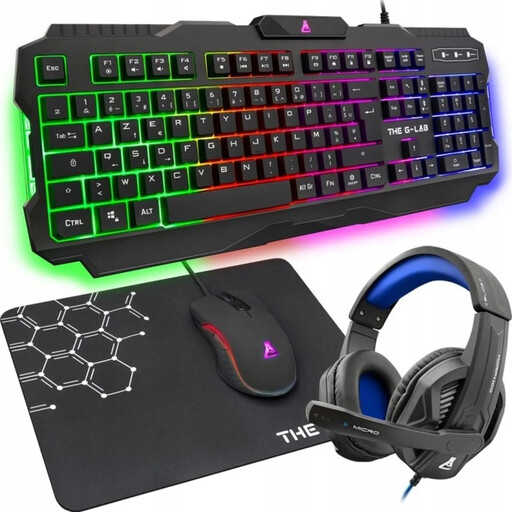
Why this product suits this profile: This 4-in-1 set combines a membrane keyboard with a QWERTZ layout and additional gaming peripherals. The USB connection works via plug and play and is compatible with PC, PS4, PS5 and Xbox.
The German layout is clearly specified. The wired design does not require battery maintenance and avoids potential wireless connection issues.
Quiet membrane keys, DE-QWERTZ layout, USB connection and support for multiple platforms.
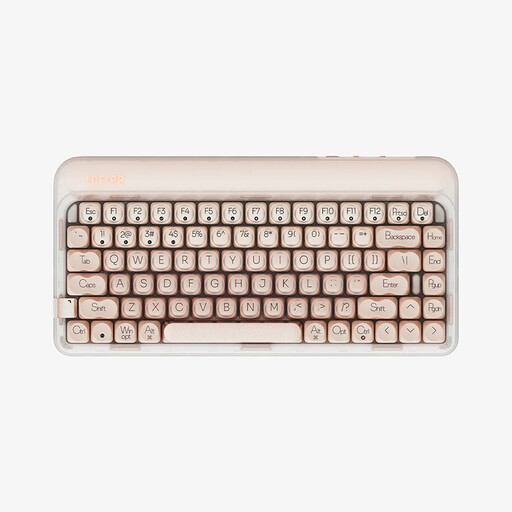
Why this product suits this profile: The 84-key design combines compact dimensions with a complete arrow-key cluster. USB-C, Bluetooth 5.3 and 2.4 GHz provide three connectivity options.
Connectivity is not limited to Bluetooth. Full hot-swap functionality lets you replace compatible switches without soldering.
Gasket construction, sound-dampening layers, a 1000-Hz polling rate and a 4000-mAh battery according to the product specifications.

Why this product suits this profile: The 87-key layout is designed for gaming, programming and extended work sessions. The keyboard supports wired connectivity, Bluetooth and 2.4 GHz.
The German layout is clearly stated. Hot-swap sockets for 3-pin and 5-pin switches allow you to customise the keyboard later without desoldering it.
PBT keycaps, RGB lighting, gasket structure and an integrated battery according to the manufacturer's specifications.

Why this product suits this profile: This full-size set includes a number pad, six hotkeys and a mouse. It connects via a 2.4 GHz receiver or Bluetooth 4.0.
The two connection methods offer flexibility for PCs, laptops and tablets. Nevertheless, check the stated layout before buying, as it is listed as US QWERTY with a euro symbol.
Slim design, rechargeable battery, six hotkeys and an optical mouse with 1600 DPI according to the product description.
We have put together a complete, regularly updated list of products that fully meet these strict selection criteria and the safety regulations applicable in the EU.
If you often write German texts, a QWERTZ keyboard with a DE layout is usually more practical. German input works on QWERTY models via the operating system settings, but the key labels are different.
Lifespan depends on the switch type, materials, usage and care. With many mechanical models, individual switches or keycaps can be replaced. A membrane keyboard, on the other hand, can be quieter and simpler to use. Check the specific key lifespan information and protect every keyboard from moisture and heavy impacts.
Power consumption depends on the wireless standard, lighting and usage time. An RGB keyboard generally uses more power when the lighting is permanently switched on than a model without lighting. With a Bluetooth or 2.4 GHz keyboard, you should also compare the stated battery life, charging time and option for wired use.