For arena matches on a big screen, your connection should suit the distance and gaming device. On PC, you can use a cable or a keyboard with a USB wireless receiver, depending on your setup. Choose a layout based on the commands you need to reach directly and how much room your mouse needs: compact layouts save desk space, while TKL and 96% formats can keep more keys within easy reach. Adjustable actuation is an option for fine-tuning input, but there’s no evidence that it guarantees better match results.
Which keyboard is right for you?
Players sitting further from the screen
If you sit further from your PC or console, the connection and cable routing should suit your setup. Logitech G lists LIGHTSPEED, Bluetooth and wired data transfer for the G515 LIGHTSPEED TKL. For consoles, you’ll also need to check compatibility with your specific device and game.
Players who need lots of commands at their fingertips
If you want to access frequently used actions without a key combination while keeping room for your mouse, compare the keys available directly on each layout. Models differ in their function, arrow and number keys, among other things.
Players who want adjustable actuation
If you want to fine-tune actuation or reset behaviour, certain magnetic-switch models with Rapid Trigger may be worth considering. SteelSeries and Wooting describe these features for specific models, but there’s no evidence that they improve match results.
What should you look for when buying?
| What matters to you |
What to check before buying |
Who is this especially important for? |
| Connection and device compatibility |
Check your gaming device, support in the specific game, connection type and cable routing. If you’re using wireless, make sure you have the USB receiver you need. |
If I’m sitting away from the big screen, I want a connection that suits my device and seating position. Around 36% of consumers put connection and device compatibility first. |
| Keys within easy reach and room for your mouse |
Compare your commands with the layout and check the function row, arrow keys and any other keys you need. |
If you want to trigger important match commands directly while keeping room for your mouse, the layout matters. Around 29% of consumers prioritise direct access and desk space. |
| Adjustable actuation |
Check the exact model, switch technology and available settings. Make sure the configuration you want is allowed by the game’s rules. |
If I want to fine-tune actuation and reset behaviour, I look for the relevant features on the specific model. Around 21% of consumers put input customisation first. |
| Noise, key feel and everyday use |
Compare the switch type and layout of the version on offer. Don’t treat the manufacturer’s claims about damping as a measurement of noise levels. |
If you game in a shared room or use the same keyboard for typing, its feel in everyday use could be a deciding factor. Around 14% of consumers put noise and practicality first. |
Avoiding common buying mistakes
-
Assuming console compatibility means you can use the keyboard in your game
A console may recognise a keyboard without supporting it for controls in every game you want to play. Sony notes that not all devices work with PS5, while Xbox describes keyboard controls as available in selected games and apps.
Before buying, check both the specific keyboard and whether your chosen arena game supports keyboard input.
-
Choosing a compact layout based only on the extra room for your mouse
A 65% layout has dedicated arrow keys, but other functions may be on a secondary key layer. TKL and 96% models offer different combinations of keys that are directly accessible.
Make a note of the match commands you use most often and compare them with the specific layout before buying.
-
Assuming similarly named or regional models are identical
The wired G515 TKL is a different model from the G515 LIGHTSPEED TKL. Layout, switches and connection type can also vary between versions.
On the product page, check the full model name, layout, switches and connection type of the version on offer.
Key brands at a glance
Logitech G
The G515 LIGHTSPEED TKL is a low-profile TKL option for setups where having several connection types could come in handy.
- According to Logitech, this model offers LIGHTSPEED, Bluetooth and wired data transfer, as well as linear or tactile switches.
- There’s no number pad. The wired G515 TKL is a separate version and shouldn’t be confused with the LIGHTSPEED model.
SteelSeries
The wired Apex Pro TKL Gen 3 - DE is aimed at players looking for a German TKL layout and adjustable input.
- SteelSeries lists magnetic switches with an adjustable actuation range of 0,1 to 4,0 mm and Rapid Trigger for this version.
- The version described is wired. Its features don’t prove that it delivers better performance in arena matches.
Wooting
The 80HE is an 80% option for buyers who want to configure analogue input and Rapid Trigger to suit their needs.
- Wooting describes the 80HE as having Rapid Trigger and adjustable actuation.
- The layout and key configuration depend on the version you choose. The manufacturer’s claims about input speed don’t prove that you’ll get better results in-game.
ASUS ROG
According to ASUS, the ROG Strix Scope II 96 Wireless combines a denser layout with several connection options.
- ASUS lists function and number keys, as well as Bluetooth, 2,4-GHz wireless and USB.
- The 96% layout takes up more desk space than smaller formats. ASUS says the keycap material may vary by region, so check the specific version.
HyperX
The Alloy Origins 65 offers a compact layout with dedicated arrow keys and mechanical switches.
- The 65% layout saves desk space while retaining dedicated arrow keys.
- The German product page lists a US layout for the version described there. This doesn’t mean a German QWERTZ version is available.
Joybuy products for different gaming setups
This selection includes wired and wireless gaming keyboards in compact layouts. The key factors are your distance from the screen, the shortcuts you need to access directly and the connection to your gaming device.
 No image available
Akko 5087S V1 TKL, Akko V3 Pro Cream Yellow, ISO-DE-QWERTZ, Black & Gold
For a wired PC setup with a German TKL layout and no number pad.
Wired USB Type-C connection; listed features include linear mechanical switches, hot-swappable switches, RGB and 1000-Hz polling.
View at Joybuy
 No image available
CHERRY MX-LP 2.1 Wireless, MX Speed, 65%, German QWERTZ, White
A compact option if you want to switch between a wireless connection and wired USB-C use.
65% layout with German QWERTZ and low-profile MX Speed switches; the product description lists 2,4-GHz wireless, Bluetooth and USB-C.
View at Joybuy
 No image available
Redragon RS68 3-Mode, 68 keys, Space Gray
For a compact setup where you want a choice of connection types to suit your seating position and device arrangement.
68-key layout with Bluetooth, 2,4-GHz wireless and wired use; hot-swappable switches and a detachable wrist rest are listed in the product name.
View at Joybuy
 No image available
Redragon M68 Magnetic Switch, 68 keys, US layout
For buyers looking for a compact layout and adjustable actuation and reset behaviour who are happy with a wired connection.
Listed features include magnetic switches, Rapid Trigger and adjustable actuation. The model uses a USB-C cable and has a US layout. The product description lists 8000-Hz polling.
View at Joybuy
 No image available
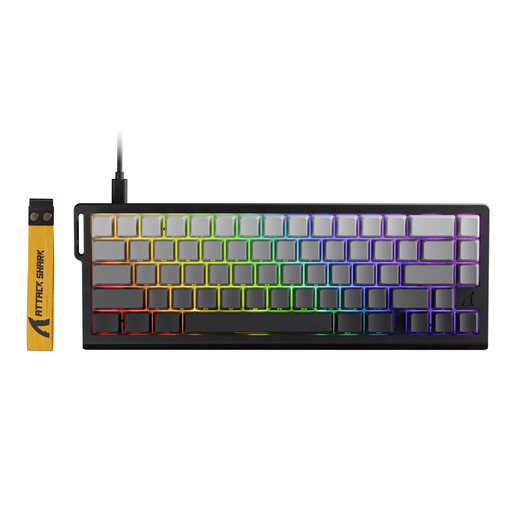
ATTACK SHARK X68 HE Rapid Trigger, Black Gradient
A compact wired option for buyers who want to consider adjustable actuation and reset behaviour.
Listed features include magnetic switches, Rapid Trigger and an adjustable actuation point. The model has 66 keys, uses USB-C and is described as compatible with PC and Mac.
View at Joybuy
Frequently asked questions
Is it enough for my console to recognise the keyboard?
No. Recognition alone doesn’t confirm that you can use it to control the game you want to play. Sony notes that not all devices work with PS5, while Xbox describes keyboard controls as available in selected games and apps. So check your device, connection type and support in the specific arena game separately.
How do I set up a keyboard with PS5?
Sony lists the PS5 settings under ‘Accessories’ for USB and Bluetooth keyboards. Bluetooth devices are paired under ‘General’ and ‘Bluetooth Accessories’. You should also check whether your specific keyboard and chosen game are supported.
Do I need a particularly small keyboard for Rapid Trigger?
No. SteelSeries also offers Rapid Trigger on the TKL Apex Pro TKL Gen 3 - DE, while Wooting describes the feature on the 80% 80HE keyboard. First decide which keys you need direct access to, then check that the specific model has the feature.
What are my rights in Germany if a product is faulty or I buy online?
Your statutory rights against the seller are not the same as a voluntary guarantee. According to the Verbraucherzentrale, online purchases generally come with a 14-day right to cancel. Exceptions and the terms of your specific purchase may apply.
What should I look for in a keyboard’s labelling?
The Bundesnetzagentur lists labelling and information requirements for electrical and electronic equipment. Among other things, retailers must check that the CE marking is correct. The CE marking says nothing about a keyboard’s latency in arena games.


