What should you look for?
The Steam listings for Slay the Spire and Balatro include mouse and controller options. So first work out whether you need a keyboard, then consider connectivity, layout and how you’ll use it from your seat.
| What matters |
What to check before buying |
Who it matters most to |
| Connection and setup |
Check whether your gaming device supports your preferred wireless mode or USB connection. Make sure you also have room for the keyboard and receiver. |
If I want to play from my seat without a keyboard cable getting in the way, checking the connection to my gaming device comes first. Around 33% of consumers prioritise finding the right connection. |
| Pointer controls and keyboard requirements |
Check the input options and key bindings for the specific game you play. If you need a mouse, make sure there’s enough space beside the keyboard. |
If I select cards and menus with a pointer, I want to be able to use the mouse comfortably from my seat. Around 27% of consumers prioritise pointer controls. |
| Layout and shortcut keys |
Compare the keys you use most often with the layout of the exact model variant. If needed, check whether the German layout you want is available. |
If I want function, navigation or number keys within easy reach, I check that they’ll fit in the space available. Around 20% of consumers prioritise easy-to-reach keys. |
| Keystroke noise and typing feel |
Check the switch variant of the specific keyboard. Manufacturer claims about sound dampening are no substitute for judging it in your own setup. |
If there are other people in the room, I want to take keystroke noise into account when choosing a keyboard. Around 20% of consumers pay particular attention to noise and typing feel. |
Joybuy products
This selection includes compact wireless keyboards and models with a near-full-size key layout, to suit different space requirements and preferences for easy-to-reach keys.
 No image available
CHERRY MX-LP 2.1 Wireless, 65 %, German QWERTZ, White
This compact design could suit you if you’re looking for a German layout and several connection options.
The product title lists 65%, Tri-Mode with 2.4 GHz, Bluetooth and USB-C, plus low-profile MX Speed switches.
View at Joybuy
 No image available
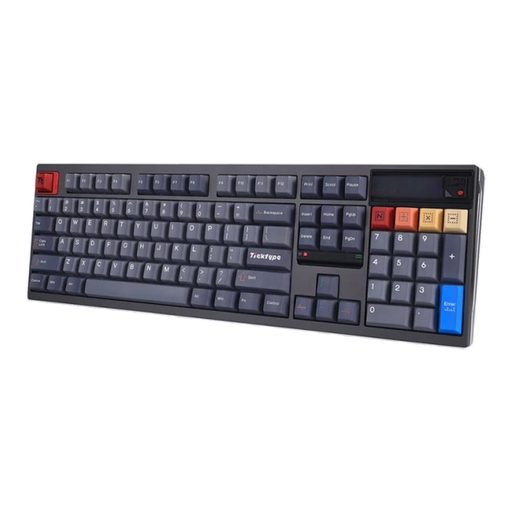
Ticktype DP104 Custom Tri-Mode, 108 keys, US layout
This model could be a good choice if you want a full-size layout with easy-to-reach keys and are happy with a US layout.
The product title lists Bluetooth, 2.4 GHz and USB-C, 108 keys, hot-swap, an 8000-mAh battery and Silent-Tactile switches. If you need German QWERTZ, check the layout carefully before buying.
View at Joybuy
 No image available
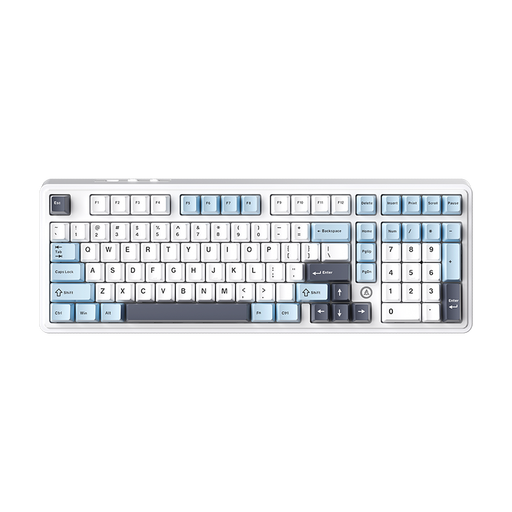
AJAZZ AK980 V2, 98% QWERTY
The 98% layout is an option if you want to keep the number pad and use several types of connection.
The product title lists wired, Bluetooth and 2.4 GHz connections, hot-swap and a 10000-mAh battery. The stated layout is QWERTY; check before buying that it meets your requirements for a German layout.
View at Joybuy
 No image available
AJAZZ AK35I V4, German QWERTZ, Tri-Mode
This model could suit you if you want a German layout, easy-to-reach keys and several connection options.
The product title lists Bluetooth, 2.4 GHz and USB-C, as well as hot-swap, a 10000-mAh battery and a 1.14-inch TFT colour display.
View at Joybuy
 No image available
AJAZZ AK820 MAX, 75%, US QWERTY layout
This compact layout could be a good fit if you want to save space while keeping arrow and function keys.
The product title lists Bluetooth, 2.4 GHz and USB-C, Flying Fish switches, a volume control and an 8000-mAh battery. Check that the US QWERTY layout meets your needs.
View at Joybuy
Frequently asked questions
Do I need a gaming keyboard to play Slay the Spire or Balatro?
No. Valve / Steam lists a mouse-only option and full controller support for both games. Check the actual input controls for the game you play and the device you use.
How do I set up a wireless keyboard with my gaming device?
Choose a connection mode supported by your device. Corsair describes the K65 PLUS WIRELESS as having a USB wireless receiver, Bluetooth and a USB cable, as well as a switch for selecting the connection type. According to the Corsair manual, this model should be fully charged before first use. Also check whether your specific game supports keyboard input on your platform.
What should I look for in a layout and easy-to-reach keys?
Compare the game and everyday keys you actually need with the layout of the exact variant. Compact designs may leave out a dedicated function-key row or number pad. Also check that the layout on offer meets your requirements.
What should I know about charging and replacing switches?
For the K65 PLUS WIRELESS, Corsair lists a battery-level indicator and USB charging. Follow the instructions for your exact model for maintenance or switch replacement. Hot-swap isn’t a standard feature on all gaming keyboards.
What are my rights if a product develops a fault after I buy it in Germany?
When you buy from a business seller, you generally have a statutory right to a minimum two-year legal guarantee from the date you receive the goods. This right is against the seller and is separate from any voluntary manufacturer’s guarantee. The EU information excludes purchases made from private individuals from these rules.


