What should you look for when buying?
First, compare your key in-game commands with the layout. Then plan the connection and setup at your gaming spot, and finally check the switches and typing noise for your room.
| What to consider | What to check before buying | Who should consider it? |
|---|
| Commands within easy reach |
Compare the position of your shortcuts on DE-ISO full-size, 96% and TKL layouts. For programmable keys, also check the specific software and in-game key mapping. |
If I often switch between maps and menus, I want to access important commands without extra steps. Around 36% of consumers put direct access to in-game commands first. |
| Connection at your gaming spot |
Check which connections your gaming device supports, where the receiver can be placed and how you can charge the keyboard where you sit. |
If my PC is further away, I need a connection that suits my setup and a practical way to charge the keyboard. For around 29% of consumers, the connection between the keyboard and gaming device is a priority. |
| Space for your keyboard and mouse |
Measure the available surface and allow for a stable area for your mouse. With TKL, check whether you need the number pad; with 96%, consider the more compact key arrangement too. |
If space is limited, I want to leave enough room for my mouse without giving up keys I need. Around 21% of consumers prioritise space for their keyboard and mouse. |
| Typing feel and noise |
Check the exact switch variant and whether sound dampening or hot-swap is important for your choice. Manufacturer specifications are no substitute for an independent noise comparison. |
If I type in a shared room, I want to choose switches and noise levels that suit my surroundings. Around 14% of consumers give typing noise top priority. |
Joybuy products for your gaming setup
This selection includes compact and full-size mechanical keyboards for different connection and desk-space needs. When checking how they match your shortcuts, pay particular attention to each model's layout.
 No image available
Ticktype EVO75 Custom, tri-mode, ISO-DE
The ISO-DE layout can be checked against your German shortcut mapping; the compact 75% format could suit a space-conscious setup.
The product description lists hot-swap switches, VIA compatibility and an 8000 mAh battery.
View at Joybuy
 No image available
ARZOPA 80%, German layout, 87 keys
The stated German layout and compact 80% form factor may be worth considering when matching the keyboard to your shortcuts and available mouse space.
The product description lists hot-swap, wireless, wired and Bluetooth operation.
View at Joybuy
 No image available
AJAZZ AK820 MAX 75%, US QWERTY
The 75% format is worth considering if desk space is limited; check whether the key layout suits your in-game commands.
The listed version has a US QWERTY layout, not a specified German layout. The product description lists hot-swap and several connection options.
View at Joybuy
 No image available
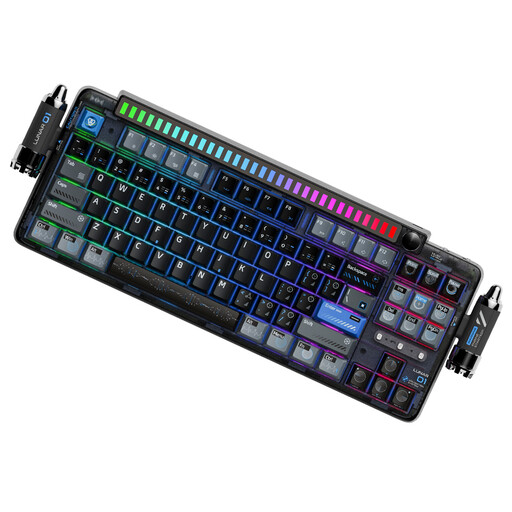
KEYSME Lunar 01 80%, US layout
The 80% form factor could be an option if desk space is limited; check that the US layout suits your key mapping before buying.
The product description lists hot-swap switches and a programmable dial. Connection options include 2.4 GHz wireless, Bluetooth and USB-C wired operation.
View at Joybuy
 No image available
Ticktype DP104, full-size, 108 keys, US layout
The full-size 108-key layout could suit you if you want plenty of keys within easy reach and have enough desk space.
The listed version has a US layout, not a specified German layout. The product description lists silent tactile switches, hot-swap and 2.4 GHz, Bluetooth and USB-C connectivity.
View at Joybuy
Frequently asked questions
Do I really need macro keys for Grand Strategy?
No. Start by thinking about the shortcuts you actually use. Logitech G lists nine G-keys for the G915 X LIGHTSPEED; Keychron lists VIA key mapping for the V6 Max. This doesn't establish whether a particular key sequence is suitable or permitted in a given game.
How do I set up a wireless keyboard at a gaming spot further away?
Choose a connection supported by your gaming device, plan where to put the receiver and keyboard, and test the connection where you actually sit. If the keyboard has a wired alternative, plan for charging too; CHERRY says the MX 3.0S Wireless can still be used while charging.
Will the keyboard work with a console version?
That depends on the game and platform; having a big screen doesn't tell you which input methods are supported. Paradox Interactive describes a specially adapted console control scheme for Crusader Kings III. This doesn't establish general keyboard support for console games.
What should I check about the layout and switches?
Compare the explicitly stated layout and switch variant with your key mappings. Model names don't guarantee a German layout: a specific listing may, for example, state Italian QWERTY or US QWERTY.
What rights do I have if a product is faulty or I buy online?
When you buy from a trader in the EU, you are generally entitled to a legal guarantee of at least two years from the date you receive the goods; a voluntary manufacturer's warranty does not replace it. Distance purchases generally come with a 14-day right to cancel, subject to legal exceptions. Your Europe, the European Union's portal, explains these rules; also check who you are buying from and their returns information.


