
Lieferung heute & morgen

Qualitätsgarantie

Willkommens-Angebote freischalten: KOSTENLOSE Lieferung | Bis zu 80 % RABATT | Kostenlose 30-Tage-JoyPlus-Testphase
App herunterladen
A gaming keyboard needs to offer more than just lighting. For PC and console gamers, streamers, prolific typists and anyone short on desk space, the key considerations are layout, connectivity, key mechanism and ease of use. If you focus only on RGB effects or high polling rates, you may overlook important limitations in everyday use.
A 60% keyboard saves space, but usually does away with dedicated arrow keys, function keys and the number pad. These functions are then accessed using secondary key assignments. A 65% keyboard typically adds arrow keys and some navigation keys. A TKL keyboard mainly omits the number pad, while retaining the function keys.
This can be practical for FPS gamers who make large mouse movements, but it may take some getting used to for typing, programming or working with spreadsheets. Before buying, decide whether you need a number pad, a full row of function keys or dedicated navigation keys.
Many compact models are available with a US QWERTY keyboard. The positions of Y and Z, as well as special characters, differ from the German layout. If you regularly write in German, a QWERTZ keyboard is usually easier to use.
Changing the language setting in Windows or macOS cannot fully compensate for the physical layout. The key labels and actual key positions will still differ. If you’re considering an international model, also check that it’s compatible with your console and offers the keyboard shortcuts you need.
Anti-ghosting and N-key rollover describe the simultaneous detection of multiple key presses. This matters in games that involve pressing movement and action keys at the same time. However, these features alone say nothing about switch quality, noise levels or ergonomics.
A high polling rate isn’t essential for everyone either. Depending on the model, keyboards with Rapid Trigger and magnetic Hall Effect switches let you adjust the actuation point and reactivate keys quickly. These features are particularly suited to competitive FPS players. For office work or casual gaming, the feel of the keys, a German layout and a comfortable position for your hands may matter more.
Check the dimensions as well as the number of keys. A smaller case gives you more room to move your mouse, but may feel less familiar during long typing sessions.
A mechanical gaming keyboard uses individual switches beneath the keycaps. Linear Red switches move smoothly and are often chosen for fast inputs. Tactile or clicky switches provide more noticeable feedback when activated and can be louder.
Membrane and mecha-membrane keyboards use different switching technologies. They may appeal to anyone who prefers a softer feel or a particular noise level. The term ‘mechanical feel’ doesn’t automatically mean that the keyboard has mechanical switches.
A hot-swap keyboard lets you replace compatible switches without soldering. The number of pins and supported switch type must match. With magnetic models, compatibility is often limited to Hall Effect switches.
A wired keyboard doesn’t need a battery and connects directly via USB. A detachable USB-C cable makes it easier to transport and manage cables. For adjusting the volume, a dial or dedicated media keys are quicker to use day to day than keyboard shortcuts.
An RGB keyboard can illuminate individual keys or zones. Lighting makes the keys easier to see in the dark, but doesn’t automatically make the keyboard more practical. Check whether lighting effects are saved directly to the keyboard or require additional software.
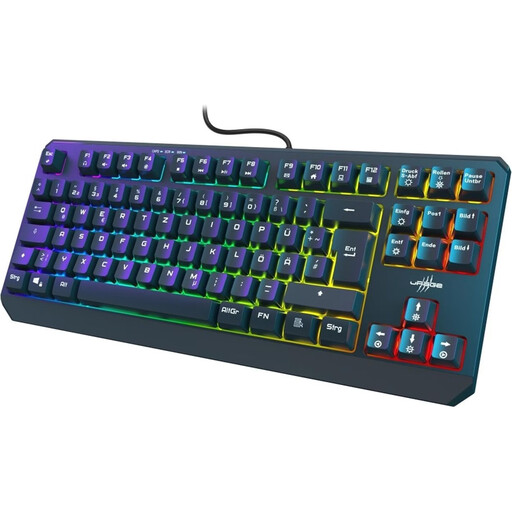
Why this product suits this user: According to the product details, this TKL keyboard has a German QWERTZ layout, 88 keys and a wired USB-C connection. It keeps the layout familiar while doing away with the number pad.
The German layout avoids the adjustment period often needed with US QWERTY models. The product description also lists 26-key rollover and anti-ghosting.
Compact TKL design, RGB lighting, WIN Lock and saved lighting settings.
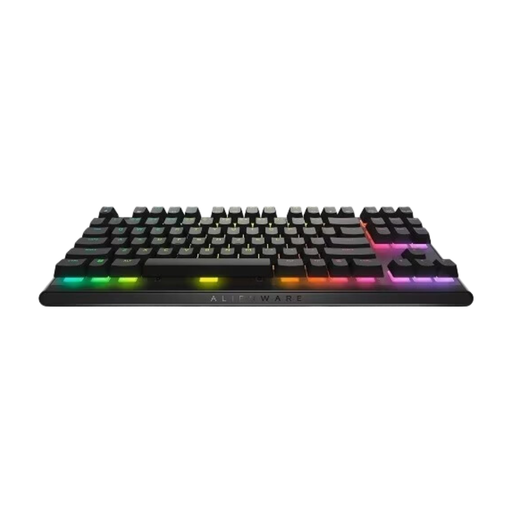
Why this product suits this user: According to the manufacturer, this model features CHERRY MX Red switches, double-shot PBT keycaps, N-key rollover and a detachable USB-C cable.
There’s more to it than lighting: the TKL layout, programmable keys and full key rollover are all clearly specified.
Mechanical Red switches, PBT keycaps, per-key RGB and three height settings.
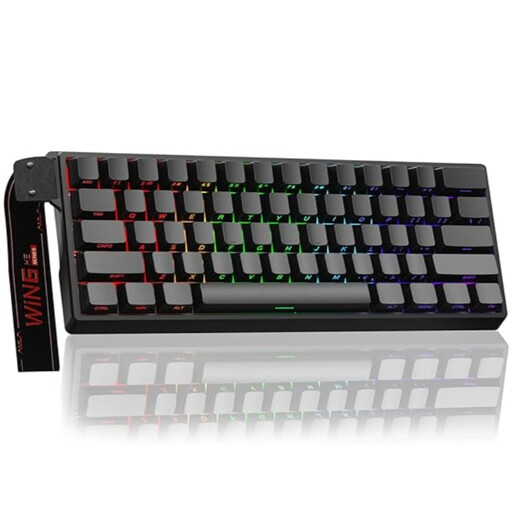
Why this product suits this user: According to the product details, this model has magnetic switches, an adjustable actuation point, Rapid Trigger and an 8,000 Hz polling rate.
The technical details give specific adjustment ranges rather than simply promising a fast response. Important: switch compatibility is limited to Hall Effect technology.
60% design, RGB lighting, magnetic switches and a wired connection.
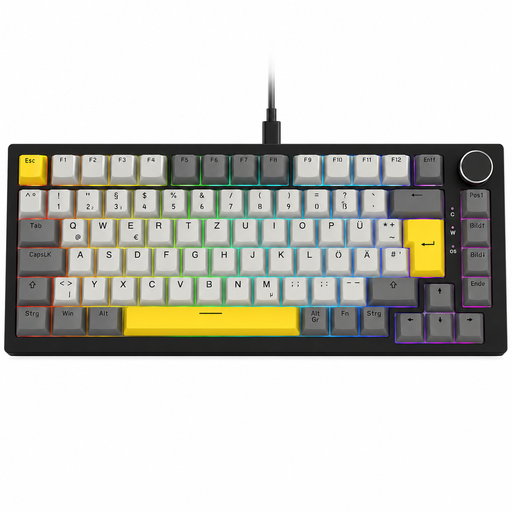
Why this product suits this user: According to the product description, this keyboard combines a German QWERTZ layout with 82 keys, hot-swap functionality, RGB lighting and a volume dial.
The 75% layout retains the arrow, navigation and function keys. Its QWERTZ layout avoids the differences you’d typically find with a US QWERTY keyboard.
Gasket-mounted construction, hot-swappable 3-pin switches, volume dial and detachable USB-C cable.
We’ve put together a comprehensive, regularly updated list of products that meet these strict selection criteria and fully comply with the safety regulations in force in the EU.
For regular typing, a QWERTZ keyboard is usually easier to use, as its letters and special characters match the German layout. With a US QWERTY keyboard, you’ll need to account for the different layout and, where necessary, the system input settings.
Lifespan depends on the switch type, keycaps, case and how you use the keyboard. Some manufacturers quote specific keystroke ratings, such as 50 or 100 million key presses. These are product specifications, not a guarantee of how long the keyboard will actually last. Dust, liquids and rough handling can shorten its lifespan, regardless of the switches.
Adjustable magnetic switches and Rapid Trigger may appeal to players who want very short actuation and reset distances in competitive shooters. Before buying, however, check the software, switch compatibility and the form factor you need. These features aren’t essential for office work or casual gaming.