Which keyboard suits you?

Quiet working and gaming

If you work at the same desk where you tend virtual gardens, typing noise may matter more than flashy gaming features. SteelSeries describes the Apex 3 TKL - DE as quiet; this is a manufacturer's claim, not an independent noise comparison.

Limited space for your mouse

If you need room to move your mouse and can do without a number pad, a more compact layout may suit you. TKL models do not have a number pad; Razer says the BlackWidow V4 75 % has arrow and function keys.

Lots of shortcuts and number entry

If you regularly enter numbers or want to use shortcuts directly from your keyboard, it is worth looking at larger models and their extra keys. Razer lists macro keys for the BlackWidow V4 Pro; CHERRY notes that the MX BOARD 3.0S is available with different switches and lighting options.

Comparing your priorities

Quiet TKL keyboard

A good fit if: You work and play at the same desk, want to keep typing noise to a minimum and do not need a number pad. SteelSeries promotes the Apex 3 TKL - DE as having Whisper-Quiet switches.

The trade-off: The TKL layout leaves out the number pad, and the manufacturer's description is no substitute for an independent listening comparison.

Compact and mechanical

A good fit if: You want a smaller layout but still want to keep the arrow and function keys, with the option to change the switches later. Razer lists these features for the BlackWidow V4 75 %.

The trade-off: This layout also has no number pad. According to Razer, the barebones version does not include switches, keycaps or a wrist rest.

Larger layout with extra keys

A good fit if: Entering numbers or having shortcuts close to hand matters more to you than extra space beside your mouse. Razer lists macro keys for the BlackWidow V4 Pro.

The trade-off: Check the space it needs, its layout and the switches on the specific version. CHERRY lists different switch and lighting options for the MX BOARD 3.0S.

Priority What to check before buying Who it matters to
Typing noise Check the switch type on the specific version; compare the typing noise yourself if possible. If I want to keep keyboard noise to a minimum while working and gaming, I check the switches rather than relying on the model description alone. Around 36 % of consumers put quiet typing first.
Space for your mouse Measure your desk and think about which keys you use every day. If I need more room to move my mouse beside the keyboard, I can do without a number pad. Around 29 % of consumers prioritise free space beside their keyboard.
Number pad and shortcuts List the numbers and shortcuts you need; if you want macro keys, check that they can be configured as you require. If I want to enter numbers or frequent shortcuts directly, I weigh up the extra keys against the space they take up. Around 21 % of consumers prioritise a number pad or shortcuts.
Connectivity and customisation Check the connection types available on the specific model and whether replacement switches are compatible. If I want flexibility with connections or switches, I compare the available options with my desk setup. Around 14 % of consumers prioritise connectivity options or future customisation.

Common keyboard-buying misconceptions

  • “Quiet” automatically applies to every version in a product range

    Manufacturers' descriptions of switches are not independent noise tests, and different versions may use different switches.

    Check the switch type on the specific product. If quiet typing is essential, compare the sound for yourself rather than relying on a product label alone.

  • Barebones does not mean fully equipped

    Razer says the barebones version of the BlackWidow V4 75 % does not include switches, keycaps or a wrist rest.

    Before buying, read what is included with the version you have chosen and check which extra parts you may need.

  • A similar model name does not guarantee the same version

    The Joybuy listing for the BlackWidow V4 Pro specifies Green Switches and a US QWERTY layout. Similar model names alone do not guarantee that the switches and layout will match.

    Compare the full model number, layout, switches and included items with your requirements.

Key brands at a glance

SteelSeries

The Apex 3 TKL - DE is aimed at users looking for a compact layout and switches promoted as quiet.

  • SteelSeries lists Whisper-Quiet switches and IP32 protection for this model.
  • TKL means there is no number pad. The manufacturer's claim is not an independent noise comparison and does not automatically apply to other Apex models.

Razer

The BlackWidow V4 75 % is a compact mechanical option, while the BlackWidow V4 Pro offers extra macro keys.

  • Razer lists hot-swap switches and arrow and function keys for the BlackWidow V4 75 %, and macro keys for the V4 Pro.
  • According to Razer, the barebones version of the V4 75 % does not include switches, keycaps or a wrist rest. Features of the two models are not interchangeable.

CHERRY

The wired MX BOARD 3.0S is a mechanical keyboard where the specific switch and lighting option matters.

  • CHERRY lists full N-key rollover and a WIN key lock for this model range.
  • Without knowing the specific switch option, these features do not tell you what the keyboard will sound like.

Cooler Master

The MK770 may appeal if you are considering multiple connection modes and hot-swappable mechanical switches.

  • Cooler Master describes hot-swap switches, a dampened case structure and several connection modes.
  • Check the layout and what is included with the specific version before you decide.

Gaming keyboards at Joybuy

The Joybuy products below range from compact layouts to full-size models. Check how the layout, connection and switches fit your working and gaming routine.

Akko 5087S V1 TKL in black and gold

Akko 5087S V1 TKL, wired, ISO-DE-QWERTZ, black and gold

The TKL layout is a good fit if you want to keep space free for your mouse and can do without a number pad.

This version is wired and lists Cream Yellow Switches, hot-swap, RGB and ISO-DE-QWERTZ.

Joybuy

CHERRY MX-LP 2.1 Wireless in white

CHERRY MX-LP 2.1 Wireless, 65 %, German QWERTZ, white

The compact 65 % layout is worth considering if you want to save space and it suits the keys you use every day.

Features listed include German QWERTZ, RGB and MX Speed Low Profile Switches. It connects via 2.4 GHz, Bluetooth or USB-C.

Joybuy

Ticktype EVO75 Custom with ISO-DE layout

Ticktype EVO75 Custom, Tri-Mode, ISO-DE, Creamy Rye Switches

The compact 75 % layout is an option if you want to save desk space and use a German layout.

This version is listed with ISO-DE, hot-swap and Bluetooth, 2.4 GHz or USB-C connectivity.

Joybuy
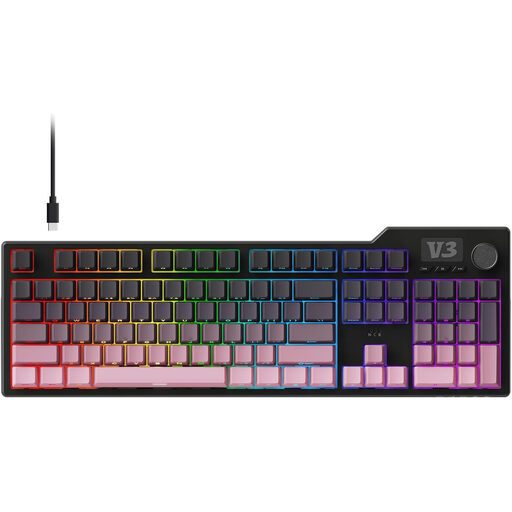
AJAZZ AK35I V3 full-size keyboard with 104 keys

AJAZZ AK35I V3, wired, full-size, 104 keys

A full-size model is worth considering if you want to use the number pad or programmable macros directly; it takes up more room than a compact layout.

Features listed include RGB, PBT keycaps and hot-swap.

Joybuy

Ticktype DP104 Custom full-size keyboard with US layout

Ticktype DP104 Custom, full-size, US layout, Silent Tactile Switches

The advertised Silent Tactile Switches and range of connection options may suit a desk used for both work and gaming. In particular, check that the US layout works for the keys you use.

Features listed include 108 keys, hot-swap and Bluetooth, 2.4 GHz or USB-C connectivity. The full-size layout takes up more room than compact layouts.

Joybuy

Frequently asked questions

How should you set up your keyboard at your home-working desk?

Make sure you have enough space to arrange your screen, keyboard and mouse comfortably. From an ergonomic perspective, the DGUV also recommends using separate input devices and a separately positioned screen when working from home. This is an ergonomic recommendation, not a blanket legal requirement for people gaming at home.

Does a gaming keyboard have to have clicky switches?

No. SteelSeries promotes quiet switches for the Apex 3 TKL - DE, while Razer describes the switches on the fully equipped BlackWidow V4 75 % as tactile but non-clicky. What matters is the specific version and the typing feel you want.

What applies if a keyboard bought online is unsuitable or faulty?

In Germany, many goods ordered online are generally covered by a 14-day cancellation period from the date of receipt; exceptions and the terms of the specific purchase should be taken into account. Your statutory rights against the seller and a voluntary guarantee are separate rights.

Do workplace rules apply when you are privately tending a virtual garden?

The Workplace Ordinance is intended to protect employees when workplaces are set up and operated. It is not a blanket product approval requirement for a gaming keyboard used privately. Whether specific requirements apply to a particular professional teleworking arrangement depends on how it is classified and the conditions involved.

Where should you take an old keyboard?

An old keyboard should not go in your household waste. The German Environment Agency lists recycling centres and suitable retail take-back points as disposal options; removable batteries should be handed in separately.