Building at a desk
If you play on a PC in front of a large monitor, check that your chosen layout keeps movement, inventory and mouse controls comfortable to use.


Choose your keyboard based on your gaming device, the keys you use most and the distance between your seat and the device. A large screen alone doesn’t call for a particular keyboard size. On a PC, a compact layout can leave more room for your mouse, while a larger layout may keep extra keys within easy reach. On consoles, both the device and the specific game must support keyboard and mouse input.
If you play on a PC in front of a large monitor, check that your chosen layout keeps movement, inventory and mouse controls comfortable to use.
If you don’t sit right next to your PC, make sure the connection suits your setup and that you have a stable surface for your keyboard and mouse. For consoles, you’ll also need to check whether the specific game supports them.
If you want to call up commands frequently, check the actual key layout and available key assignments rather than relying on claims about extra keys.
First, check your gaming device and the keys you need. Then consider the connection and the space available. This will help you weigh up the size and typing feel that best suit your setup.
| What matters to you | What to look for | Who is this important to? |
|---|---|---|
| Access to gaming keys | Compare your key assignments with the specific layout, especially for movement, the space bar, Escape and inventory. | If I often switch between movement and inventory while building, I want the keys I need to be within easy reach. Around 31% of consumers put direct access to gaming keys first. |
| Connection to your gaming device | Check the cable length or wireless connection you need, as well as support from the game and platform. | If I sit some distance from my PC, the connection needs to suit my setup. With a console, I also check whether the specific game supports it. Around 25% of consumers prioritise the connection to their gaming device. |
| Space for your keyboard and mouse | Measure the available surface and check which keys remain within easy reach on your chosen keyboard size. | If my mouse needs plenty of room to move beside my keyboard, I want to take the dimensions of my whole setup into account. For around 25% of consumers, space for their keyboard and mouse is a priority. |
| Typing feel and noise | Check the specific switch type. Case-dampening claims aren’t a comparable measure of the noise made by the whole keyboard. | If I play for long periods or share a room with others, key feel and noise matter more to me than extra lighting. Around 19% of consumers prioritise typing feel and noise. |
Connecting to a console and having the game support keyboard input are two separate requirements. PlayStation notes that not every device is compatible with PS5. Xbox says the game or app in question must support keyboard and mouse input.
First check whether you play on a PC or console. If you use a console, check that both the specific game and device are supported.
A smaller layout can save desk space, but it may arrange frequently used keys differently or make them less accessible.
Before deciding, compare your in-game key assignments with the layout of the specific size and language version.
Products in the same range can differ in their language layout and switch type.
Check the full model number, layout and switches in the specific product listing.
A manufacturer’s description of the case design doesn’t provide a measured noise level for every switch type and room.
Consider the switch type and noise in your surroundings separately. Don’t assume that a dampening claim tells you how loud the whole keyboard will be.
The G915 X LIGHTSPEED TKL is a low-profile TKL model with several connection options.
The SKILLER SGK50 S3 is a wired 75% model for setups with limited desk space.
The BlackWidow V4 Pro is a larger model with extra shortcut controls.
The MK770 combines hot-swappable switches with several connection options.
This selection includes gaming keyboards for compact mouse spaces, different connection options and easy-to-reach keys. Check the layout and support from your gaming device for each model.
 No image available
An option to consider if you’re specifically looking for magnetic switches and Rapid Trigger features to suit your key assignments.
The product name lists Hall-effect switches and an aluminium frame.
 No image available
An option to consider if you’re looking for a model with several connection options and hot-swappable switches.
The product name lists 2.4GHz wireless, Bluetooth, USB-C, hot-swappable switches, 108 keys and a US layout. The product notes recommend charging via a standard 5V USB port and avoiding fast chargers or high-power adapters.
 No image available
An option to consider if you prefer a larger layout and easy-to-reach keys to a compact design.
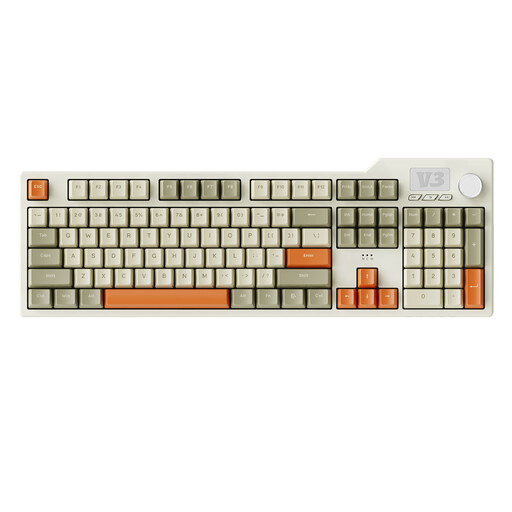
The product name describes a full-size mechanical gaming keyboard with USB-C. Its listed features include RGB lighting, PBT keycaps and hot-swappable switches.
 No image available
An option to consider if you want to explore a compact layout and different connection options for your setup.
The product name lists Bluetooth, 2.4GHz wireless and a wired connection, as well as a detachable wrist rest.
 No image available
An option to consider if a German QWERTZ layout and several connection options matter to you.
The product name lists Bluetooth, 2.4GHz wireless, USB-C, hot-swappable switches and a 1.14-inch TFT colour screen.
Start with the WASD movement keys, the space bar for jumping and E for your inventory. The Minecraft developer lists these key assignments, which you can change in the game. Also compare the keys you use most with the specific layout.
No. PlayStation notes that not every device is compatible with PS5. Xbox explains that the game or app in question must support keyboard and mouse input. So check both the specific game and the console.
Your statutory consumer rights against the seller are separate from any voluntary manufacturer’s warranty. If a product is faulty, consumers can ask the seller to put things right; the details depend on the purchase and the fault. The Verbraucherzentrale (German consumer advice centre) explains this.
Sony explains that you can pair it via “Settings > Accessories > General > Bluetooth Accessories”. However, successful pairing doesn’t automatically mean that every device is compatible or that a particular game supports keyboard input.
For products covered by relevant EU harmonisation legislation and placed on the EU market, the Bundesnetzagentur (German Federal Network Agency) describes a CE marking requirement. The Umweltbundesamt (German Environment Agency) notes that waste batteries must be collected separately from unsorted municipal waste. There are also collection routes for waste electrical and electronic equipment. You can’t tell from a keyboard description alone whether an individual listing meets the applicable requirements.