For learning a multiplayer map at a small desk, a 60% layout is a good fit if you value freedom of movement for your mouse more than having arrow, navigation and function keys within easy reach. A 75% or TKL keyboard gives you more direct-access keys but takes up more desk space. Adjustable actuation points are an optional tweak, not a requirement for learning maps.
Who are the different layouts suited to?
Those who prioritise mouse space
If you’re practising routes and angles in a limited space, a 60% layout can leave more room for mouse movement. The trade-off is that you’ll have to go without dedicated arrow, navigation and function keys, or access them via layers. RTINGS.com highlights this compromise with 60% keyboards.
Those who prefer direct-access keys
If you often use the arrow or function keys for gaming, learning or writing, consider a 75% or TKL layout and check the key configuration of the specific variant. A German ISO-DE or QWERTZ layout is important if that’s the key arrangement you expect.
Those who like to customise inputs
If you want to adjust the actuation point or reset behaviour, compare the switch technology and settings available on each model. Also check whether any additional input features comply with the rules of the game and server you use.
What should you look for when buying?
60% keyboard
A good fit if: you prioritise mouse space at a small desk and can access less frequently used keys via layers.
The trade-off: there are no dedicated arrow, navigation or function keys.
75% keyboard
A good fit if: you want to keep things compact while still having certain arrow and function keys within easy reach.
The trade-off: it typically takes up more width than a 60% model, so check the dimensions of the specific keyboard.
TKL keyboard
A good fit if: you can do without a number pad but prefer function and navigation keys in a familiar layout.
The trade-off: a TKL leaves less room at the side for your mouse than a suitable 60% model.
Full-size
A good fit if: you use the number pad regularly and, after measuring up, still have enough room for your mouse.
The trade-off: the extra space it takes up is worth considering if your desk is particularly small.
| Buying priority |
What to check |
Who it matters most to |
| Desk space and room for your mouse |
Compare your desk’s width and depth, the keyboard’s dimensions and the space you need for your mouse. |
If I need to make wide mouse movements while learning a map, I want the keyboard to take up as little room as possible. Around 31% of consumers prioritise having enough space for their mouse. |
| Direct-access keys and layout |
Check the game commands you need, Fn layers and the specific ISO-DE or QWERTZ variant. |
If I use the arrow or function keys often, I want to reach them without repeatedly using Fn combinations and have a layout that suits me. Around 25% of consumers prioritise keys they can access directly and their arrangement. |
| Adjustable inputs |
Check the switch technology, available adjustment range and the rules of the game in question. |
If I want to customise actuation and reset behaviour, I compare the specific features and check that they’re allowed in the game. Around 19% of consumers put adjustable inputs first. |
| Connectivity |
Check whether the variant uses a cable, wireless receiver or Bluetooth, as well as the USB ports you need and its operating mode. |
If I play competitively, I want to choose a connection that suits my setup rather than just looking for ‘wireless’. Around 13% of consumers prioritise the type of connection. |
| Typing feel and noise |
Check the switch variant and the specific noise information for the model; don’t treat manufacturers’ descriptions as a substitute for sound measurements. |
If I also write at the same desk or want to avoid disturbing others, typing feel and acoustics matter to me as well as gaming. Around 12% of consumers give the most weight to everyday use. |
Common buying mistakes
-
Choosing based only on the smallest size
A 60% layout saves desk space, but it usually has no dedicated navigation or function keys. This can mean using Fn combinations for commands you need often.
Make a note of the keys you really need for gaming and learning, then measure the space you have for both your keyboard and mouse.
If you often have to use Fn layers, getting used to the keyboard may make it more cumbersome to use.
-
Assuming all wireless connections are the same
Bluetooth and a wireless connection via receiver have different characteristics. RTINGS.com considers Bluetooth less suitable for competitive gaming than a cable or receiver because of its higher latency.
Check the connection mode and what’s included with the specific variant, and make sure you have a spare USB port for a receiver.
A wireless receiver may need a spare USB port on the device you’re using.
-
Assuming input automation is always an advantage
Additional input features aren’t automatically permitted in every game or on every server. On 19 August 2024, Valve announced that certain automated movement or shooting inputs could be detected on official Counter-Strike 2 servers and result in a player being removed from the match.
Distinguish adjustable actuation points from automated features, and check the rules of the specific game before using them.
-
Assuming magnetic hot-swappable switches can be freely replaced
According to the manufacturer, the Keychron K2 HE is compatible only with specific Gateron Double-Rail magnetic switches.
Check which replacement parts are compatible with the exact model before choosing different switches.
Replacement switches that aren’t compatible may not work with this model.
Brands to consider
Wooting
The 60HE v2 is a 60% option for limited desk space and extensive input customisation.
- Wooting lists magnetic switches and configurable features.
- For the ISO version, Wooting’s guide describes a separate keycap installation process. With no dedicated arrow or function keys, you’ll need to plan to access them via layers.
SteelSeries
The German version of the Apex Pro Mini Gen 3 combines a wired 60% format with adjustable Hall Effect switches.
- SteelSeries lists Rapid Trigger and an adjustment range of 0,1 to 4,0 mm.
- These model specifications aren’t independent evidence of a gaming advantage; going without direct-access keys remains a compromise of the layout.
Razer
The Huntsman V3 Pro Mini is aimed at people looking for a 60% format with customisable analogue optical inputs.
- According to Razer, the model offers Rapid Trigger, a variable actuation point and Snap Tap, which can be switched on separately.
- Whether additional input features are allowed depends on the rules of the game and server in question.
Keychron
The K2 HE in DE-ISO is a 75% alternative that combines a compact design with more direct-access keys.
- Keychron lists magnetic switches, Bluetooth and a wired option.
- According to the manufacturer, the K2 HE is compatible only with specific Gateron Double-Rail magnetic switches; ‘replaceable’ doesn’t mean you can choose any switches you like.
Logitech G
The PRO X TKL is a numpad-free option for people who prefer a more familiar layout.
- Logitech G offers the model with linear, tactile and clicky switch options, as well as LIGHTSPEED and Bluetooth.
- A TKL takes up more space at the side than a suitable 60% model. Check the dimensions and specific variant before buying.
Joybuy products for small desks
This selection includes compact gaming keyboards, as well as TKL and 75% models for limited desk space and different preferences for layout and inputs.
 No image available
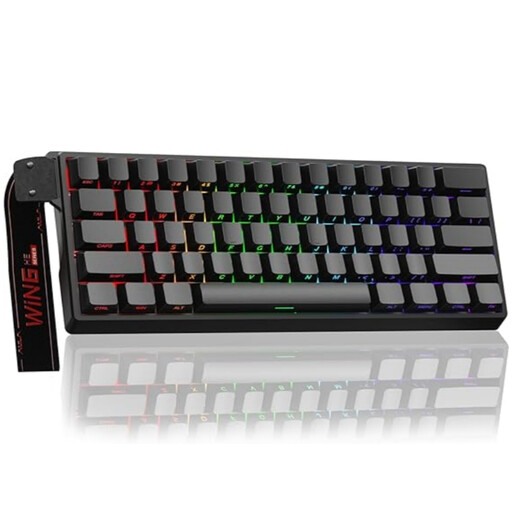
AULA WIN60HE 60% – magnetic switches
A good fit if you prioritise mouse movement at a small desk and want to customise your inputs.
Listed in the title: magnetic hot-swappable switches, adjustable actuation, Rapid Trigger and an 8.000 Hz polling rate. The 60% layout has no dedicated direct-access keys. The product description warns that the sensors are sensitive to liquids and lists Hall Effect magnetic switches as the compatible switch type.
View at Joybuy
 No image available
Redragon M68 – compact 68-key layout, US
A compact option if you want customisable inputs and are comfortable with a US key layout.
The product specifications list magnetic switches, Rapid Trigger and adjustable actuation from 0,2 to 4,0 mm. It has a US layout, so check that the key legends and arrangement will suit you as you get used to it.
View at Joybuy
 No image available
MageGee TS91 60% – wired, US QWERTY
A good fit if you’re looking for a compact wired layout and US QWERTY works for you.
The product description lists dimensions of 29,2 × 10,1 cm, 61 keys and RGB lighting. It describes a membrane-based design with a mechanical typing feel; the layout is US QWERTY.
View at Joybuy
 No image available
Akko 5087S V1 TKL – ISO-DE QWERTZ
A TKL option if you’re happy to go without a number pad but want to keep a familiar key arrangement and German layout.
Wired ISO-DE QWERTZ layout with RGB and hot-swap; this variant is listed with Akko V3 Pro Cream Yellow switches. TKL takes up more space at the side than a suitable 60% model.
View at Joybuy
 No image available
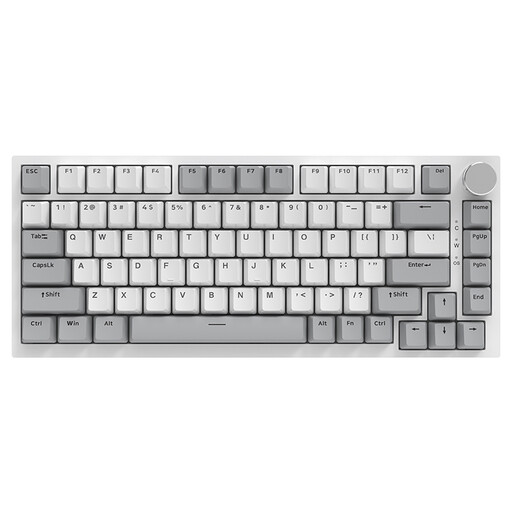
AJAZZ AK820 75% – US layout
A good fit if you want more keys than a 60% layout offers and a US layout could work for you.
The product specifications list 83 keys, wired operation, linear hot-swappable switches, white lighting and a CNC volume knob. Check that the US layout and listed dimensions of 327 × 136 mm suit your setup.
View at Joybuy
Frequently asked questions
Is a 60% keyboard enough for learning a multiplayer map?
Yes, if the commands you need are on the available keys or you can use suitable Fn layers comfortably. If you often need direct access to arrow, navigation or function keys, consider a 75% or TKL layout instead.
What should I set up first after connecting the keyboard?
Start by checking the layout, your in-game key bindings and, if applicable, the Fn layer. If your model has an adjustable actuation point, you can then try settings that suit your inputs; they’re not essential for learning maps.
Are Snap Tap and similar input features always allowed in multiplayer games?
No, it’s not possible to say that they’re allowed in every game. On 19 August 2024, Valve announced that certain automated movement or shooting inputs could be detected on official Counter-Strike 2 servers and result in a player being removed from the match. Other games have their own rules.
What are my rights when buying a new keyboard online in Germany?
When you buy online from a business seller, you generally have a 14-day right to cancel from the date of delivery; conditions and exceptions apply. Your Europe, the European Union’s information portal, also states that faulty goods are covered by a statutory minimum guarantee of two years from receipt. These rights are separate from any voluntary manufacturer’s warranty.
How should I dispose of an old keyboard?
An old keyboard shouldn’t go in your household rubbish. The German Environment Agency recommends recycling centres and suitable take-back points; removable batteries should be taken out and disposed of separately before you hand it in.


