If you often use arrow and function keys while reviewing footage, a 75% layout is a sensible place to start. However, compare the exact key layout with a TKL keyboard and your software shortcuts. A 60% layout takes up less desk space, but on the HyperX Alloy Origins 60, additional functions are assigned to secondary key combinations. The deciding factors are the space on your desk and the commands you actually use.
Which layout is right for you?
For those who use lots of shortcuts
If you often pause or skip through footage while reviewing it, compare the keyboard layout with your software shortcuts. VideoLAN lists the space bar for play and pause in VLC, as well as arrow-key combinations for skipping.
For those with limited desk space
If your mouse and keyboard have to share a small desk, a compact layout can free up more room. RTINGS.com describes TKL keyboards as models without a number pad. With even smaller layouts, check which functions are accessed through secondary key combinations.
For those who want to customise their keys
If you want to assign your own shortcuts or control media directly, check the features and required software for the specific model. Keychron lists VIA for customisable keys and macros on the V1 Max; Logitech G lists programmable keys and media controls for the PRO X TKL.
What should you look for when buying?
First, compare the shortcuts you use most often with the keyboard layout. Then check how much desk space each model needs.
75%
A good fit if: you want direct access to arrow and function keys without using much desk space. Keychron and Razer list these keys on their respective 75% models.
Keep in mind: The exact layout varies by model, so check it against your software shortcuts.
TKL
A good fit if: you prefer a layout without a number pad and want direct access to navigation keys. RTINGS.com describes TKL as a tenkeyless format without a number pad.
Keep in mind: Compare the dimensions with your desk; a larger format may leave less room than a more compact one.
60%
A good fit if: desk space is your priority and you’re happy to use secondary key combinations. HyperX lists printed secondary functions on the Alloy Origins 60.
Keep in mind: Frequently used navigation commands may require an additional key layer.
For reviewing footage in VLC, VideoLAN lists the space bar for play and pause, as well as arrow-key combinations for skipping. Check the layout in your own software before making a separate function-key row a deciding factor.
| Buying criterion |
What to check |
Who is it most important to? |
| Shortcut access |
Compare the shortcuts you need with the arrow keys, function keys and layout of the specific model. |
If I often pause or skip through footage, I want to reach the keys I need without extra steps. Around 36% of consumers prioritise direct access to shortcuts. |
| Desk space |
Measure the space available and compare it with the dimensions of your chosen model. |
If I need to leave room for my mouse beside the keyboard, the actual footprint matters. Around 29% of consumers prioritise available space when choosing. |
| Key feel and noise |
Check the exact switch type and the manufacturer’s information on key feel and noise. |
If I work at my desk for longer periods or share the space, I want to choose switches and noise levels that suit my surroundings. Around 21% of consumers place particular importance on key feel and noise. |
| Customisation and connectivity |
Check whether the key-mapping software is compatible with your system and which connection types the model offers. |
If I want to assign my own shortcuts or choose between connection types, these features are essential. Around 14% of consumers prioritise customisation or connectivity. |
How to avoid common buying mistakes
-
Choosing a keyboard based on its layout percentage alone
The layout size alone won’t tell you whether the commands you use most are easy to reach. On the HyperX Alloy Origins 60, secondary functions are on an additional layer; the Razer BlackWidow V4 75 % listed here has a dedicated row of function keys and arrow keys.
Make a note of your software shortcuts and compare them with the actual keyboard layout and the space available on your desk.
-
Assuming a barebones model includes everything
Razer notes that the barebones version of the BlackWidow V4 75 % does not include switches, keycaps or a wrist rest.
Check what’s included with your chosen version before buying. With the barebones model mentioned here, you’ll need to buy switches and keycaps separately.
-
Assuming similarly named models are identical
The Logitech G Pro X TKL Rapid is not automatically the same as the PRO X TKL. Similar names alone don’t mean the models or versions are identical.
Check the full model name and version before relying on information about a product.
Key brands at a glance
Keychron
The V1 Max is a 75% option for anyone looking for a compact layout and customisable key assignments.
- Keychron lists VIA, 2.4 GHz wireless and Bluetooth for the DE-ISO version.
- Check the key layout and features of the specific version.
Razer
The BlackWidow V4 75 % is designed for anyone who wants arrow and function keys in a compact layout.
- Razer lists hot-swap sockets for 3- or 5-pin mechanical switches.
- According to Razer, the barebones version does not include switches, keycaps or a wrist rest. Noise information is provided by the manufacturer.
Corsair
The K65 PLUS WIRELESS is a 75% option with a multifunction dial.
- Corsair says the dial can be programmed through iCUE, for tasks such as scrolling or zooming.
- Compare the edition and switch type; noise-dampening claims come from the manufacturer.
Logitech G
The PRO X TKL has a layout without a number pad and is aimed at those who prefer media controls.
- Logitech G lists programmable keys, media controls and a volume control.
- Check the full model name to avoid confusing different versions.
HyperX
The Alloy Origins 60 is an especially compact option for anyone happy to use secondary key combinations.
- HyperX lists a 60% layout and printed secondary functions.
- Check that the layout for frequently used navigation commands works with your software.
Joybuy products
The models below cover TKL, 60% and 75% layouts. Compare the key layout with your software shortcuts, and the keyboard dimensions with the space available on your desk.
 No image available
Razer Ornata V3 Tenkeyless, German layout
If you want to control playback and volume directly from your keyboard, the listed media keys are worth noting. The product description also mentions programmable keys through Razer Synapse.
Tenkeyless layout; German layout.
View at Joybuy
 No image available
Akko 5087S V1 TKL, Cream Yellow, ISO-DE, Black & Gold
If you’re looking for a TKL layout with German key assignments and want to customise frequently used commands, the listed macros are worth considering.
ISO-DE-QWERTZ layout; Akko V3 Pro Cream Yellow switches; hot-swappable switches.
View at Joybuy
 No image available
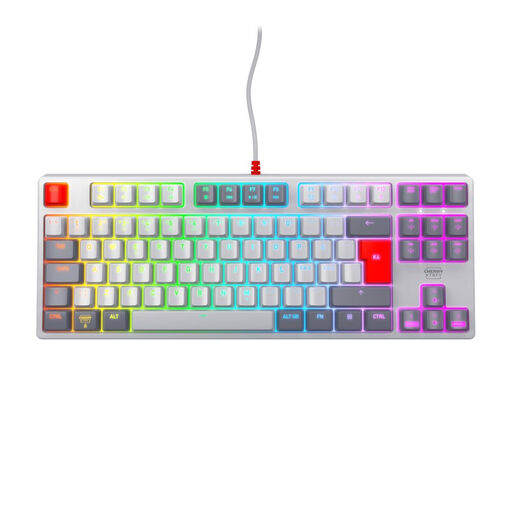
CHERRY XTRFY K4V2 TKL, MX2A Red, Pan-Nordic
If you don’t need a number pad, this model gives you a TKL layout.
Wired mechanical keyboard; MX2A Red switches; RGB lighting; Pan-Nordic layout.
View at Joybuy
 No image available
AULA WIN60HE 60%, Graywood Magnetic switch
If desk space is your priority, the explicitly listed 60% layout is a compact option.
Wired; magnetic hot-swappable switches; adjustable actuation point with Rapid Trigger mode.
View at Joybuy
 No image available
Ticktype EVO75, ISO-DE, Creamy Rye switches
If you want to assign your own keys and macros, the product description lists VIA support for this 75% model.
ISO-DE layout; Bluetooth, 2.4 GHz wireless and USB-C; hot-swappable switches.
View at Joybuy
Frequently asked questions
Do I need function keys to review tournament footage?
No, not necessarily. VideoLAN lists the space bar for play and pause in VLC, as well as arrow-key combinations for skipping. Check the shortcuts for the software you actually use before assuming you need a dedicated row of function keys.
Can I use any switches in a hot-swappable keyboard?
No. Razer lists hot-swap sockets for 3- or 5-pin mechanical switches on the BlackWidow V4 75 %. Check compatibility with your specific version before choosing replacement switches.
How can I set up my own keyboard commands?
It depends on the model and the software it supports. Keychron describes customising keys and macros through VIA on the V1 Max. Check that your chosen key assignment triggers the right command in your video software.
Is a 60% layout suitable for reviewing video?
It can be a good fit if desk space is your priority and you’re happy to use secondary key combinations. HyperX lists printed secondary functions on the Alloy Origins 60; check that the navigation commands you need match the layout of the specific model.


