What should you look for when buying?
First, decide which keys you need to reach directly and how much clear space you want to leave for your mouse.
60% keyboard
Best if: You want to free up as much space for your mouse as possible and are happy to use secondary functions.
Trade-off: There are no dedicated F or navigation keys, so check that the Fn key mapping works for your game shortcuts.
75% keyboard
Best if: You want a dedicated row of F keys and arrow keys within easy reach, even on a small desk.
Trade-off: It leaves less free desk space than a particularly compact mini layout.
TKL keyboard
Best if: You can do without a number pad but prefer a larger cluster of keys.
Trade-off: It needs more desk space than compact mini formats.
Full-size keyboard
Best if: The number pad is important for your controls or other regular tasks.
Trade-off: This format doesn’t make the keyboard any smaller, so check that there’s enough room for your mouse alongside it.
| Buying priority |
What to look for |
Who is it important to? |
| Desk space and mouse movement |
Measure the space available for your keyboard and mouse. Bear in mind that smaller layouts may move functions to secondary key mappings. |
If mouse movement is my priority on a small desk, I’m more willing to use secondary Fn functions. Around 31% of consumers put space requirements first. |
| Direct access to gaming keys |
Check which keys you use most in your game and try out how easily you can reach them with the specific Fn mapping. |
If I often use F or arrow keys while building, I want to reach them without pressing Fn first. Around 25% of consumers prioritise direct access to gaming keys. |
| The right key layout |
Compare the specified layout variant with the one you’re used to; QWERTZ and US QWERTY are not the same layout. |
If I type using a particular key layout, I don’t want to accidentally choose a different one. Around 19% of consumers put the right key layout first. |
| Noise and typing feel |
Check the switch type and, if it matters to you, listen to sound samples. Damping claims are no substitute for an independent noise test. |
If I use a shared desk for work and gaming, I pay attention to how the keyboard feels and sounds. Around 13% of consumers prioritise noise and typing feel. |
| Connections and switching between devices |
Check the connection options on the specific variant, as well as the space needed for a cable or receiver. With wireless models, remember to consider charging needs too. |
If I want to connect my device flexibly or switch between devices, I check the connections on the exact model. Around 12% of consumers put connections and switching between devices first. |
Examples of compact gaming keyboard brands
The information below relates to specific product lines and variants, not a brand’s entire range.
Razer
The Huntsman Mini is an example of a compact 60% layout.
- Razer describes the secondary functions as a way to access extra commands despite the compact format.
- According to Razer, it has no dedicated function keys, navigation cluster or number pad; extra commands require secondary functions.
AJAZZ
The AK820 is an example of a compact 75% format.
- The listing for the specific wired model mentions QWERTZ, a function-key row and dedicated arrow keys.
- The features of this model can’t be assumed to apply to other AK820 variants; check the layout and features of the exact model.
RK ROYAL KLUDGE
The RK61 range includes compact variants; the RK61-DE is one example with QWERTZ.
- The manufacturer’s RK61-DE page lists Bluetooth and wired operation, as well as arrow keys accessed via Fn.
- Check the connections, layout and other features of the exact variant rather than assuming they’re the same as another RK61 model.
Dierya
The DK61E is a wired 60% alternative with optical switches.
- According to the manufacturer, the switches can be changed as long as the replacements are compatible optical switches.
- The manufacturer states that the DK61E’s USB connection is not waterproof; a German QWERTZ layout is not confirmed for every variant.
SteelSeries
The Apex 9 Mini is an example of a compact keyboard available in a specified German variant.
- The product page lists a 60% format and secondary functions printed on the side of the keys.
- Advertised speed comparisons are manufacturer claims and don’t demonstrate an independently verified advantage when building.
Joybuy products for small desks
This selection features compact 75% keyboards that keep the F and arrow keys within easy reach.
 No image available
Royalaxe E75 with TTC magnetic switches, 75% layout
The 75% layout is a compact option if you want the F and arrow keys within easy reach.
Features listed include TTC magnetic switches, RT mode, a Type-C connection and an aluminium case. Before buying, check that the specific variant has the key layout you want.
View at Joybuy
 No image available
Ticktype EVO75, ISO-DE, Tri-Mode
The 75% layout with ISO-DE key legends is a good fit if you want a compact format with function keys within easy reach.
The title lists triple connection mode, hot-swap and an 8000mAh battery. Switch off the keyboard before changing switches, and use only a standard 5V USB output for charging.
View at Joybuy
 No image available
AJAZZ AK820 MAX, 75%, magnetic switches, wired
The 75% format is a compact option if you want the F and arrow keys within easy reach.
The listing mentions 82 keys, wired operation, magnetic switches and RT mode. Hot-swap applies to magnetic switches; this doesn’t mean the keyboard is compatible with standard mechanical switches.
View at Joybuy
 No image available
AJAZZ AK820 MAX, 75%, Tri-Mode, US QWERTY
The compact layout is suitable if you want keys within easy reach and the US QWERTY key legends suit the way you type.
The title lists Tri-Mode, Flying-Fish switches, a volume knob and an 8000mAh battery. US QWERTY differs from German QWERTZ, so check the key legends before buying.
View at Joybuy
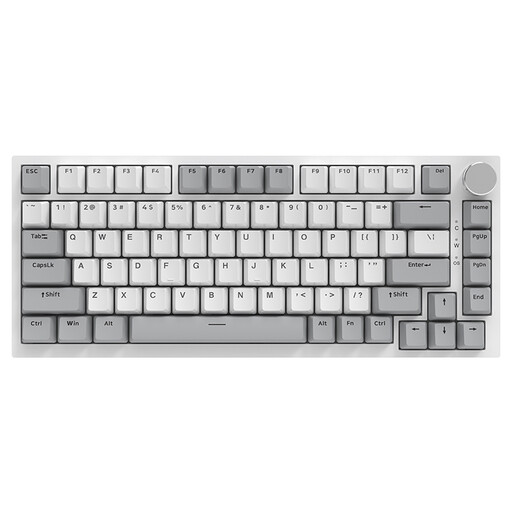 No image available
AJAZZ AK820, 75%, wired, US QWERTY
The 75% layout is a compact option if you want the function and arrow keys within easy reach.
Features listed include wired operation, 83 keys, a volume knob and hot-swappable linear switches. US QWERTY differs from German QWERTZ; also check compatibility before buying replacement switches.
View at Joybuy
Frequently asked questions
Do I need a dedicated F3 key for Minecraft Java?
Not necessarily: Minecraft documents F3 as the key for opening the debug screen. If your keyboard doesn’t have a dedicated row of F keys, check how to access F3 using Fn or another key mapping. Other games and custom controls may work differently.
What should I set up before my first game?
First, check the in-game key bindings and test the functions you use most often. Minecraft lets you change controls in the Options menu; if you have a 60% keyboard, try out the secondary functions too.
Can I use any switches in a hot-swappable keyboard?
No, it depends on the keyboard and switch compatibility. For the Dierya DK61E, the manufacturer specifies compatible optical replacement switches only. Check the details for your exact variant before buying replacement parts.
What are my rights in Germany if the keyboard is faulty or an online purchase isn’t right for me?
The Verbraucherzentrale distinguishes between the statutory guarantee you have with the seller and a voluntary warranty. Online purchases generally come with a 14-day cancellation period from the date you receive the goods; check the details and exceptions that apply to your purchase.
Can I put an old keyboard in household rubbish in Germany?
No. The German Environment Agency explains that electrical waste must be disposed of separately from household rubbish and packaging waste. Make sure you dispose of your old keyboard separately.


