For role-playing games in a shared bedroom, specific membrane or silent-switch models are a sensible place to start; according to RTINGS, clicky switches are among the louder options. What matters is how the complete keyboard sounds, as a ‘quiet’ label is no substitute for listening to it yourself. Then you can decide whether dedicated macro keys, more desk space or customisable lighting matters most to you.
Who these keyboards are for
Night-time role-players
If someone else is sleeping in the room, a quieter keystroke may matter more than a particular switch feel. SteelSeries calls the Apex 3 ‘Whisper Quiet’, while PC-WELT described its membrane switches as quiet in a 2020 review. This is not a current noise measurement for every version.
Players with lots of commands
If you often use abilities or command sequences in role-playing games, look for easy-to-reach keys that you can assign yourself. Corsair lists six macro keys on the K55 RGB PRO DE; the Razer BlackWidow V4 is also described as having six dedicated macro keys.
Players with limited desk space
If space is tight and you can do without a number pad, a tenkeyless model could be a good fit. Corsair describes the K55 CORE TKL DE as a membrane keyboard without a number pad; this form factor alone does not mean it will be quieter.
What to look for when buying
First, check the specific switch and case version. Then compare the commands you need, the space available and the lighting controls.
| Buying priority |
What to look for |
Who it matters to |
| Keystroke noise |
Check the switch version and any sound-dampening features in the case. If possible, listen to the complete keyboard in a quiet room. |
If someone sleeps next to me, keystroke noise matters more than a particular switch feel. Around 36% of consumers are likely to see keystroke noise as their top buying priority. |
| Role-playing commands |
Check the number and position of dedicated macro keys, and whether they’re set up using software or onboard memory on the specific model. |
If I use abilities often, I want them to be easy to reach and assign. Around 29% of consumers are likely to prioritise quick access to commands. |
| Space and layout |
Check the keys you need, the keyboard’s size and the layout listed for the specific version. |
At a small, shared desk, I want to save space without losing the keys I use regularly. Around 21% of consumers are likely to place the greatest importance on available desk space. |
| Lighting |
Check whether you can adjust the brightness and lighting settings on the model. |
If I play in a darkened room, I want to be able to adjust the key lighting to suit the situation. Around 14% of consumers are likely to consider lighting controls their main priority. |
The percentages refer to the buying priorities for role-playing keyboards in a shared bedroom described here; they are not market shares or measured survey results.
Common buying mistakes
-
Choosing by model name alone instead of checking the switch version
The Razer BlackWidow V4 comes with different Yellow and Green switches: Razer describes Yellow as quiet and Green as clicky, while RTINGS called Green considerably louder in its review.
Check the switch version and layout in the specific product listing rather than choosing by model name alone.
-
Assuming ‘quiet’ means ‘silent’
The sound you hear doesn’t depend on the switch alone. The case and stabilisers can also make a difference, and a ‘silent’ label is no guarantee of complete silence.
If possible, listen to the complete keyboard and check the applicable returns policy before buying online.
-
Choosing a compact size without checking which keys you need
The Corsair K55 CORE TKL doesn’t have a number pad. The differently designed K55 RGB PRO DE, according to Corsair, has six dedicated macro keys.
Before choosing a size, compare the keys you use most in your role-playing games with the keyboard layout and the desk space available.
Notable brands and model ranges
SteelSeries
The Apex 3 is a membrane option for anyone who prefers a quieter keystroke when gaming in a shared room.
- SteelSeries markets the Apex 3 as ‘Whisper Quiet’; PC-WELT described its membrane switches as quiet in a 2020 review.
- That older review is not a current noise measurement. SteelSeries states that the Apex 3 has proprietary, non-replaceable keycaps.
Corsair
The K55 RGB PRO DE is aimed at players who want dedicated macro keys, while the K55 CORE TKL DE is a compact membrane option without a number pad.
- Corsair lists six macro keys and quiet keys on the K55 RGB PRO DE. The manufacturer also describes onboard recording and macro programming through iCUE for this model.
- These features vary by model: the K55 CORE TKL page does not list dedicated macro keys like those on the K55 RGB PRO.
Razer
The BlackWidow V4 with Yellow switches combines a mechanical design with dedicated, assignable macro keys.
- Razer describes Yellow as a quiet alternative to the clicky Green switches; the BlackWidow V4 is available with six dedicated macro keys. RTINGS tested the Yellow version.
- Check the exact switch version: details about the BlackWidow V4 shouldn’t automatically be applied to the V4 X or other versions.
be quiet!
According to the manufacturer, the Light Mount combines mechanical silent switches with sound-dampening material in the case.
- be quiet! lists three layers of sound-dampening material and silent switches in the available versions.
- The listed versions are specified as US ANSI. Check separately for a German layout if you need one.
Logitech G
The G213 Prodigy is a gaming keyboard with Mech-Dome keys, adjustable lighting and multimedia controls.
- Logitech G describes the sound of the Mech-Dome keys as whisper-quiet and lists five lighting zones.
- This sound description is the manufacturer’s claim about the G213 model, not an independent ranking of its noise levels.
Joybuy product selection
This selection includes mechanical models with different switch versions, as well as compact keyboards. Pay particular attention to the layout of each version if you need a German keyboard layout.
 No image available
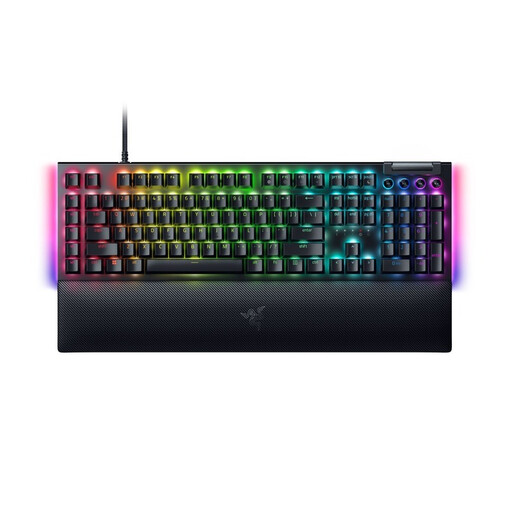
Razer BlackWidow V4 Yellow Switch, German layout
For players who want mechanical keys and programmable commands; Razer describes the Yellow switches as quiet and linear.
German QWERTZ layout, RGB lighting, media controls and wrist rest.
View at Joybuy
 No image available
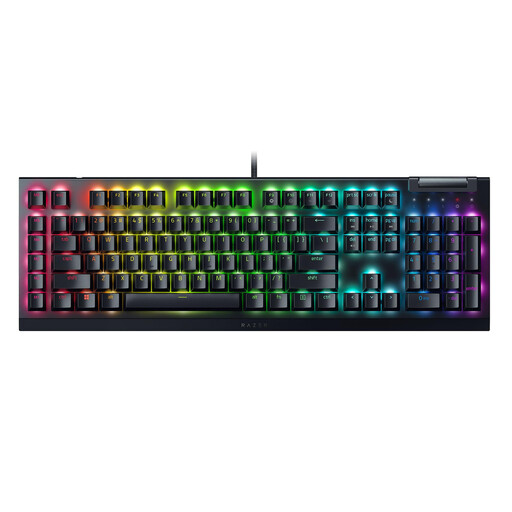
Razer BlackWidow V4 X Yellow Switch, US QWERTY
A mechanical version with Yellow switches and six dedicated macro keys for commands you use often.
US QWERTY layout; a German layout is not listed for this version.
View at Joybuy
 No image available
CHERRY STREAM KEYBOARD TKL, US layout
If you have a smaller desk, the tenkeyless design without a number pad could be a good option; the product description says it offers quiet typing.
Scissor mechanism, USB connection, six multimedia hotkeys and English US layout with Euro symbol.
View at Joybuy
 No image available
CHERRY MX-LP 2.1 Wireless, 65%, German QWERTZ
The compact size and German layout could suit you if you have limited desk space and need a German keyboard layout.
65% form factor, low-profile MX Speed switches, RGB lighting and three connection options: 2.4 GHz, Bluetooth and USB-C.
View at Joybuy
 No image available
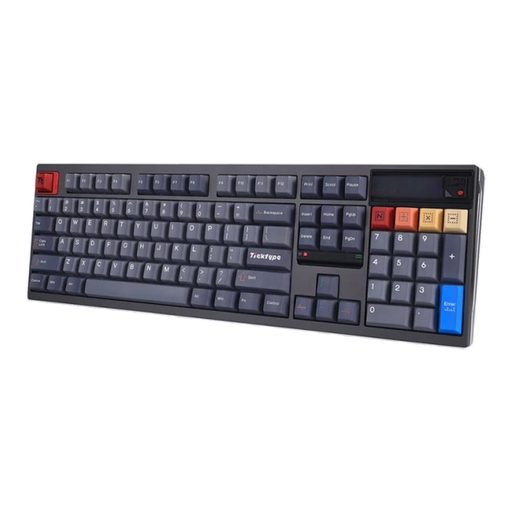
Ticktype DP104, Silent Tactile, US layout
For consumers looking for mechanical Silent Tactile switches and a full-size keyboard; the listed layout is US.
108 keys, hot-swappable switches, RGB lighting and Bluetooth, 2.4 GHz and USB-C connectivity. A German layout is not listed.
View at Joybuy
Frequently asked questions
Are silent switches completely quiet in a shared bedroom?
No. ‘Silent’ doesn’t mean a keyboard makes no noise at all. RTINGS notes that the case and stabilisers, as well as the switches, can affect noise levels. So compare the specific keyboard rather than relying on the switch label alone.
How do I set up role-playing macros on the Corsair K55 RGB PRO?
Corsair lists onboard recording for the K55 RGB PRO; according to the manufacturer, you can programme more complex macros through iCUE. Also check which commands your game allows and which key assignments you actually need.
Can I replace the keycaps on the SteelSeries Apex 3 later?
SteelSeries describes the Apex 3 keycaps as proprietary and non-replaceable. If you might want to change the keycaps later, bear this in mind when choosing a model.
What are my rights when buying online in Germany if the sound or product isn’t right?
When you buy online from a retailer, you generally have a 14-day right to cancel. If the goods are faulty, you also have statutory rights against the seller. These are separate from a voluntary manufacturer’s warranty, which doesn’t replace them. Check the applicable terms and any exceptions for your specific purchase.


