What should you look for when buying?
First check how the keys feel and sound in conditions similar to how you’ll use them. Then consider how much space the keyboard needs, followed by the input and connection features you actually need.
| What matters |
What to check when buying |
Who is this important to? |
| Key noise |
Check the exact switch type and, if possible, try the keyboard in conditions similar to where you’ll use it. |
If I play at night without unnecessarily disturbing the other person in the room, how the keys actually sound matters more to me than a marketing claim. This is a priority for around 36% of consumers who value peace and quiet. |
| Space for your mouse and keyboard |
Measure the available space and consider whether you use a number pad day to day. |
If I need more room to move my mouse when playing shooters, I can weigh up whether I’m happy to go without a number pad. Around 29% of consumers prioritise mouse space. |
| Simultaneous inputs |
Look for documented anti-ghosting or rollover support for the key combinations you need. |
If I use the keyboard to trigger several game actions at once, I want to know which inputs the specific model can recognise. Around 21% of consumers prioritise simultaneous input recognition. |
| Connection and customisation |
Check that the connection works with your devices and that any replacement switches you want are compatible. |
If I share a desk with several devices or might want to swap switches later, I check the connection and customisation options for each model. Around 14% of consumers prioritise flexibility. |
Keyboards at Joybuy
This Joybuy selection includes compact gaming and mechanical keyboards for limited mouse space, simultaneous inputs and different connection needs. Pay particular attention to the switch type and keyboard layout for each model.
 No image available
CHERRY MX-LP 2.1 Wireless, 65%, QWERTZ
The compact format is an option if you want to make room for mouse movement and use several inputs at once.
65% format with a German QWERTZ layout and linear MX Low Profile Speed switches. The product specifications list N-key rollover and anti-ghosting, along with 2.4 GHz, Bluetooth and USB-C connections.
Joybuy
 No image available
Redragon RS68, 65%, hot-swap
The 65% format could be a good fit if you want more room for your mouse on your desk.
The product description lists linear switches with a quiet keystroke, hot-swap support and Bluetooth, 2.4 GHz or wired connections. The noise description isn’t a measurement for your room, so check which switch type is supplied.
Joybuy
 No image available
Logitech MX Mechanical Wireless, QWERTZ
An option if you’re looking for a German layout and a wireless connection for a shared desk.
Features Tactile Quiet switches, Bluetooth and Logi Bolt; the product description says you can switch between up to three devices. Check which connection works with your devices.
Joybuy
 No image available
CHERRY STREAM KEYBOARD TKL, US layout
The TKL format is an option if you’re happy to go without a number pad and want more room for your mouse.
Wired USB keyboard with scissor-switch keys and six multimedia hotkeys. Important when choosing: the specified layout is US English with a euro symbol, not German QWERTZ.
Joybuy
 No image available
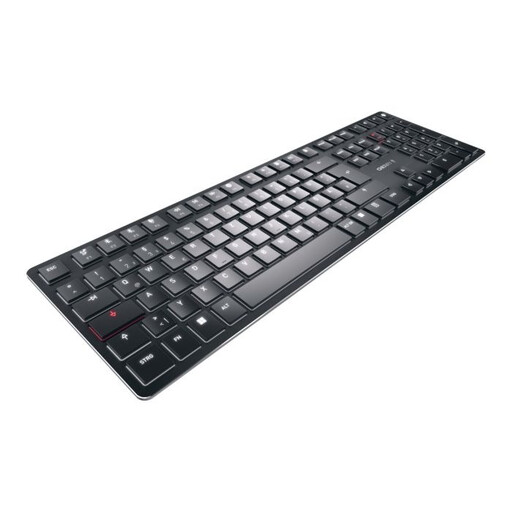
CHERRY KW X ULP, US layout
If you use several devices or need simultaneous inputs for gaming, check the listed connections and input features.
Ultra-slim keyboard with tactile MX switches and a US English layout. The product specifications list Bluetooth, 2.4 GHz wireless and USB-C, as well as full N-key rollover and anti-ghosting. The layout isn’t German QWERTZ.
Joybuy
Frequently asked questions
Which connection should I check for a shared desk?
Check the ports on your devices and the connection options for the specific keyboard model. Logitech G lists wireless, Bluetooth and wired connections for the G515 LIGHTSPEED TKL, but that doesn’t mean every mode will work with every device.
Can I make a mechanical keyboard quieter later?
According to Sharkoon, the SKILLER SGK50 S3 lets you swap compatible mechanical 3- or 5-pin switches. Whether a different set of switches sounds quiet enough in your room depends on the specific switches and how you use the keyboard.
What are my rights regarding cancellations and faulty goods when buying online?
When buying online from a trader in the EU, you generally have a 14-day right to cancel; exceptions and the terms of the specific contract should be taken into account. Your Europe also explains the legal guarantee of at least two years for faulty goods, which applies against the seller and is separate from any additional guarantee offered.
Can I put an old keyboard in the household rubbish?
No. Germany’s Federal Ministry for the Environment says that waste electrical and electronic equipment must be taken to an authorised collection point, such as a local council collection facility. Retailer take-back schemes are subject to the relevant conditions.


