For card games in a shared bedroom, first check how the full-size keyboard sounds in the place where you plan to use it, and whether you can adjust its lighting to suit the room. A switch described as quiet doesn’t guarantee a particular noise level at the bedside. Then choose between TKL and full-size according to the keys you actually need for your game commands.
Who are the different keyboards suited to?
Considerate evening gamers
If someone in your bedroom needs peace and quiet, the sound of the keys and subtle lighting may matter more to you than extra gaming features. Manufacturer claims such as “Whisper Quiet” or “virtually silent” aren’t comparative measurements taken in a room.
Players who use lots of keyboard shortcuts
If you often use the keyboard to trigger commands, check which keys need to be within easy reach or available for remapping before choosing a layout. RTINGS describes the SteelSeries Apex 3 TKL as having programmable keys; check whether the key mapping you want works with your particular game.
Players with a small desk
If you need room for your mouse beside the keyboard, a TKL model could be a good option—as long as you don’t need a number pad. If desk space is tight, also consider whether an integrated wrist rest will take up extra room.
What should you look for when buying?
First, check the sound and lighting in the place where you plan to use the keyboard. Then consider which keys you need for your game commands, followed by the space available. SteelSeries and Logitech describe their respective keyboards as quiet, but this doesn’t tell you how their noise levels compare in a bedroom.
| What matters when buying |
What to check |
Who it matters to |
| Key noise |
Check the exact switch type and, if possible, listen to the complete keyboard in similar conditions to how you’ll use it. |
If I play in the evening without disturbing someone who’s asleep in the same room, the sound of the keys is my main concern. Around 36% of consumers say keyboard noise is their most important buying consideration. |
| Game commands at your fingertips |
Check the keys you need and whether they can be remapped on the specific model, then compare this with your game. |
If I prefer to trigger commands using specific keys, I want to know before buying whether they’re available on my chosen layout. Around 29% of consumers prioritise having game commands within easy reach. |
| Desk space |
Measure the available space, including the area for your mouse, and decide whether you need a number pad. |
If I share a small desk, I need enough room for my mouse beside the keyboard. Around 21% of consumers say limited desk space is their top priority. |
| Lighting |
Check whether you can adjust the brightness and effects as you’d like on the specific model. |
If I play in the bedroom, I want to be able to choose lighting that won’t disturb the other person. Around 14% of consumers say subtle lighting is their most important consideration. |
Which buying mistakes should you avoid?
-
Assuming “Red” means the same as “Silent Red”
CHERRY’s noise-dampening claim applies to MX Silent Red. The Joybuy listing for the CHERRY MX 3.0S Wireless, on the other hand, specifies MX2A Red; the names aren’t interchangeable.
Check the full switch name for the version you’re planning to buy. A linear action or the word “Red” on its own doesn’t mean it has a Silent switch.
-
Choosing TKL without checking your game’s key mapping
TKL saves space, but it doesn’t have a number pad. This could matter if you use it to trigger specific game commands.
Before buying, compare the layout with the commands you need and check whether an alternative key mapping will work for you.
-
Taking “virtually silent” as a guarantee of undisturbed sleep
Manufacturer descriptions don’t tell you how loud the complete keyboard will sound beside your bed or at your desk.
If quiet is essential, try to assess the complete keyboard in similar conditions to how you’ll use it. Also consider its lighting and where you’ll place it.
Which brands are worth considering?
SteelSeries
The Apex 3 TKL is a rubber-dome keyboard without a number pad, making it an option if you’re looking for a compact layout.
- SteelSeries describes its switches as “Whisper Quiet”. RTINGS confirms that it uses rubber-dome switches and has a TKL layout.
- RTINGS considers its latency less suitable for competitive gaming, though that may not be a deciding factor for card games. The manufacturer’s claim doesn’t guarantee a particular noise level in a bedroom.
Logitech G
The G213 is a full-size option with Mech-Dome keys, an integrated wrist rest and adjustable lighting zones.
- Logitech describes the sound of its keys as “virtually silent”.
- This description isn’t an independent comparison with other keyboards. Make sure you have enough space for the full-size layout and wrist rest.
be quiet!
The Light Mount TKL Silent Linear in DE-ISO layout combines a design without a number pad with a mechanical switch option that the manufacturer describes as dampened.
- be quiet! specifies Silent V2 switches and three layers of sound-dampening material for this version.
- These details don’t guarantee a particular noise level beside your bed, and the keyboard doesn’t have a number pad.
CHERRY
CHERRY offers a dampened switch in the MX Silent Red and a mechanical full-size keyboard with several connection options in the MX 3.0S Wireless.
- CHERRY describes the MX Silent Red as having integrated noise reduction. According to the manufacturer, the MX 3.0S Wireless can connect via Bluetooth, 2.4 GHz or USB cable.
- The noise-dampening claim for MX Silent Red doesn’t automatically apply to MX2A Red. Check the switch and layout versions of the MX 3.0S Wireless separately.
Razer
The BlackWidow V4 is available with, among other options, Yellow or Green switches, as well as extra macro keys.
- Razer describes Yellow switches as silent and Green switches as clicky.
- These descriptions of the individual switches don’t prove that the complete keyboard is silent, or that the macro keys will be useful for every card game.
Joybuy keyboards for different space requirements
The Joybuy keyboards below cover a range of layouts, from compact designs to models with a number pad. Before buying, check that the game keys you need, the space available and the exact switch type all suit your requirements.
 No image available
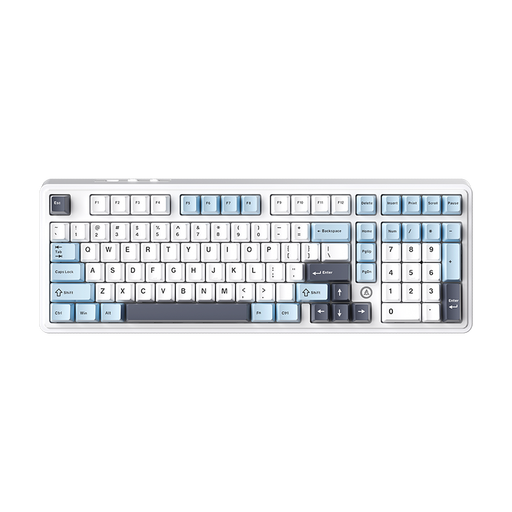
AJAZZ AK980 V2, 98% QWERTY layout, Flying Fish switch
The description mentions an integrated number pad. Check whether you need one and whether the layout will fit on your desk.
98% QWERTY layout; hot-swappable; wired, Bluetooth and 2.4G connectivity; 10000mAh; RGB lighting. The product name specifies the Flying Fish switch.
Joybuy
 No image available
Redragon RS68, 65%, 68 keys, Space Gray
The 65% layout with 68 keys is a compact option if you can access the game commands you need without a larger layout.
The product description says the keys are quiet; this is a seller’s claim, not a noise measurement. It lists Bluetooth, 2.4G and wired connectivity, as well as a detachable wrist rest.
Joybuy
 No image available
AJAZZ AK820 MAX, 75%, Flying Fish switches, US layout
The 75% layout is described as a more compact alternative. Check that it has the keys you need for your game.
Features include arrow and function keys, a volume control, RGB lighting and hot-swap. The product description says the switches sound quiet, but this isn’t an independent noise measurement.
Joybuy
 No image available
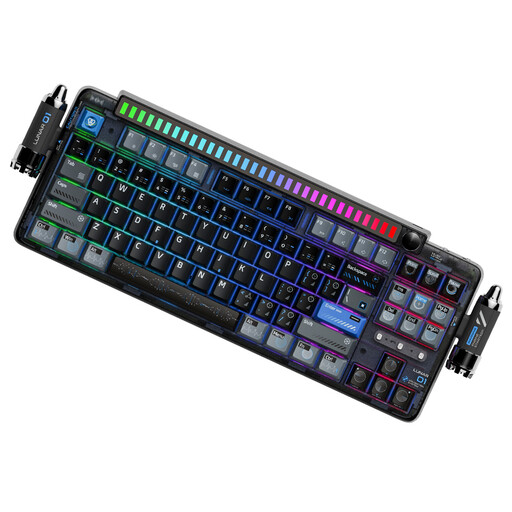
KEYSME Lunar 01, 80%, QWERTY US layout, Black
The 80% format could suit you if you’re looking for a mechanical layout and have checked that it includes all the game keys you need.
The product name specifies hot-swap and a programmable rotary knob; the product description also lists a detachable rhythm light bar. Connectivity options include Bluetooth, 2.4 GHz and USB-C, and it has a 4000mAh battery.
Joybuy
 No image available
Ticktype DP104 Custom, full-size 108 keys, Silent Tactile switches
The full-size layout has 108 keys, but according to the product information it takes up more desk space than a TKL model.
This version is described as having Silent Tactile switches; that doesn’t tell you how loud the complete keyboard will be. Features listed include hot-swap, RGB lighting, US layout and an 8000mAh battery, with Bluetooth, 2.4 GHz wireless and USB-C connectivity.
Joybuy
Frequently asked questions
Do I need a mechanical keyboard for card games?
No. The game genre alone doesn’t mean you need mechanical switches. Rubber-dome, Mech-Dome and mechanical options are all available. Choose based on the keys you need, the feel you prefer and the sound of the specific model.
What should I check before connecting and cleaning the keyboard?
Check that the connection is compatible with your computer and follow the instructions for the specific model. Logitech recommends unplugging wired devices before cleaning and not applying cleaning fluid directly to the device.
What are my rights in Germany if I buy online and don’t like the keyboard or it’s faulty?
Consumers who buy online generally have a 14-day right to cancel; you must notify the retailer that you wish to cancel. This is separate from your rights if goods are faulty: the European Union explains that goods are covered by a statutory guarantee of at least two years. A voluntary manufacturer’s guarantee doesn’t replace these rights.
Can I put an old keyboard in my household rubbish?
No. The German Environment Agency says that old electrical equipment shouldn’t be put in household rubbish. It must be collected separately and taken to a suitable collection point.


