If someone else is sleeping in the same bedroom, the specific switch type and the sound it makes should take priority over RGB or a high polling rate. If you prefer the feel of mechanical keys, check the exact switch variant; compact layouts save space but may require extra key combinations. A manufacturer’s claim that a keyboard is “quiet” is no substitute for comparing its sound at your own desk.
Who is this guide for?
Considerate night-time gamers
If someone else in the room needs peace and quiet, keeping keypress noise to a minimum is a priority. SteelSeries advertises Whisper-Quiet switches for the Apex 3 TKL DE; CHERRY describes MX Silent Red as dampened, while Razer distinguishes between Yellow and clicky Green switches for the BlackWidow V4. These claims are no substitute for listening to the keyboard where you’ll use it.
Players who use maps and inventory often
If you regularly open the map, inventory and other commands in exploration games, consider which keys need to be within easy reach. Razer lists dedicated macro keys for the BlackWidow V4, but the key arrangement and layout depend on the specific model.
Players with a small desk
A compact layout can free up desk space, as long as the keys you need remain easy to reach. The SteelSeries and Logitech G model specifications provided here include TKL keyboards; TKL layouts do not have a number pad.
What should you look for when buying?
First check the exact switch variant, then make sure the layout keeps your most-used game commands within easy reach.
| Consideration |
What to check before buying |
Who is this especially important to? |
| Keypress noise |
Check the exact switch variant and, if possible, assess the whole keyboard where you plan to use it. |
If someone is sleeping next to me, I want to keep keypresses as quiet as possible. Around 42% of consumers put low noise first. |
| Keys within easy reach |
Check the specific layout against the keys you use most for the map, inventory and other commands. |
If I open the map and inventory often, I want to reach the keys I need directly rather than rely on extra combinations. Around 33% of consumers prioritise direct access to game commands. |
| Customisation |
Check which key assignments, switches or features can actually be customised on the specific variant. |
If I want to customise recurring commands or switches, I check the features of the exact variant. Around 17% of consumers say customisation is their top priority. |
| Connectivity |
Check whether the model is wired or wireless and which ports or receivers it needs. |
If I want flexibility in where I place my keyboard, I look for a suitable connection and the ports I need. Around 8% of consumers put connection flexibility first. |
Common buying pitfalls
-
Comparing model names without checking the switch variant
For the Razer BlackWidow V4, Razer distinguishes between clicky Green switches and Yellow switches, which are advertised as quiet. The model name alone doesn’t tell you which variant is on offer.
Before buying, check the exact switch name and layout of the specific option.
Choosing the wrong switch variant could mean the extra hassle of returning it or buying another keyboard.
-
Assuming “quiet” guarantees a certain noise level in your room
Manufacturer claims about switches or noise-dampening designs do not provide a comparable noise rating for the fully assembled keyboard on your desk.
Use the claim to narrow down your options, then, if possible, assess the specific keyboard in your own setup.
-
Buying a compact keyboard without checking your game key assignments
A TKL layout does not have a number pad; other compact layouts can also differ in their key arrangements. This could matter if you want certain commands within easy reach.
Before buying, check how the specific layout works for the map, inventory and other commands you use often.
Key brands to consider
SteelSeries
The Apex 3 TKL DE combines a compact TKL layout with switches that the manufacturer advertises as quiet.
- For this model, SteelSeries lists Whisper-Quiet switches, anti-ghosting and IP32.
- The manufacturer’s claim does not establish how loud it will be in a bedroom; IP32 does not mean you can safely clean the keyboard under running water.
Razer
With the BlackWidow V4, the switch variant you order and the key arrangement you want are what matter.
- Razer describes Yellow switches as quiet and Green switches as clicky; the manufacturer also lists dedicated macro keys for the BlackWidow V4.
- These switch characteristics cannot be assumed to apply to every BlackWidow variant.
Logitech G
The wired G515 TKL combines a low-profile TKL design with configurable features.
- Logitech G lists linear or tactile switch variants, as well as a noise-dampening design.
- The switches supplied and the sound of the finished keyboard depend on the specific variant and how you use it.
Cooler Master
The MK770 is worth considering if you’re looking for a more compact mechanical layout with customisable features.
- Cooler Master lists hot-swap functionality and a gasket design, which the manufacturer says reduces vibration and noise.
- The manufacturer’s claim is not an independent noise measurement; the layout and switches of the specific option you buy still matter.
CHERRY
MX Silent Red is a specific switch type you can look for in a mechanical keyboard.
- CHERRY describes MX Silent Red as linear switches with built-in damping.
- This switch description only applies to keyboards actually fitted with MX Silent Red.
Joybuy products for this setup
The Joybuy models below include compact gaming layouts and keyboards with switches specifically described as quiet. For each variant, check that the switches, key arrangement and connection suit your room and your game key assignments.
 No image available
Akko 5087S V1 TKL, ISO-DE, Akko V3 Pro Cream Yellow
The TKL layout is a good fit if you want to save space and can do without a number pad.
According to the product details: ISO-DE QWERTZ layout, Akko V3 Pro Cream Yellow switches, hot-swap and RGB. The switch name alone does not prove that the keyboard is quiet.
View at Joybuy
 No image available
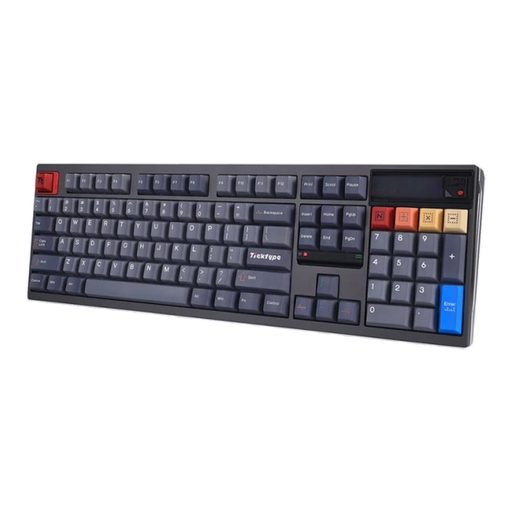
Ticktype DP104, full-size, Silent Tactile, US layout
The product name specifies Silent Tactile switches and a full-size layout with 108 keys. This could suit you if having keys within easy reach matters more than a compact design. Check that the US layout meets your needs before buying.
According to the product details: hot-swap, Bluetooth, 2.4 GHz wireless, USB-C, 8000 mAh and RGB. The claim of “quiet typing” is not a comparable noise test.
According to the product information, use a standard 5 V USB output when charging; switch off the keyboard before hot-swapping.
View at Joybuy
 No image available
Ticktype EVO75, ISO-DE, Creamy Rye switches
The 75% layout described, with ISO-DE, could suit you if you’re after a compact keyboard with keys that are easy to reach.
According to the product details: hot-swap, RGB, VIA compatibility and software for macros and key assignments. Disconnect or switch off the keyboard before changing switches.
View at Joybuy
 No image available
Redragon RS68, 65%, 68 keys
The compact 65% layout could be a good option for a smaller desk if the key arrangement still lets you reach the game commands you need.
The product description lists linear switches and describes typing as quiet; this is not a comparable noise test. According to the product details, USB-C, Bluetooth and 2.4 GHz wireless are available.
View at Joybuy
Frequently asked questions
Should I simply buy a mechanical keyboard without clicky switches for a shared bedroom?
Not on that basis alone: check the exact switch variant and, if possible, listen to the whole keyboard where you plan to use it. CHERRY describes MX Silent Red as dampened; for the BlackWidow V4, Razer distinguishes between clicky Green switches and Yellow switches advertised as quiet.
How do I clean a gaming keyboard?
Disconnect the keyboard from the power supply before cleaning it. SteelSeries recommends this in its cleaning guide; also follow the instructions for your specific model when removing keycaps or carrying out other steps.
What should I do if the keyboard is faulty or I don’t like it after buying it online?
If a product is faulty, statutory consumer rights should be distinguished from a voluntary guarantee, as explained by Verbraucherzentrale. For online purchases in Germany, you generally have a 14-day right to cancel after receiving the goods; check the terms of your specific purchase contract.
Can I put an old keyboard in household waste?
No. The Federal Ministry for the Environment points out that electrical waste must be taken to an authorised collection point, such as a local authority recycling centre. Retailer take-back schemes are subject to additional conditions.


