If you’re deliberately practising stops and changes of direction, Rapid Trigger and adjustable actuation may be worth considering; there’s no evidence that they improve your aim. Choose the size to suit the space available for your mouse, and check that your device and game support the keyboard if you’re playing on a console. The keyboard is only one part of the overall input latency.
Which keyboard is right for you?
Players practising movement
If you’re practising stops and changes of direction, the adjustable actuation and reset behaviour of the movement keys may be important. Rapid Trigger is not the same as automated input. Wooting and SteelSeries describe relevant adjustment options, while Valve warns of restrictions on certain forms of input automation on official Counter-Strike 2 servers.
Players with limited desk space for a mouse
If you do most of your aiming with a mouse, a more compact keyboard can leave you with more room beside it. At the same time, consider whether you can manage without a number pad. Joybuy Insights’ guide to keyboard sizes explains this trade-off with compact keyboards.
Players using a screen at a distance
If your PC or console is some distance from where you play, check the connection and whether the specific device and game are supported. PlayStation notes that not all keyboards are compatible with PS5. As NVIDIA explains in its guide to PC latency, overall latency involves more than just the keyboard.
What should you look for when buying?
For shooter training on a large screen, choose a keyboard that suits the movement exercises you practise, the space you need for your mouse and how you plan to connect it. Screen size alone doesn’t determine which keyboard technology you need.
Rapid Trigger for movement practice
A good fit if: you want to practise repeated movement, stopping and changes of direction on a supported PC, and adjust how the keys behave.
Consider: the setup and game rules; this doesn’t prove that your aim will improve. Valve has reported that certain forms of hardware-assisted input automation may lead to players being excluded from matches on official Counter-Strike 2 servers.
Compact size with fixed switches
A good fit if: you want more room for your mouse and don’t need adjustable actuation.
Consider: a TKL keyboard has no number pad. Also check the layout and whether the specific model has the extra keys you need.
Everyday use and flexible connectivity
A good fit if: you also use the same keyboard for typing, need a number pad or want to switch between devices.
Consider: a full-size keyboard takes up more desk space. If it offers several connection types, make sure the connection and your device are compatible.
| Buying priority |
What to check |
Who is it important to? |
| Movement and stopping inputs |
Rapid Trigger and adjustable actuation on the exact model; the game’s rules on input automation. |
If I practise repeated changes of direction manually, I want to be able to adjust how the movement keys behave. Around 40% of consumers prioritise movement control. |
| Room for the mouse |
Keyboard size and dimensions; whether you need a number pad, arrow keys and function keys. |
If I need plenty of room for my mouse when aiming, I’ll weigh up a more compact keyboard against the keys I’d lose. Around 30% of consumers say mouse space is their top priority. |
| Connection to a large-screen setup |
Wired or wireless connection and whether your gaming device supports it; keyboard controls in the specific game. |
If my gaming device is some distance away, I want to check the connection and available input options in advance. Around 20% of consumers prioritise connectivity and setup. |
| Simple use for both gaming and everyday tasks |
Key layout and switches; a connection that works with your device. |
If I mainly use my keyboard for gaming and typing, I don’t necessarily need adjustable specialist features. Around 10% of consumers prioritise straightforward everyday use. |
How to avoid choosing the wrong keyboard
-
Assuming Rapid Trigger will improve your aim
Rapid Trigger changes how the keys behave, but it doesn’t automatically improve your aim or how quickly the screen responds. The feature is therefore no proof of better aim.
Before you buy, decide whether you mainly want to practise movement and stopping inputs or mouse aiming.
-
Taking an 8 kHz polling rate to mean lower overall input latency
The polling rate doesn’t describe the latency of the whole chain, from the input device and PC or console to the game and screen. Razer limits its latency comparison to the path from the switch to the USB port.
Check how measurements are defined and what the test conditions were before applying a figure to your own setup.
-
Enabling automatic directional prioritisation without checking
On 19 August 2024, Valve said it could detect certain forms of hardware-assisted movement or shooting input automation on official Counter-Strike 2 servers. Affected players may be removed from the match. This is different from ordinary Rapid Trigger.
Check the rules for the specific game and mode before using features that prioritise opposing inputs.
Key brands at a glance
Wooting
The Wooting 80HE is an 80% keyboard for users who want to configure analogue input and Rapid Trigger in detail.
- Wooting lists Rapid Trigger, adjustable actuation and 8 kHz polling. PC-WELT highlights the customisation options in its review.
- PC-WELT also notes compromises in the case finish and space bar. Wooting’s claim about input speed isn’t a measurement of the complete gaming system.
Razer
The Huntsman V3 Pro Tenkeyless 8KHz is aimed at users looking for a compact keyboard with adjustable optical analogue keys.
- Razer describes Rapid Trigger, adjustable actuation and the optional Snap Tap feature.
- According to Razer, its latency comparison measures the time from the switch to the USB port, not the entire input chain. Check the rules of the specific game before using Snap Tap.
SteelSeries
The Apex Pro TKL Gen 3 Steel - DE combines a TKL layout with adjustable magnetic switches.
- For this exact Steel variant, SteelSeries lists an actuation range of 0.1 to 4.0 mm, as well as Rapid Trigger and Rapid Tap.
- These specifications don’t automatically apply to other Apex models. Check the rules of the relevant game before using Rapid Tap.
CHERRY
The MX 3.0S Wireless is aimed at users who prefer mechanical keys and several connection options to adjustable actuation.
- For this model, CHERRY lists a USB cable, Bluetooth and 2.4 GHz wireless.
- The manufacturer’s ‘under 1 ms’ claim applies to Gaming Mode, not the mouse, game and screen combined. Check the exact version and switches of the model you’re considering.
Logitech G
The wired PRO X TKL RAPID is a TKL option with magnetic analogue switches.
- Logitech G describes Rapid Trigger and adjustable actuation for this model.
- The manufacturer’s description of the key features isn’t independent evidence of improved aim.
Joybuy products for shooter training
This selection includes compact keyboards that leave more room for your mouse, as well as models with Rapid Trigger for practising manual movement.
 No image available
Akko 5087S V1 TKL, ISO-DE-QWERTZ, V3 Pro Cream Yellow
The TKL layout is an option if you want more room for mouse movement beside your keyboard.
Listed in the product name: wired, RGB, hot-swappable and ISO-DE-QWERTZ layout; V3 Pro Cream Yellow switches; black and gold.
View at Joybuy
 No image available
AULA WIN60HE, 60%, White & Graywood Magnetic Switch
The 60% layout may suit you if you want to leave as much room as possible beside the keyboard for your mouse while practising.
Listed in the product name: wired, hot-swappable magnetic switches, adjustable actuation, Rapid Trigger Mode and an 8000 Hz polling rate.
According to the product information, the keyboard is compatible only with Hall effect magnetic switches; standard 3- or 5-pin mechanical switches won’t work.
View at Joybuy
 No image available
Royalaxe X68 Esports Magnetic Switch
This model is marketed for FPS games and features Rapid Trigger for users who want to practise manual movement and stopping inputs.
Listed in the product name: magnetic switches and an aluminium frame.
View at Joybuy
 No image available
Redragon M68, 68 keys, US layout
The compact 68-key layout is an option if you want to leave more room for mouse movement beside your keyboard.
Listed in the product name: magnetic switches, 8000 Hz polling rate and Rapid Trigger; US layout.
View at Joybuy
 No image available
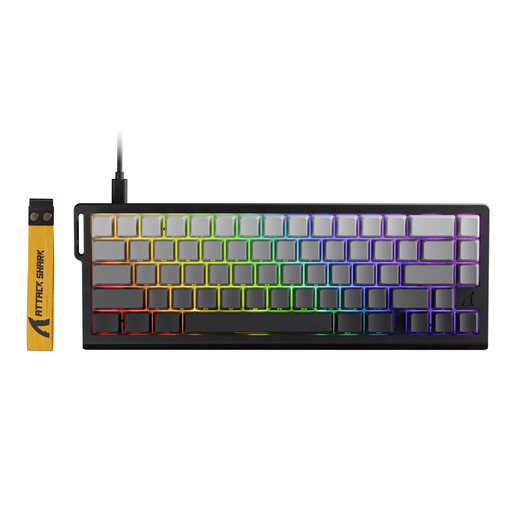
ATTACK SHARK X68 HE, Rapid Trigger, Black Gradient
A compact option if you’re looking for Rapid Trigger for manual movement practice and want to leave room for your mouse.
Listed in the product name: magnetic switches and Rapid Trigger.
Snap Tap and Last Keystroke Prioritisation are listed as features. Check the rules of the specific game before using them; Valve warns that certain automated inputs may lead to players being excluded from matches on official Counter-Strike 2 servers.
View at Joybuy
Frequently asked questions
Will a fast keyboard automatically improve my aim on a large screen?
No. You can’t draw that conclusion from keyboard specifications. Rapid Trigger affects key inputs, while overall input latency also includes the computer and screen. Keyboard specifications alone aren’t proof of better aiming.
Can I simply use a gaming keyboard to play shooters on PS5?
Not necessarily. Sony explains how to connect USB and Bluetooth keyboards to PS5, but notes that not all devices are compatible. Check the specific keyboard model and whether the game you want to play supports keyboard controls. Connecting a keyboard to the console doesn’t prove that the game supports it.
How do I set up Rapid Trigger for movement practice?
Set it up according to the instructions for your specific model, then adjust it gradually to suit your needs. Corsair describes an adjustable actuation point for the K70 MAX; those settings don’t apply to all keyboards.
Is Snap Tap or similar input prioritisation safe to use in Counter-Strike 2?
There’s no blanket answer. On 19 August 2024, Valve said it could detect certain forms of hardware-assisted movement or shooting input automation on official servers and remove affected players from matches. Check the rules for your game mode, and distinguish these features from a standard adjustment to the actuation point.


