Which keyboard is right for you?

Aquarium gamers with limited mouse space

If you manage a virtual aquarium at a small desk, you’ll need to leave room for mouse movement as well as your keyboard. Behind Glass: Aquarium Simulator is a PC game about building virtual aquariums, as described by BitBros Inc on Steam.

Players who often use game and menu keys

If you prefer to access commands directly, compare the keys on the specific model with your game’s controls. With compact layouts, some functions may be assigned to secondary key combinations.

Players at shared desks

If you also use the same space for other tasks, or other people are within earshot, typing noise and keeping your setup tidy may influence your choice.

What should you look for when buying?

65% keyboard

A good fit if: you want to leave as much room as possible for your mouse and can access the commands you need on the specific model.

The trade-off: You won’t have the familiar full function row; check which commands require secondary key combinations.

75% keyboard

A good fit if: you want dedicated arrow and function keys, and the wider case fits beside your mouse.

The trade-off: This format takes up more space than a smaller keyboard; layout and features may vary depending on the version you choose.

TKL keyboard

A good fit if: you can do without a number pad but want more dedicated keys or separate media controls.

The trade-off: TKL isn’t the smallest format covered here; remember to measure up any wrist rest you’re planning to use, too.

What to consider What to check before buying Who it matters most to
Desk space and mouse movement Measure the available width, including the space for your mouse, and compare it with the dimensions of the specific model’s case. If I need room to move my mouse beside the keyboard, I pay particular attention to the case width. Around 36% of consumers prioritise having clear space for their mouse.
Direct access to commands Compare the game commands you use most often with the dedicated arrow, function and navigation keys, as well as any secondary key combinations. If I often use game and menu keys, I want to access them as directly as possible. Around 29% of consumers say direct access to keys is their top priority.
Typing noise Check the switch type and sound dampening; manufacturer claims alone don’t establish a comparable noise level. If I play at a shared desk, I want the typing noise to suit the space. Around 21% of consumers say keeping noise to a minimum is the deciding factor.
Wired, wireless and charging Check the connection types supported, whether they’re compatible with your devices and, if you’re going wireless, how often you’ll need to charge the keyboard. If I want to set up the keyboard without a cable permanently attached, I factor in a suitable connection and charging. Around 14% of consumers prioritise a wireless setup.

Avoid common buying mistakes

  • Choosing a keyboard based only on its lowest percentage

    Compact formats differ in which keys you can access directly. Whether that’s a problem depends on the commands you use in your game.

    Before choosing a format, compare the commands you use most often with the keys and secondary key combinations on the specific model.

  • Assuming DE-ISO, UK-ISO and model variants are all the same

    With the Keychron K2 Max, the layout and hot-swap features depend on the version you choose; UK-ISO may be selected by default on the product page.

    Before buying, check the layout and features of the exact version you intend to order.

  • Assuming dampening or ‘quiet’ guarantees a certain noise level

    Manufacturer claims about switches and sound dampening aren’t an independently comparable measure of how loud a keyboard will be in your room.

    Check the exact switch type and don’t rely on these descriptions alone when comparing noise levels.

  • Going wireless without considering charging and connectivity

    Wireless models need a compatible connection and must be charged; with a wired keyboard, charging isn’t an issue.

    Check that the receiver or Bluetooth support works with your setup, and consider whether you have a practical way to charge the keyboard.

Brands and suitable ranges

Corsair

The K65 PRO MINI is a wired 65% model designed for desks with limited space.

  • Corsair lists arrow keys, a detachable USB-C cable and onboard profile storage for this model.
  • Check whether you can access the function keys you need directly or only through key combinations.

Keychron

The K2 Max is a 75% option if function keys and multiple connection types are important to you.

  • Keychron lists 2.4 GHz, Bluetooth and wired connections for this model, as well as a DE-ISO option.
  • According to the manufacturer, hot-swap is available only on suitably equipped versions. Also check that DE-ISO is selected rather than the preselected UK-ISO version.

CHERRY XTRFY

The K5V2 Compact combines a 65% format with customisable switches.

  • CHERRY lists MX2A RED switches and two layers of sound-dampening foam for this model.
  • These manufacturer claims don’t prove a particular noise level or gaming advantage.

Razer

The BlackWidow V4 Tenkeyless HyperSpeed is a TKL option for anyone happy to do without a number pad.

  • Razer lists 2.4 GHz, Bluetooth, pre-installed tactile switches and hot-swap for this model.
  • TKL takes up more desk space than the smaller formats covered here; the stated wireless speed isn’t an independent comparison measure.

SteelSeries

The Apex 3 TKL is an option for anyone who wants more keys within easy reach.

  • SteelSeries describes the Apex 3 TKL’s switches as quiet.
  • The manufacturer’s description isn’t a comparative acoustic test and doesn’t automatically apply to other Apex models.

Joybuy products for limited desk space

This selection includes compact 65% gaming keyboards for desks with limited space, including wired and wireless models. Layouts, connection types and secondary key combinations vary by model.
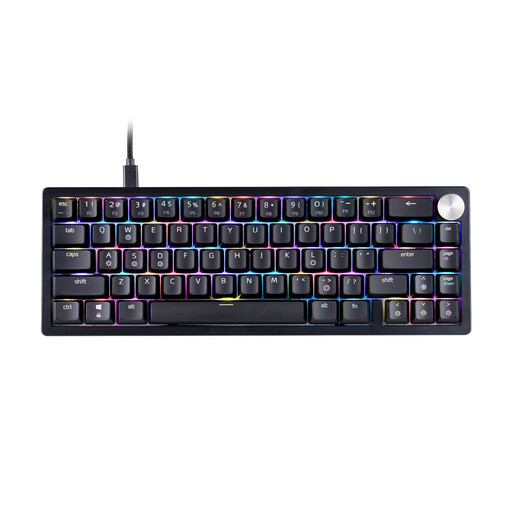
XPG SORCERER MINI 65% Mechanical Gaming Keyboard, US layout, RGB, black

XPG SORCERER MINI 65%, US layout, RGB, black

The 65% format is designed for limited desk space; check that the US layout matches your preferred key arrangement.

Mechanical gaming keyboard; RGB lighting.

View at Joybuy

CHERRY MX-LP 2.1 Wireless Gaming Keyboard, 65%, German QWERTZ layout, white

CHERRY MX-LP 2.1 Wireless, 65%, German QWERTZ layout, white

The compact format and German QWERTZ layout are a good fit if you need to save desk space and want to play wirelessly.

Tri-mode connectivity: 2.4 GHz, Bluetooth and USB-C; MX Speed low-profile switches. The built-in battery needs charging when used wirelessly.

View at Joybuy

Redragon RS68, 65%, 68 keys, blue

Redragon RS68, 65%, 68 keys, blue

The compact 65% format is designed for limited desk space; check that the keys and secondary key combinations suit the commands in your game.

Tri-mode connectivity via Bluetooth, 2.4 GHz or wired connection; hot-swap switches and detachable wrist rest.

View at Joybuy

Redragon RS68, 65%, 68 keys, Space Grey

Redragon RS68, 65%, 68 keys, Space Grey

The compact layout is an option for desks with limited space; check that the key arrangement suits the commands you need in your game.

Tri-mode connectivity via Bluetooth, 2.4 GHz or wired connection; hot-swap and linear switches.

View at Joybuy

CHERRY XTRFY K5V2 Compact, wired, German QWERTZ layout, MX2A RED

CHERRY XTRFY K5V2 Compact, German QWERTZ layout, MX2A RED

The 65% format with a German QWERTZ layout is suited to limited desk space; access media and macro functions using secondary key combinations.

Wired mechanical keyboard with hot-swap switches and RGB lighting.

View at Joybuy

Frequently asked questions

Is an especially fast gaming keyboard enough for my aquarium game?

It’s not possible to say in general without knowing the specific game and its controls. First, check the commands you use most often and how much desk space you have; a macro setting alone doesn’t prove it will give you an advantage in your game.

What should I check when buying a wireless keyboard?

Choose a connection mode supported by both the specific model and your device. Keychron lists 2.4 GHz, Bluetooth and wired connections for the K2 Max; also check the layout and features of the exact version you’ve selected.

Can I change the switches on a gaming keyboard?

Only if it’s a hot-swap version designed for this, and you use compatible switches. Razer lists 3- or 5-pin switches for the BlackWidow V4 Tenkeyless HyperSpeed; according to the manufacturer, hot-swap is available only on suitably equipped versions of the Keychron K2 Max.

What rights do I have when buying online from a trader?

For an online purchase from a trader covered by EU consumer law, you generally have a 14-day cooling-off period from the date of delivery. Exceptions and possible return costs should be taken into account. Faulty goods are also covered by a legal guarantee of at least two years from receipt, as explained in the EU consumer information; this is separate from any additional manufacturer’s warranty.

What should I look for to check the safety of a wireless keyboard?

The Bundesnetzagentur lists CE marking, product identification, manufacturer details, German-language instructions and a declaration of conformity among the points it checks during market surveillance. Check the information for the specific product rather than treating an advertising claim as proof for an individual listing.