What should you consider when buying?
First, measure the space available, then decide which keys you need to access directly in your games. If noise or connectivity matters in your room, compare the precise switch and connection options too.
60% keyboard
A good fit if: You need as much mouse space as possible and can access important commands using secondary functions.
Trade-off: Before choosing this compact layout, check how you access the arrow, function and navigation keys.
75% keyboard
A good fit if: You want to save space while keeping the arrow and function keys within easy reach.
Trade-off: This layout takes up more desk space than a 60% keyboard; switch and acoustic specifications vary by model, including the Corsair and Razer versions.
Tenkeyless keyboard (TKL)
A good fit if: You can do without a number pad but prefer a more familiar layout with control keys close to hand.
Trade-off: Hardwareluxx measured the be quiet! Light Mount TKL at 358 × 133 mm without a wrist rest; with the rest, it was 213 mm deep. These measurements apply to the model tested.
| Priority |
What to check when buying |
Who is this important to? |
| Desk space and mouse movement |
Measure the keyboard width and the space available for your mouse, allowing for a possible wrist rest. |
If I need room for my mouse on a small desk, the actual footprint, including any wrist rest, matters. Around 36% of consumers put having clear space for their mouse first. |
| Direct access to gaming commands |
Compare the commands you use most with the specific layout and its Fn layer. |
If I use arrow, function or menu keys often, I want to reach them without an Fn combination. Direct access to commands is a priority for around 29% of consumers. |
| Noise when typing |
Check the precise switch option and the full keyboard model, not just the word “Silent”. |
If I play in a shared room, I want to avoid disturbing others with keystrokes as much as possible. Around 21% of consumers prioritise quieter keys. |
| Connectivity and switching between devices |
Compare the connection options, what’s included in the box and compatibility with your device. |
If cable management or switching between devices matters to me, I check the connections on the specific keyboard. Around 14% of consumers prioritise flexible connectivity. |
Joybuy product selection
This selection includes compact gaming keyboards for small desks, with 60%, 65% and 75% layouts.
 No image available
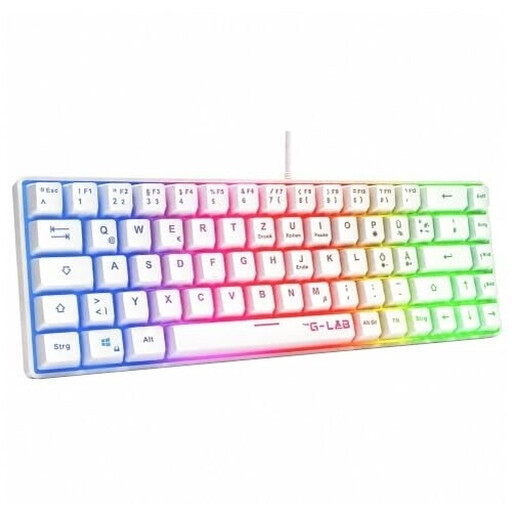
The G-Lab KEYZ-HYDROGEN-W/DE, 60%, membrane, white
This 60% layout is worth considering if mouse space is a priority on your small desk and you’re happy to use secondary functions.
Wired; membrane keyboard; rainbow lighting; white.
View at Joybuy
 No image available
CHERRY MX-LP 2.1 Wireless, 65%, German QWERTZ layout, white
This compact 65% layout is an option if you want to save space and use a German QWERTZ layout.
MX Speed low-profile switches; RGB; connects via 2.4 GHz, Bluetooth or USB-C.
View at Joybuy
 No image available
AULA WIN60HE, 60%, wired, magnetic switches
This 60% layout is one way to prioritise mouse space on a small desk.
Hot-swappable magnetic switches; adjustable actuation; Rapid Trigger mode; 8000 Hz; RGB.
View at Joybuy
 No image available
Ticktype EVO75 Custom Tri-Mode, 75%, ISO-DE, Creamy Rye switches
This 75% layout is an option if you’re looking for a compact German ISO-DE layout rather than a 60% model.
Hot-swappable; aluminium; leaf-spring mount; VIA compatible; connects via Bluetooth, 2.4 GHz or USB-C; 8000 mAh; RGB.
View at Joybuy
 No image available
Akko 3084B Plus Tri-Mode, 75%, ISO-DE, V3 Pro Cream Yellow switch
This 75% layout is worth considering as a more compact alternative if you’re looking for a German ISO-DE layout and prefer more keys than a 60% model offers.
V3 Pro Cream Yellow switches; hot-swappable; RGB; connects via Bluetooth, 2.4 GHz or USB-C.
View at Joybuy
Frequently asked questions
Will a quiet keyboard make my character quieter when sneaking?
No. Switches and sound dampening affect how loud your keystrokes are in the room; whether your character is spotted depends on the controls and rules of the game you’re playing.
What should I bear in mind when setting up and cleaning my keyboard?
Allow space beside the case for your mouse, cables and a possible wrist rest. Check the instructions for the exact version before cleaning or changing switches; hot-swappable doesn’t mean that any switch will fit.
What are my rights in Germany if a keyboard bought online is faulty?
If a new product is faulty, consumers can generally claim their statutory rights against the seller within two years, as explained by the Verbraucherzentrale; a manufacturer’s guarantee is separate. Many online purchases also generally come with a 14-day right to cancel, starting from receipt of the goods. Check the conditions that apply to your specific purchase.
Which product marking is relevant when buying in Germany?
The European Union explains that CE marking is required when the applicable harmonised EU rules require it for a product. For radio equipment, the Bundesnetzagentur also monitors compliance with requirements. CE is a declaration by the manufacturer, not individual EU approval of a product listing.
How should I dispose of an old gaming keyboard?
In Germany, an old electrical keyboard must not go in household waste. The Umweltbundesamt lists local recycling centres and suitable retailer take-back points as options; removable batteries should be disposed of separately.


