Gamers with limited mouse space
If your desk is small, a layout without a number pad can free up room for your mouse. 75% and TKL keyboards differ in their key layout and actual dimensions.


If there’s little room left for your mouse on your desk, a 75% layout or a TKL keyboard could be a good fit. Compare the actual width and the keys you want to reach directly. If you use the number pad regularly, a full-size keyboard may be a better choice despite taking up more space. With very compact layouts, check beforehand whether you can access essential commands using secondary functions.
If your desk is small, a layout without a number pad can free up room for your mouse. 75% and TKL keyboards differ in their key layout and actual dimensions.
If you often use the arrow, function or number keys, check which of them remain directly accessible on the specific layout before switching.
Typing noise and connection type may also influence your choice. Sound dampening, switch feel and connectivity options vary by model and configuration.
A good fit if: you have limited desk space but want direct access to the arrow and function keys.
The trade-off: There’s no number pad, and the exact key layout varies by model.
A good fit if: you want to keep the main key block, arrow keys and navigation keys, and are happy to do without a number pad.
The trade-off: TKL models are generally less compact than a 75% layout, so check the width of the specific keyboard.
A good fit if: you often need the number pad for gaming or writing, and there’s enough room for both your mouse and keyboard after measuring up.
The trade-off: The extra block of keys takes up desk space.
A good fit if: saving as much space as possible is your priority, and you’ve checked your gaming commands against the specific layout.
The trade-off: Depending on the model, you may need to use secondary functions to access familiar keys.
First, measure the available width of your desk and allow for the space you need for your mouse. Then check the key layout, switches and connectivity of the specific configuration.
| What matters | What to look for | Who is it important to? |
|---|---|---|
| Desk space and mouse movement | Measure the usable width of your desk and compare it with the dimensions of the specific keyboard. Allow room for your mouse and cable connection. Logitech lists the G515 LIGHTSPEED TKL as 354.75 mm wide. | If I need room to move my mouse on a small desk, I don’t want my keyboard to be unnecessarily wide. Around 33% of consumers prioritise desk space and room for their mouse. |
| Keys within easy reach | Compare your gaming key bindings with the arrow keys, function row, navigation keys and number pad on the specific layout. | If I want to reach frequently used commands without extra steps, I check the key layout first. Around 27% of consumers prioritise gaming and navigation keys that are directly accessible. |
| Typing feel and noise | Check whether the configuration you want has linear or tactile switches, and what kind of dampening is specified for the model. This doesn’t determine exactly how loud it will be on your desk. | If I play for long periods or share a room, I want to choose a switch feel and typing noise that suit me. Around 20% of consumers base their decision mainly on these factors. |
| Connectivity, layout and features | Check for DE-ISO/QWERTZ, your preferred connection type and what’s included in the box. Some configurations don’t include switches or keycaps. | If I need a German layout or a particular connection type, I also want to make sure the version I choose is fully compatible with my setup. Around 20% of consumers place the greatest importance on connectivity, layout language or what’s included in the box. |
75% and TKL refer to layout categories, not the exact dimensions of the case or how much room you’ll have for your mouse.
Check the dimensions of the specific model and compare them with your available desk space and the commands you need to access directly.
According to Razer, the barebones version of the Razer BlackWidow V4 75% doesn’t include switches or keycaps. DE-ISO is an available option for the Keychron K2 Max, but the product selection may initially show UK-ISO.
Check the selected variant and included items right through to the specific product you’re ordering, and make sure you’ve selected the German layout you want.
With a barebones version, you’ll need to budget for the missing switches and keycaps as well.
A single speed-related feature doesn’t prove an advantage in this gaming scenario. PC-WELT reports a significantly shorter battery life with the lighting on for the Corsair K65 PLUS WIRELESS it tested.
Prioritise accessible commands, space and how you’ll actually use the keyboard over unproven gaming benefits attributed to individual features.
Using the keyboard wirelessly with the lighting on may mean you need to charge it more often; the test result applies to the model tested.
The K65 PLUS WIRELESS DE combines a 75% layout with arrow keys and a programmable dial, making it an option if space is limited but you want direct access to these keys.
The G515 LIGHTSPEED TKL is a low-profile TKL option with wireless, Bluetooth and wired connectivity.
The K2 Max is a 75% model with connectivity and key-mapping options for gamers who want to customise their keys.
The BlackWidow V4 75% combines function and arrow keys with a compact design, and is also aimed at people interested in changing their switches.
The MX 8.2 TKL Wireless is a wireless TKL alternative for anyone who prefers the TKL layout to a more condensed 75% layout.
These keyboard options cover TKL, 75% and even smaller layouts for limited desk space. Before choosing, check which keys and connections you need for your setup.
 No image available
A TKL option without a number pad, if you want a German layout and room for your mouse on your desk.
It’s listed as having 88 keys and 12 FN multimedia functions. The description specifies USB-C wired connectivity and fold-out feet.
 No image available
A 75% option with a German ISO layout, if you’re looking for a more compact design and multiple connection types.
Listed features include Bluetooth, 2.4 GHz and USB-C, as well as V3 Pro Cream Blue switches and hot-swap.
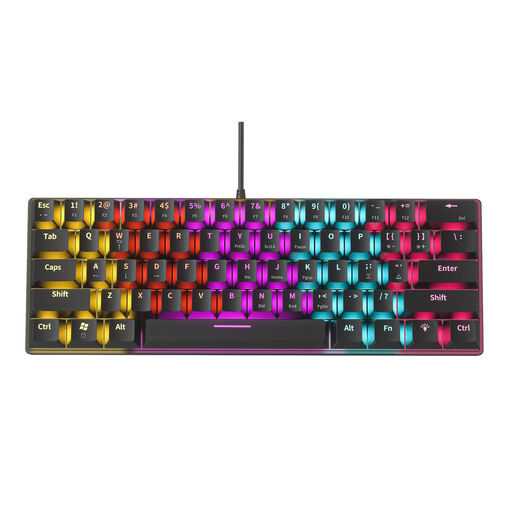 No image available
The compact 61-key layout could be a good fit if you’ve checked how to access the commands you use frequently in this format before buying.
The description lists blue switches with audible clicks, USB wired connectivity and a 1.58 m cable. Bear the noise in mind if you share a room.
 No image available
The 60% format suits anyone prioritising a small footprint; first check how you’ll access the gaming commands you need on this layout.
The product name specifies magnetic switches and wired connectivity.
 No image available
Another 75% option for a smaller desk; check that the layout gives you direct access to the keys you want.
The product name specifies Hall Effect switches, TTC Magnetic HE Switches and hot-swap in wired mode.
Measure the usable desk space and compare it with the manufacturer’s dimensions for the version you’ve chosen. Allow room for your mouse and the cable connection. For example, Logitech lists the G515 LIGHTSPEED TKL as 354.75 mm wide – this isn’t a standard width for TKL keyboards.
Not necessarily: the 75% Corsair and Razer models described here have arrow keys, and Razer also specifies a function row. Still, compare your frequently used commands with the exact key layout, especially if you currently use the number pad.
Check which connection types are available on the version you want and how it charges. CHERRY says the MX 8.2 TKL Wireless can also be used via cable while charging; this is a feature of that model, not a general guarantee for wireless keyboards.
The European Union’s Your Europe consumer information states that, in general, you have 14 days from delivery to withdraw from ordinary distance purchases; exceptions and conditions apply. EU consumer information also provides for a legal guarantee of at least two years for faulty goods. This is separate from a voluntary manufacturer’s guarantee.
No. The German Environment Agency points out that waste electrical and electronic equipment must be collected separately. Removable batteries should be taken out and disposed of separately before you hand the keyboard in.