If you often need to use the arrow and function keys while building, start by considering a 75% layout and checking how much room it leaves for your mouse. If that’s too wide, a 65% model with arrow keys could work. TKL gives you more dedicated keys, while 60% layouts mean you’ll use secondary functions more often.
Finding the right keyboard for you
Players who need plenty of room for their mouse
If you use your mouse to place objects and move the camera, having clear space next to your keyboard matters. A compact layout can help, as long as the keys you need remain within easy reach. Planet Coaster 2 lists mouse controls for selecting items and moving the camera.
Frequent shortcut users
If you often switch between building tools, menus and views, having keys within easy reach can be useful. Whether you need a dedicated function-key row depends on the commands you use most and how they’re mapped.
Players sharing a desk
If you also use the same small workspace for typing or share it with others, switch noise and key layout can influence your choice. Check the specific switch option: Razer offers Green and Yellow switches for the BlackWidow V3 Mini HyperSpeed.
What to look for when buying
75%: keys within easy reach
A good fit if: you use the arrow and function keys often but still want a more compact layout.
Bear in mind: It isn’t the smallest format, so check the exact keyboard’s width and depth. Razer lists this key layout for the BlackWidow V4 75%.
65%: arrow keys in a smaller footprint
A good fit if: mouse space is your priority, but you still want the arrow keys close to hand.
Bear in mind: The Razer BlackWidow V3 Mini HyperSpeed has no dedicated function-key row or number pad. Also check the connection type and switch option for the specific model on offer.
TKL: more dedicated keys without a number pad
A good fit if: you prefer the dedicated keys of a larger layout and can do without a number pad.
Bear in mind: A TKL model may be wider than a 65% or 75% model. CHERRY lists Bluetooth, 2.4 GHz wireless and wired operation for the MX 8.2 TKL Wireless. Check the available space before buying.
60%: the smallest possible footprint
A good fit if: every centimetre of mouse space counts and you’re comfortable using secondary functions for keys that aren’t directly available.
Bear in mind: Check how your frequently used building and camera controls are mapped. SteelSeries describes the Apex 9 Mini as having secondary functions printed on the sides of the keys.
Planet Coaster 2 lists mouse controls for selecting items and moving the camera. That means you’ll want to consider both clear space for your mouse and easy access to the commands you use most.
| Priority |
What to check before buying |
Who it matters most to |
| Desk space and room for your mouse |
Compare the keyboard’s width and depth with the space on your desk, and allow room for mouse movement and any accessories you need. |
If I need plenty of mouse space to place items and move the camera, I don’t want my keyboard getting in the way. That’s why around 36% of consumers put clear mouse space first. |
| Easy access to commands |
Make a note of the game commands you use most and check which keys are available directly or through a secondary function. |
If I often switch between building tools and views, I want to reach important commands without an extra key combination. Around 29% of consumers prioritise direct access to keys. |
| Switch feel and noise |
Check the exact switch option rather than assuming every version of a model is the same. |
If I share my desk, I want a typing feel that suits me and causes as little disruption as possible. Around 21% of consumers prioritise switch feel and noise. |
| Connectivity |
Check whether you need Bluetooth, 2.4 GHz wireless or wired operation, and whether you can use the keyboard while it’s charging. |
If I want the flexibility to switch between wired and wireless use at my small workspace, choosing the right connection mode is essential. Around 14% of consumers put this flexibility first. |
Avoiding common buying pitfalls
-
Choosing the smallest layout without checking your commands
On a very compact keyboard, commands you use often may be on a secondary key layer. This can mean extra steps when switching between building and navigation commands.
Before choosing 60% instead of 65% or 75%, compare the key mapping for your most important game commands with the layout of the specific model.
-
Mistaking a barebones keyboard for a complete model
According to the manufacturer, the barebones version of the Razer BlackWidow V4 75% doesn’t include switches, keycaps or a wrist rest.
Check the exact model and what’s included, not just the product name.
You’ll need to buy switches and keycaps separately for this barebones version.
-
Assuming input speed figures mean a gaming advantage
A manufacturer’s latency or polling-rate figure doesn’t, on its own, prove that building and navigating in a theme park simulator will be easier.
Prioritise a suitable footprint and easy access to your commands. Only consider speed figures in the context of the operating mode and source they refer to.
Brands to consider
Razer
The BlackWidow V4 75% is designed for users who want a dedicated function-key row and arrow keys, while the BlackWidow V3 Mini HyperSpeed uses a smaller 65% layout.
- Razer says the BlackWidow V4 75% supports hot-swapping. The manufacturer lists three connection options for the BlackWidow V3 Mini HyperSpeed.
- The barebones version of the BlackWidow V4 75% doesn’t include switches or keycaps. The BlackWidow V3 Mini HyperSpeed has no dedicated function-key row, and its switch options differ in noise level.
CHERRY XTRFY
The MX 8.2 TKL Wireless is worth considering if you can do without a number pad but want a TKL layout and several connection options.
- CHERRY lists Bluetooth, 2.4 GHz wireless and wired operation. The manufacturer says you can also play while the keyboard is charging via cable.
- Check the space available for a TKL keyboard before buying. The manufacturer’s latency figure of under 1 ms applies to the specified gaming mode and doesn’t prove an advantage for building a theme park.
HyperX
According to the manufacturer, the Origins 2 65 is designed for users looking for a compact layout and replaceable switches.
- The product page lists pre-installed linear hot-swappable switches and PC compatibility.
- Check that the specific model on offer has the German key layout you want. A high polling rate doesn’t prove an advantage when building in the game.
SteelSeries
The Apex 9 Mini offers a 60% layout for when a very small footprint matters and you’re happy to use secondary functions.
- SteelSeries describes secondary functions printed on the sides of the keys for accessing additional functions.
- Check the exact key layout and model before buying. The switch speeds quoted by the manufacturer don’t prove an advantage for building a theme park.
Compact keyboards at Joybuy
These product cards feature compact 60%, 65% and 75% keyboards. Before buying, compare the actual dimensions, key layout and switch option with your desk space and the commands you use in the game.
 No image available
Akko 3084B Plus Tri-Mode, 75%, ISO-DE
The 75% layout with ISO-DE configuration is an option if you want a compact format and a German key layout.
Bluetooth, 2.4 GHz wireless and USB-C wired operation are listed. The V3 Pro Cream Blue switches are described as tactile and clicky, so bear this in mind if noise matters at a shared desk.
View at Joybuy
 No image available
CHERRY MX-LP 2.1 Wireless, 65%, German QWERTZ
The 65% layout is a compact option if you want more room for your mouse and a German QWERTZ key layout.
2.4 GHz wireless, Bluetooth and USB-C are listed as connection options. The product listing specifies low-profile MX Speed switches.
View at Joybuy
 No image available
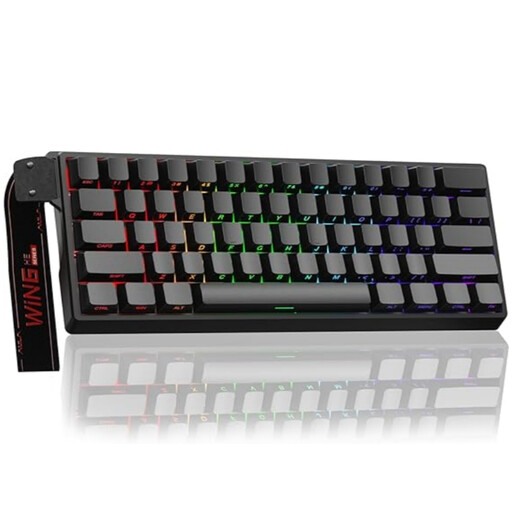
AULA WIN60HE, 60%, wired
The 60% layout is an option if you want a very compact keyboard and are happy to use secondary functions for keys that aren’t directly available.
The listing specifies magnetic switches and adjustable actuation. According to the product warning, it’s compatible only with Hall-effect magnetic switches; standard 3- or 5-pin mechanical switches won’t work.
View at Joybuy
 No image available
Royalaxe E75 Custom, 75%, Hall-effect
The 75% layout is a compact option if you want to save desk space without switching to a smaller layout such as 60%.
The product listing specifies TTC magnetic switches and hot-swapping. The keyboard is listed as wired.
View at Joybuy
 No image available
Ticktype EVO75 Custom, 75%, ISO-DE
The 75% layout with ISO-DE configuration is an option if you want a compact format and a German key layout.
Bluetooth, 2.4 GHz wireless and USB-C are listed, along with hot-swapping and VIA compatibility. According to the product warning, the USB-C cable is intended for charging.
View at Joybuy
Frequently asked questions
Do I need a number pad for building a theme park?
That depends on the commands in the game you’re playing and how your keys are mapped. Planet Coaster 2 documents mouse and keyboard controls for building, the camera and menus. Check the commands you use most before giving up the number pad for more mouse space.
How do I set up a compact keyboard for frequent building commands?
Start by checking which commands you use often and whether they’re available directly or through secondary functions. The HyperX product page lists software for remapping keys and assigning macros to the Origins 2 65. This is a model-specific option, not a requirement for theme park games.
What should I consider when using a wireless keyboard day to day?
Check which connection mode you want to use and how the model charges. CHERRY says the MX 8.2 TKL Wireless can also be used while charging via USB cable.
What rights do I have when buying online from a business seller?
For a qualifying distance purchase in the EU, you generally have a 14-day right to cancel from the date of delivery. Exceptions and possible return costs may apply. Your Europe states that faulty goods are covered by a legal guarantee of at least two years from receipt, which is separate from a voluntary warranty.


