Players with limited mouse space
If you need more room to move your mouse when aiming, a narrower layout can help. You may, however, have to give up some dedicated keys.


Choose a layout based on how much room your mouse needs and which keys you want to reach quickly during a match. A 60% keyboard saves the most desk space; a 65% model can combine a compact footprint with dedicated arrow keys; and a TKL gives you more keys within easy reach. Adjustable actuation and Rapid Trigger are optional features for specific input styles, but they’re not essential for squad survival matches.
If you need more room to move your mouse when aiming, a narrower layout can help. You may, however, have to give up some dedicated keys.
If you regularly use additional keys during a match, check whether they’re directly accessible or need to be accessed through an Fn layer.
If you often make quick movement inputs, adjustable actuation features may be worth considering. How useful they are depends on your play style and whether you want the extra configuration options.
A good fit if: You have limited space for your mouse and can manage without dedicated keys, or reliably use the Fn layer instead.
The trade-off: This layout typically doesn’t have dedicated function, navigation or arrow keys.
A good fit if: You want a compact layout but would like dedicated keys such as arrow keys on the specific keyboard you choose.
The trade-off: Check the actual key layout of the model; additional functions may be assigned to secondary key functions.
A good fit if: You want dedicated arrow and navigation keys, and still have enough room next to the keyboard to move your mouse.
The trade-off: TKL keyboards omit the number pad, but are wider than more compact layouts.
| Buying priority | What to check | Most important for |
|---|---|---|
| Mouse space and keyboard width | Measure the available desk space, including the area you need to move your mouse, and compare it with the dimensions of the specific keyboard. | If I need room to aim beside my keyboard on a small desk, I want to compare its width with the space I actually need to move my mouse. Around 31% of consumers put available mouse space first. |
| Keys within easy reach | Check your in-game keybinds, as well as the model’s function row, arrow and navigation keys, and Fn layer. | If I often use additional keys during a match, I don’t want to keep using an Fn combination to access them. Around 25% of consumers prioritise gaming keys that are within easy reach. |
| Adjustable inputs | Check the feature on the exact model version and consider whether your play style involves frequent, rapid changes of direction. | If I make quick movement inputs repeatedly, I want to weigh up adjustability against the extra configuration it involves. Around 19% of consumers put input configuration first. |
| Typing and gaming noise | Check the exact switch variant and, if noise is a concern where you play, look for independent reviews of the specific model. | If I play in a shared space, noise matters more to me than extra gaming features. Around 13% of consumers prioritise noise levels. |
| Connection and cable | Check whether the model connects by cable, 2.4 GHz receiver or Bluetooth, and whether you can use it while it’s charging. | If I want flexibility in how I arrange my small desk, I need to know which connection suits my setup. Around 12% of consumers put connection and cable options first. |
60% keyboards typically don’t have a function row or dedicated navigation and arrow keys. This can be inconvenient during a match if you use these inputs often.
Make a note of your most-used keybinds and check the Fn layer on the specific keyboard before choosing a layout.
The feature changes how inputs work; whether it’s useful to you depends on the game and how you play.
First decide which layout and keys you need. Then check whether the adjustable settings suit your play style.
A model family or form factor doesn’t automatically confirm the key legends and layout of the regional version on sale.
Check the full model name, physical layout and keycap legends on the specific product listing.
The 60HE v2 is a 60% model designed for a compact setup, with configurable inputs.
The Alloy Origins 65 offers a compact layout with dedicated arrow keys.
The MX 8.2 TKL Wireless is a TKL option with several ways to connect.
The Huntsman V3 Pro Mini is a 60% alternative with analogue optical switches.
The PRO X TKL Wireless is a wireless TKL model available with different mechanical switch variants.
This selection includes compact 60% and 65% gaming keyboards for desks where you need to weigh up mouse space against having keys within easy reach.
 No image available
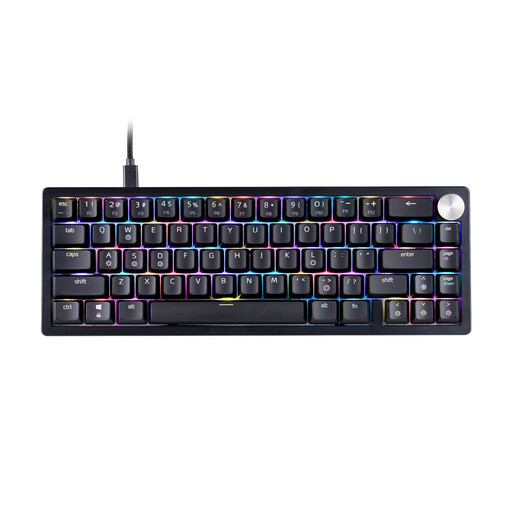
The 65% layout is designed for a compact gaming setup; check that the US layout suits your needs.
Mechanical XPG Red switches, RGB lighting and three-level height adjustment. Wired connection with a detachable USB-C cable.
 No image available
The compact 65% layout with German QWERTZ keys is a good fit if you’re looking for a small keyboard with several connection options.
Low-profile MX-LP Speed switches, RGB lighting and 2.4 GHz wireless, Bluetooth or USB-C connectivity.
 No image available
The 60% layout is worth considering if you have limited mouse space and are happy with fewer keys within easy reach.
The title lists hot-swappable magnetic switches, adjustable actuation and Rapid Trigger. This model is wired.
Keep away from liquids and high humidity; the product warning mentions possible sensor damage.
 No image available
The compact 65% layout may suit a small desk; bear the US layout in mind before buying.
The product description lists magnetic switches, Rapid Trigger, adjustable actuation and a detachable USB-C cable.
 No image available
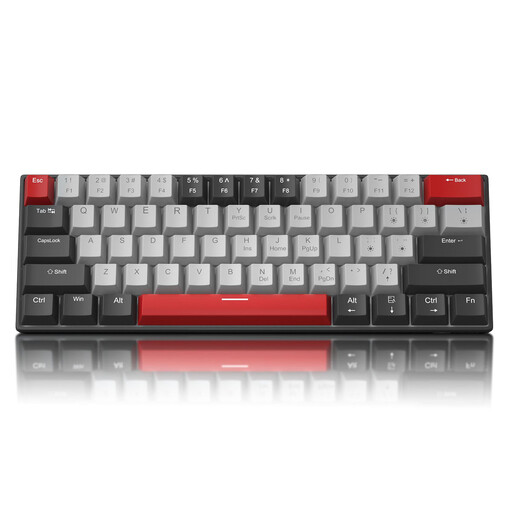
The 60% layout with US QWERTY keys is designed for a compact setup; according to the product description, the arrow keys are accessed using Fn.
Blue switches, wired connection and detachable USB-C cable. The description also lists N-key rollover and anti-ghosting.
No. If you need dedicated arrow or navigation keys, consider 65% or TKL models. Choose based on your keybinds and the space you actually have for moving your mouse.
Check the physical key layout and the keyboard language set in your operating system separately. The keycap legends alone don’t determine which characters your computer types. Then set up your in-game keybinds.
Disconnect the keyboard from its power source immediately. Wooting recommends cleaning its keyboards straight away and letting them dry completely before reconnecting them; don’t follow disassembly instructions intended for another model without checking first.
For a consumer purchase in the EU, the statutory two-year legal guarantee starts when you receive the goods and applies against the seller. Online purchases are also generally covered by a 14-day right to cancel, although exceptions and the specific contract should be taken into account. Your Europe explains the legal guarantee, while Verbraucherzentrale covers the right to cancel.
Check the information for the exact version you’re buying, including its markings, manufacturer details and German-language instructions. The Bundesnetzagentur lists these points as part of its market surveillance for products within its remit; a product name alone doesn’t prove compliance.