Builders who use lots of keyboard shortcuts
You want to control parts, views or tools using the commands in the software you use. So look for a suitable layout and check whether you can assign the keys you need.


Start by choosing a layout that gives you easy access to the building and gameplay commands in the software you use. Then check the key mapping, feel and typing noise in your surroundings. A compact model frees up desk space, but may leave out dedicated keys. Features such as sound dampening and adjustable actuation are specific to certain models; they don’t guarantee silent typing or automatically give you an advantage when building.
You want to control parts, views or tools using the commands in the software you use. So look for a suitable layout and check whether you can assign the keys you need.
You wear headphones but also want to consider the typing noise others in the room can hear. The specific switch type and sound dampening may influence your choice; headphones won’t make the noise any quieter for other people.
You want to make room for your mouse without giving up arrow and function keys you use often. Compare the key groups on the specific model with the commands you need.
First, make a note of the commands you actually use when designing and playing. Then compare the layout and key mapping, and check that the connection and typing feel suit your device and surroundings.
| What to consider | What to look for | Who should pay particular attention? |
|---|---|---|
| Commands and shortcut keys | Check the country-specific layout, number pad, function keys and possible key assignments on the specific model. | If I use commands often when building, I want to reach my most important shortcuts without extra steps. Around 33% of consumers put direct access to building and control commands first. |
| Typing noise | Compare the specific switch type and sound dampening; a manufacturer’s claim is no substitute for listening to the keyboard in your own surroundings. | If other people in the room are working or resting, I want to be considerate of them even when I’m wearing headphones. Around 25% of consumers prioritise a considerate typing feel. |
| Desk space and layout | Compare the dimensions and arrow, function and number keys with your workspace and list of commands. | If my desk is short on space, I want more room for my mouse without giving up important shortcut keys. Around 25% of consumers prioritise having free space next to the keyboard. |
| Connection and set-up | Check whether it connects by cable, wireless or Bluetooth, and whether it’s compatible with your device and the software needed to assign keys. | If I need a particular connection type or want to switch devices, I want to check the set-up beforehand. Around 17% of consumers prioritise a suitable device connection. |
Manufacturers describe different sound-dampening designs. Without comparable measurements, you can’t use this information to determine how noisy a keyboard is compared with other models.
Check the exact switch type and, if possible, try listening to the keyboard in surroundings similar to where you’ll use it.
A 65% layout and a 75% keyboard have different groups of keys. A smaller format may mean you need extra key combinations for commands you use often.
Before buying, compare the specific layout with the building and gameplay commands you use most.
The Logitech G PRO X TKL RAPID is wired; the differently named PRO X TKL is a wireless model. The name, connection and layout can vary within the same product family.
Compare the full model name, layout and switch type rather than relying on the brand or product family alone.
The ROG Azoth 96 HE may interest buyers looking for a larger compact layout and multiple connection options.
The product range includes the wired MX 3.1 with a sound-dampening structure, and a compact magnetic model, the K5 Pro TMR Compact.
According to the manufacturer, the K65 PLUS WIRELESS TACTILE (DE) combines a German 75% layout with hot-swappable switches and a programmable dial.
The wired PRO X TKL RAPID may suit buyers considering a TKL layout and adjustable magnetic actuation.
The Apex Pro TKL Gen 3 - DE is a German TKL variant with adjustable actuation.
The following Joybuy keyboards come in a range of layouts, including TKL and full-size models. Compare the listed keys, connections and key-mapping options with the specific commands you need.
 No image available
The TKL layout may suit you if you want to save space and don’t need direct access to a number pad.
ISO-DE QWERTZ layout; Akko Macro support; Akko V3 Pro Cream Yellow switches; hot-swappable; RGB lighting. The TKL format doesn’t include a number pad.
 No image available
A full-size layout may suit you if you want to use a number pad and additional shortcut keys.
German QWERTZ layout; 110 keys; MX2A Red switches; wired USB-A connection; multimedia and function keys.
 No image available
Consider this full-size model if you’re looking for a German layout and direct access to additional media functions.
German QWERTZ layout; MX2A Brown switches; programmable media panel; integrated sound-dampening mechanisms; wired.
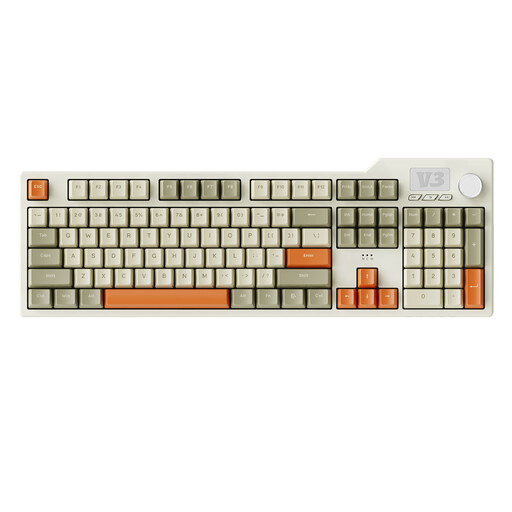 No image available
The full-size layout with a number pad may be useful for frequent number entry and easy access to keys.
104 keys; wired Type-C connection; programmable macros and volume control; hot-swappable; five-layer sound-dampening structure; RGB lighting.
 No image available
This full-size model may suit you if you need a number pad and one of the listed connection options works with your device.
German QWERTZ layout; Bluetooth, 2.4 GHz wireless or USB-C; 10.000-mAh battery; multifunction dial; 1,14-inch TFT colour screen; hot-swappable.
No, that doesn’t follow from the use described. Check how your headphones connect to the device you actually use; a keyboard’s media or volume keys are separate features. CORSAIR lists an assignable multifunction dial for the K65 variant.
Make a note of the commands in the game or programme you use, then compare them with the layout and key-mapping options for the exact model. CORSAIR lists iCUE for the K65 PLUS WIRELESS TACTILE; SteelSeries describes saved settings for the Apex Pro TKL Gen 3. This doesn’t guarantee compatibility with an unspecified game.
Logitech recommends unplugging a wired keyboard before cleaning and switching off a wireless keyboard. Also follow the instructions for your specific model, especially before removing keycaps or switches.
When buying online from a trader, you generally have a 14-day right to cancel from the date of delivery, subject to statutory exceptions. The EU consumer portal Your Europe also explains the two-year minimum legal guarantee for faulty goods; an additional manufacturer’s warranty does not replace it.
For electronic products, the German Federal Network Agency lists a correct CE mark, identifiable products, accurate manufacturer details and German-language instructions among the points checked during market surveillance. Check the information for the specific model; this general guidance from the authorities doesn’t prove that every product on offer has been tested.