Strategy players who use lots of keyboard commands
If you often select units or groups using your keyboard, make sure your key commands are easy to reach. The Creative Assembly / Total War manual explains how to select groups using a single key.


First, check that the keys you need for your in-game commands are easy to reach on your preferred layout, and whether you need a number pad for work. If you share your desk, typing noise, a German layout and room for your mouse and paperwork may matter more than extra gaming features.
If you often select units or groups using your keyboard, make sure your key commands are easy to reach. The Creative Assembly / Total War manual explains how to select groups using a single key.
If you use the same desk for work during the day, a familiar layout, typing feel and noise level can all make a difference when you play. SteelSeries and Logitech G offer both compact TKL and full-size models; the right design depends on which keys you use for work.
If you need room for your mouse alongside your keyboard and work materials, a model without a number pad could be a good fit. The key question is whether you actually need the number pad for work.
Start by comparing your in-game commands with your need for a number pad. Then check the layout, noise level and connection options against your workspace.
| What matters | What to check before buying | Who should pay particular attention |
|---|---|---|
| In-game commands within easy reach | Compare the commands you actually use with the number keys, function keys and, where available, dedicated macro keys. | If I often select units and groups using my keyboard, I want to reach the keys I need without awkward workarounds. Around 31% of consumers prioritise quick access to in-game commands. |
| Typing noise when working from home | Check the switch type on the specific variant and, if possible, try out how it sounds in your own working environment. | If other people share the room, I want to take typing noise into account, especially during longer work sessions. Around 25% of consumers prioritise typing noise. |
| Typing and keyboard layout | Check the layout listed for the specific variant and decide whether you need a number pad. | If I use the same keyboard for German text and gaming, I want a layout that suits my habits. Around 25% of consumers prioritise typing and layout. |
| Space and connectivity | Measure the available space and check the connection options, including whether you can charge the keyboard while using it. | If my desk also needs to fit a mouse and work materials, I want to choose a design and connection that suit my setup. Around 19% of consumers prioritise space or connectivity. |
The specific product variant may have a different layout. The Razer BlackWidow V4 X sold by Joybuy is explicitly labelled as a US QWERTY variant.
Check the layout of the specific variant instead of relying on the language of the product page or the model name alone.
A TKL keyboard has no number pad. This can change your usual workflow if you use those keys regularly.
Check which keys you use for work and gaming before deciding whether or not you need a number pad.
Descriptions such as “Whisper Quiet” or references to Yellow and Green switches come from the manufacturers. They don’t provide a standardised measurement of noise levels at your desk.
Compare the switches on the specific variants and, if possible, try out the typing noise for yourself. Pay particular attention to whether a switch is explicitly described as clicky.
The Apex 3 TKL - DE is a compact option for shoppers looking for a German variant with typing that the manufacturer describes as quiet.
The G413 SE is full-size, while the G413 TKL SE has no number pad. Your choice of model therefore also depends on how much space you have and how you use your keyboard for work.
According to Razer, the BlackWidow V4 X has six dedicated macro keys for shoppers who want to assign extra commands.
The MX 3.0S Wireless is worth considering if you want to switch between wireless, Bluetooth and wired connections on a mechanical keyboard.
The MK770 is a compact mechanical option for shoppers who want to swap switches and customise their inputs.
This selection includes compact and full-size keyboards. Check the layout, connection and key configuration for each specific variant.
 No image available
This compact TKL variant with ISO-DE QWERTZ could be a good fit if you want a German layout and more space beside your keyboard.
The product name lists Akko V3 Pro Cream Yellow switches, hot-swap capability, RGB and wired use. TKL models don’t have a number pad.
 No image available
Its compact design and German QWERTZ layout make this an option if you’re looking for a smaller keyboard for gaming and typing.
The product name lists low-profile MX Speed switches, RGB and 2.4 GHz, Bluetooth and USB-C connections.
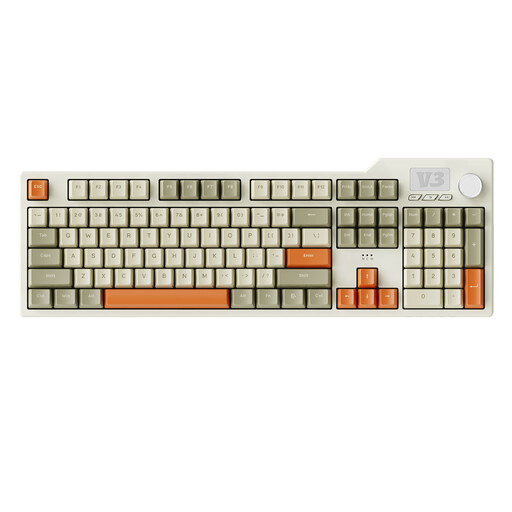 No image available
The full-size design is an option if you want a complete set of keys for gaming and work.
The product name lists 104 keys, USB-C, RGB, PBT keycaps and hot-swap capability.
 No image available
This variant could suit you if you want a German QWERTZ full-size keyboard with several connection options for your work and gaming setup.
The product name lists Bluetooth, 2.4 GHz wireless, USB-C, a gasket mount, a 10,000 mAh battery and hot-swap capability.
 No image available
The 80% design and German layout make this an option if you’re looking for a more compact keyboard for gaming and typing.
The product name lists 87 keys, mechanical switches, RGB, hot-swap capability, and wired, wireless and Bluetooth connections.
No. Macro keys are not a proven requirement for historical strategy games. The Creative Assembly / Total War manual describes selecting groups using keyboard inputs, so check which commands you actually use first and think of dedicated macro keys as an extra way to assign controls.
First, check the layout of the specific variant and test your most important in-game commands. If you have a programmable model, you can use the manufacturer’s software to set up your own key assignments. Whether certain macros are allowed in a particular online game depends on that game’s rules.
SteelSeries recommends using a microfibre cloth and tools to remove dust from between the keys, among other cleaning methods. For liquids, removable keycaps and cleaning products, also follow the instructions for your specific model.
For a typical distance purchase in the EU, you generally have a 14-day right to cancel from the date of delivery, subject to legal exceptions and conditions, such as those relating to return costs. The European Union’s consumer information also states that faulty goods are covered by a legal guarantee of at least two years; this is separate from a manufacturer’s warranty.
No. ASR A6 does not create a general legal obligation for private gamers to buy particular equipment. The Federal Institute for Occupational Safety and Health describes requirements for display screen workstations within the scope of the relevant employment law. If you work from home, the specific circumstances need to be considered separately.