Playing at night while someone else is sleeping
If you’re trying not to disturb someone who’s asleep, keeping typing noise to a minimum is your priority.


If you play while someone else is sleeping in the same room, start by checking the exact switch variant and how the whole keyboard is built to control noise – not just its gaming features. Then choose a layout that suits the commands you actually use: a full-size keyboard and extra keys give you more inputs within easy reach, while a TKL layout saves space by leaving out the number pad. A manufacturer’s “quiet” claim doesn’t guarantee a particular noise level where you play.
If you’re trying not to disturb someone who’s asleep, keeping typing noise to a minimum is your priority.
If you often use keyboard shortcuts in strategy games, check that the keys you need are easy to reach and can be mapped as you want.
If space around your keyboard is limited, consider whether you can do without a number pad.
First decide whether quieter typing or easy access to in-game commands matters more. Then check the layout, what’s included and the exact switch variant.
| What matters | What to check before buying | Who it matters to |
|---|---|---|
| Typing noise | Consider the switch variant, case insulation and the noise made by larger keys such as the space bar and Enter key together. | If you play while someone else is sleeping in the same room, quieter typing is a priority. Around 36% of consumers put keeping noise down first. |
| In-game commands and shortcuts | Make a note of the F keys, arrow keys and number pad keys you need, then check whether you can map your preferred commands in the game. | If you want to trigger lots of commands quickly, having the right keys and being able to map them is essential. Around 29% of consumers prioritise easy access to in-game commands. |
| Layout and desk space | Check whether you use the number pad, F keys and arrow keys, and confirm the dimensions of the specific variant. | If you play in a limited space, you can choose a smaller layout as long as it still has all the keys you need. Around 21% of consumers prioritise saving space. |
| What's included and customisation | Check what’s included, whether compatible replacement switches are available and that the specific variant is compatible with them. | If you want to customise your keyboard or avoid missing parts, check what’s included with the variant you choose. Around 14% of consumers first consider what they’re buying and any potential extra costs. |
The case design and stabilisers can affect typing noise as well as the switches. A manufacturer’s claim doesn’t confirm a comparable noise level for the keyboard as a whole.
Check the exact switch variant, case design and larger keys together. If possible, try the keyboard in the conditions you plan to use it in.
Razer describes Yellow switches on the Razer BlackWidow V4 as quiet and Green switches as clicky. Compact layouts leave out some keys or arrange them differently.
Check that the switch type and German layout match the listing, and make sure the keys you need for your game are included and easy to reach.
The Razer BlackWidow V4 75% is also available as a barebones version, which Razer says does not include switches or keycaps.
Check what’s included and allow for compatible parts before comparing this variant with a fully equipped keyboard.
You may also need to buy compatible switches and keycaps for the barebones version.
The Light Mount Silent Linear and Dark Mount Silent Linear are designed for buyers looking for quieter mechanical typing.
The Apex 3 TKL is a gaming keyboard available in a German layout, with switches the manufacturer describes as quiet.
The BlackWidow V4 has extra macro keys, while the BlackWidow V4 75% is a more compact, hot-swappable model in the range.
The MX Silent Red is an example of a dampened switch, while the MX BOARD 3.0S is available with different switch variants.
The VANGUARD 96 and VANGUARD PRO 96 are other models for which the manufacturer lists sound-dampening case materials.
This selection includes compact gaming keyboards and a full-size model, with a range of switch and layout options. Pay particular attention to the US layouts listed and check that they suit your needs.
 No image available
The 75% layout could be a good fit if you want to save space on your desk.
75% layout, TTC magnetic switches, RT mode, Type-C connection and an aluminium case; this variant comes in a two-tone Silver-Pink finish.
 No image available
The full-size layout could suit you if you want a number pad and plenty of keys within easy reach.
108 keys, hot-swappable switches, customisable pixel display, 8000-mAh battery and US layout. The product name specifies Silent Tactile Switches, but still consider how the keyboard sounds in your room.
 No image available
The 75% layout could be a good option if you want to save space and prefer a compact key arrangement.
Tri-mode connection, Flying Fish switches, volume control, 8000-mAh battery and hot-swappable switches; the layout is US QWERTY.
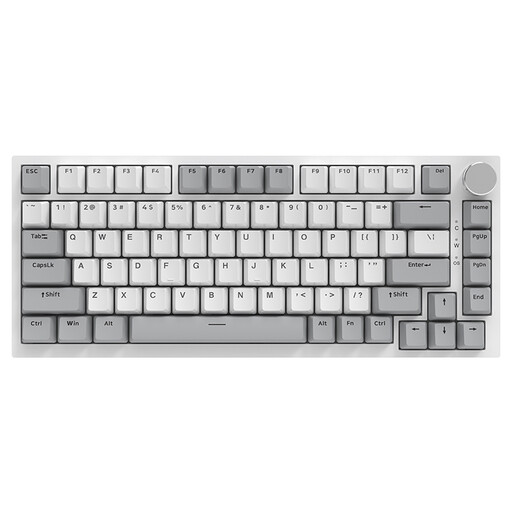 No image available
The 75% layout could suit you if you’re after a compact keyboard with a volume control and are happy with a US QWERTY layout.
Wired, 83 keys, hot-swappable switches, linear switches and a CNC volume control; the product description also lists compatibility with PC, Windows and Mac.
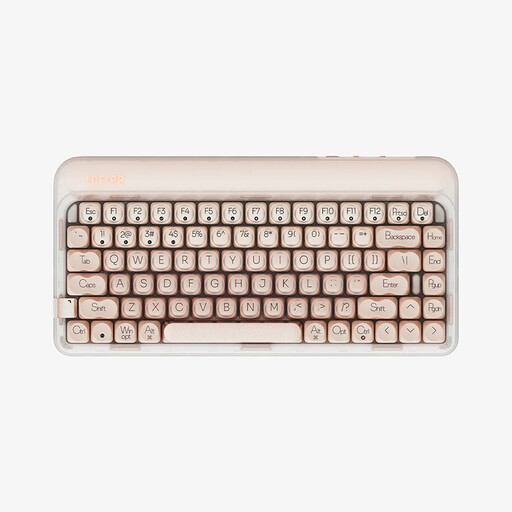 No image available
The 75% layout could suit you if you want a compact keyboard with function keys and are comfortable using a US QWERTY layout.
84 keys, three connection modes, hot-swappable switches, linear switches and a 4000-mAh battery; this variant is listed in Warm Pink.
No, not necessarily. It depends on the commands in the game you play and how you map them. A TKL keyboard doesn’t have a number pad, while Razer lists six extra macro keys for the BlackWidow V4.
Only if the keyboard is designed for it and you choose compatible switches. be quiet! lists hot-swap support for 5-pin MX-style switches for the Light Mount; Razer lists sockets for 3- or 5-pin switches for the BlackWidow V4 75%. Before changing the switches, check compatibility with your specific model and parts.
According to Razer, the BlackWidow V4 75% Barebones doesn’t include switches or keycaps. Check what’s included and make sure any additional parts you need are compatible before comparing it with a complete keyboard.
When you buy as a consumer online, you generally have a statutory right to cancel. The Verbraucherzentrale states that the 14-day period starts from the date the contract is made or the goods are received. Check the requirements for your specific purchase, and distinguish cancelling because you’ve changed your mind from your rights if the goods are faulty.
The seller is generally responsible for your statutory warranty rights. An additional guarantee is voluntary and subject to its own terms; the Verbraucherzentrale recommends contacting the seller if a product is faulty.