What to consider when buying
First, decide which keys you need to reach easily for work and how much space you have. Then compare the key feel and connection options for your particular workspace.
| What matters |
What to look for |
Who it matters to |
| Noise and typing feel |
Check the switch type and key feel; manufacturer claims about quiet switches are not comparable noise measurements. |
If I work and play at the same desk, I want a key feel that won’t distract me when I’m typing. Around 27% of consumers prioritise noise and typing feel. |
| Key access and mapping |
Match the arrow and function keys, number pad and custom mappings to the commands you actually use. |
I want to reach frequently used work commands or in-game actions easily, and I’ll only set up macros if I really use them. Around 27% of consumers prioritise easy access to keys and key mapping. |
| Space and layout |
Measure the available space and check which functions are assigned to secondary key functions on the specific size you’re considering. |
If desk space is limited, I’ll choose a smaller keyboard only if I can still reach the keys I need easily. Around 20% of consumers prioritise size and layout. |
| Connection |
Check the connection options supported by the specific model, whether you need a receiver and how it charges. |
I want to avoid cables on my desk or switch between devices, and I’ll factor in charging and setup. Around 13% of consumers prioritise flexible connection options. |
| Features and purchase terms |
Check what’s included with the exact variant, and distinguish between the right to cancel and the statutory guarantee. |
If I want a complete setup and need to keep the purchase terms in mind, I pay particular attention to variants and included accessories. Around 13% of consumers prioritise features and purchase terms. |
Joybuy keyboards for work and gaming
This selection includes compact keyboards for work and gaming. Check the exact layout for each model: the CHERRY XTRFY K4V2 is listed with a Pan-Nordic QWERTY layout.
 No image available
Razer Ornata V3 Tenkeyless – German layout
The TKL format could suit you if you need space beside your keyboard and can do without a number pad.
Tenkeyless format and German layout; the switches are described as clicky.
View at Joybuy
 No image available
Akko 3084B Plus Tri-Mode, 75%, ISO-DE, V3 Pro Cream Blue, Black & Gold
The 75% layout is worth considering if you want a more compact format with several connection options.
ISO-DE QWERTZ; Bluetooth, 2.4 GHz wireless and USB-C. The V3 Pro Cream Blue switches are described as tactile and clicky.
View at Joybuy
 No image available
Akko 5087S V1 TKL, Cream Yellow, ISO-DE, Black & Gold
This wired TKL keyboard could suit you if you want a German layout and can do without a number pad.
ISO-DE QWERTZ, wired; the Cream Yellow switches are described as linear.
View at Joybuy
 No image available
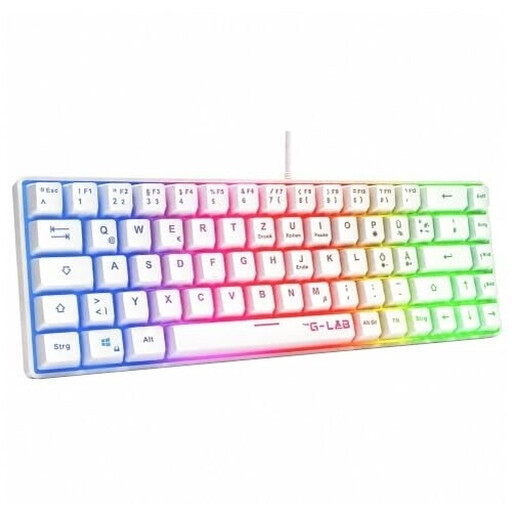
The G-Lab KEYZ-HYDROGEN-W/DE, 60%, membrane, white
The 60% format is an option if freeing up desk space matters more than having all standard keys readily accessible.
60% format, membrane design and German QWERTZ layout.
View at Joybuy
 No image available
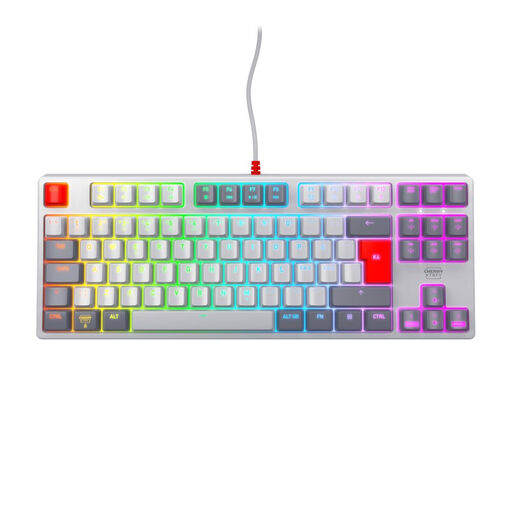
CHERRY XTRFY K4V2 TKL, MX2A Red, Pan-Nordic QWERTY
The wired TKL format could suit you if you want to save space and don’t need a German QWERTZ layout.
MX2A Red linear switches, USB connection and Pan-Nordic QWERTY layout; a German QWERTZ layout is not listed for this variant.
View at Joybuy
Frequently asked questions
Do I need macro keys or a particularly high polling rate for deck-building games?
Not necessarily. First, check which commands your particular game and work programmes use. Some models have programmable keys, but that alone does not demonstrate any particular advantage for deck-building games.
What should I check before using a wireless keyboard?
Check the connection mode, any equipment needed to connect it and how it charges. CHERRY lists Bluetooth, 2.4 GHz wireless and wired use while charging for the MX 3.0S Wireless; check what’s included with the specific variant.
How should I dispose of an old keyboard?
According to the German Environment Agency, electrical and electronic waste should not go in household rubbish. You can take it to a recycling centre, among other options; removable batteries should be handed in separately.
What rights apply when buying online from a business seller?
For a typical distance purchase, you generally have 14 days from delivery to cancel; exceptions and information about return costs should be taken into account. Your Europe, the European Union’s consumer portal, also explains the statutory guarantee of at least two years from the date you receive the goods. This is separate from a voluntary warranty.
Do I need a separate licence in Germany to use a wireless keyboard?
Wireless connectivity alone does not mean that buyers face a blanket ban or need an individual licence. The applicable EU product rules concern placing products on the market; the German Federal Network Agency, among other things, monitors radio equipment. The CE marking is a manufacturer’s declaration, not an independent quality seal.


