Which keyboard is right for you?

Noise-sensitive gamers

If you work and play at the same desk, compare the switch and case construction of the specific model rather than relying on the word ‘quiet’. CORSAIR and Logitech G describe noise-related features on certain models, but these claims aren’t a substitute for a standardised volume test.

Those who type a lot between games

A German layout may be important if you regularly type. Also consider whether you need a number pad for work: TKL models leave it out, while a full-size keyboard takes up more desk space. CHERRY offers the MX 3.1 in a DE/QWERTZ version, among other options.

Gamers with a small desk

A more compact format can free up space for your mouse, but the exact key layout still matters. With TKL or 75% models, check whether the arrow and function keys are easy to reach in the way you want to use them while gaming. Razer says the BlackWidow V4 75% retains these keys.

What to look for when buying

Membrane in a TKL format

A good fit if: quiet typing and a compact format are your priorities, and you don’t need a number pad.

Consider: CORSAIR says the K55 CORE TKL (DE) has membrane keys. This design doesn’t offer the switch-swapping option found on mechanical keyboards.

Dampened mechanical TKL keyboard

A good fit if: You want mechanical switches in a compact format. Logitech G lists linear and tactile GL switches for the wired G515 TKL.

Consider: There’s no number pad, and the stated dampening doesn’t indicate a specific noise level.

Full-size mechanical keyboard

A good fit if: You need a number pad for work. CHERRY lists MX2A Brown switches without a click and MX2A Red linear switches for the MX 3.1, among other options.

Consider: A full-size keyboard needs more space, and you’ll want to choose a switch option that suits your preferences.

Compact with swappable switches

A good fit if: You can manage without a number pad and might want to change switches later. Razer says the BlackWidow V4 75% has hot-swap sockets for compatible 3- or 5-pin switches.

Consider: Check the layout and what’s included carefully: according to Razer, the barebones version is supplied without switches or keycaps.

What matters What to check before buying Who it matters most to
Typing noise Check the switch option and case construction of the complete model; manufacturers’ claims aren’t a like-for-like decibel comparison. If I work and play at the same desk, I want to take typing noise into account without relying on the word ‘quiet’ alone. Around 36% of consumers would put typing noise first.
Layout and keys for work Check that it’s the DE/QWERTZ version and make sure it has the number pad, arrow keys and function keys you need. If I type regularly, I want a familiar German layout and the keys I need. Around 29% of consumers would prioritise layout and keys for work.
Space and gaming keys Measure the space available and check the layout of the exact version. If desk space is tight, I want room for my mouse and easy access to gaming controls. Around 21% of consumers would prioritise desk space and easy-to-reach gaming keys.
Features you need Decide in advance whether you want multiple connection options or hot-swap switches; check what’s included with each version. If I’m looking for a keyboard for a fixed workstation, I only want to choose features I’ll actually use. Around 14% of consumers would prioritise features that suit their needs.

Common buying mistakes

  • Assuming ‘quiet’ means the same thing across models

    Manufacturers describe noise reduction using different terms and designs. Their claims don’t allow for a direct comparison of volume between models.

    Compare the exact switch option and case construction. Don’t choose based solely on an unquantified description of how quiet a keyboard is.

  • Overlooking the missing number pad on a TKL keyboard

    TKL models don’t have a number pad. If you use one frequently at work, a compact format could disrupt your workflow.

    Before choosing a format, check which keys you actually need and compare TKL with full-size options.

  • Assuming similarly named versions are the same

    The wired Logitech G515 TKL and the G515 LIGHTSPEED TKL differ in their connection options. The contents of the box can also vary between versions of the Razer BlackWidow V4 75%.

    On the specific product page, check the full model name, connection, switches, DE layout and what’s included.

Key brands at a glance

CORSAIR

The K55 CORE TKL (DE) is a wired membrane option in a TKL format.

  • CORSAIR lists 12-key rollover for the model and confirms it has no number pad.
  • ‘Quiet’ is the manufacturer’s description, not the result of an independent volume test.

Logitech G

The wired G515 TKL is a low-profile mechanical TKL option for a workstation that doubles as a gaming setup.

  • Logitech G lists linear or tactile GL switches and a noise-dampening design.
  • The wireless connection options on the separately sold G515 LIGHTSPEED TKL don’t automatically apply to the wired G515 TKL.

CHERRY

The XTRFY MX 3.1 is a full-size mechanical option if you need a number pad.

  • CHERRY describes a dampened case structure and lists different switch options, including MX2A Brown without a click and MX2A Red with a linear feel.
  • A full-size keyboard takes up more desk space. Check the layout and switches for the specific version.

Razer

The BlackWidow V4 75% combines a compact format with the option to swap compatible switches.

  • Razer says the arrow and function keys are retained; the hot-swap sockets support 3- and 5-pin switches.
  • Razer also sells a barebones version without switches or keycaps, so check exactly what’s included.

SteelSeries

The Apex 3 range is another membrane option for a desk used for both work and gaming.

  • SteelSeries describes the Apex 3 as having a design intended to reduce acoustic vibrations.
  • For the specific version, check that the German keyboard layout you want is available.

Joybuy keyboards for work and play

The following Joybuy listings include compact TKL and 75% models, as well as full-size keyboards. When comparing them, pay particular attention to the German layout, number pad, switches and connection options you need for your desk.

Akko 5087S V1 TKL, wired mechanical keyboard, ISO-DE QWERTZ

Akko 5087S V1 TKL, ISO-DE QWERTZ

The TKL format is worth considering if you can manage without a number pad at a fixed workstation.

Wired; Akko V3 Pro Cream Yellow switches; hot-swap; RGB; ISO-DE QWERTZ; black and gold.

View at Joybuy
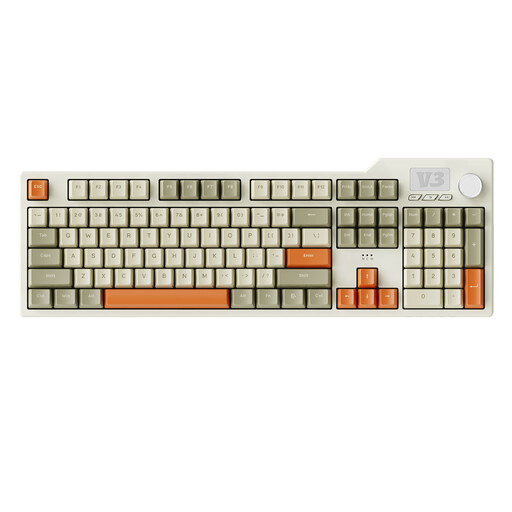
AJAZZ AK35I V3 full-size gasket gaming keyboard

AJAZZ AK35I V3 Full-Size Gasket

If you need a number pad for work, a full-size keyboard could be a good fit; it takes up more desk space than a compact layout.

Wired; mechanical; 104 keys; USB Type-C; RGB; PBT keycaps; hot-swap.

View at Joybuy

AJAZZ AK35I V4 full-size, German QWERTZ layout

AJAZZ AK35I V4, German QWERTZ layout

This full-size version is an option if you want German QWERTZ, a number pad and several connection options; make sure you have room for its larger size.

Mechanical; tri-mode: Bluetooth, 2.4G and USB-C; gasket mount; 10000mAh; 1.14" TFT colour display; hot-swap.

View at Joybuy

Razer Ornata V3 Tenkeyless gaming keyboard with German layout

Razer Ornata V3 Tenkeyless, German layout

The TKL format is a more compact option if you can do without a number pad. If typing noise bothers you, bear in mind that the switches are described as clicky.

Gaming keyboard with German layout.

View at Joybuy

Akko 3084B Plus, 75% keyboard with ISO-DE layout

Akko 3084B Plus, 75% ISO-DE

The compact 75% format with an ISO-DE layout is worth considering if you want to use less desk space and swap the switches when needed. If typing noise matters to you, bear in mind that the switches are described as clicky.

Mechanical; tri-mode: Bluetooth, 2.4G and USB-C; Akko V3 Pro Cream Blue switches; hot-swap; RGB; black and gold.

View at Joybuy

Frequently asked questions

Does a gaming keyboard for puzzle adventures have to be mechanical?

No. If quiet typing and a straightforward wired setup matter more to you than swappable switches, you can also compare membrane options; CORSAIR describes the K55 CORE TKL in these terms. With mechanical models, choose switches to suit the feel you prefer, and don’t treat noise claims as a standardised measurement.

How do I set up a compact keyboard for work and gaming?

Compare its footprint and key layout with your desk, and check whether you want arrow or function keys within easy reach. Razer says the BlackWidow V4 75% retains these keys; TKL models don’t have a number pad.

What should I bear in mind when cleaning or disposing of an old keyboard?

Follow the cleaning instructions from the relevant manufacturer. In Germany, an old electrical keyboard shouldn’t go in household waste; the Federal Environment Agency lists recycling centres and suitable take-back points at retailers.

What rights apply when buying online in Germany?

For a qualifying distance purchase, you generally have a 14-day right to cancel from the date of delivery; exceptions and conditions apply. Your Europe, the European Union’s information portal, distinguishes this right from the seller’s statutory legal guarantee, which lasts for at least two years from receipt of the goods.

How can I tell whether a wireless model is intended for the EU market?

Radio equipment is covered by the EU legal framework for radio equipment. Where relevant harmonised rules require it, the CE marking is the manufacturer’s declaration of conformity, not an independent quality mark. Check the product labelling and accompanying information for the specific wireless version; you can’t tell from the brand name alone.