What to look for when buying
Start by checking the switches and layout, then consider the size and connection. This will help you find a keyboard that works for both your job and your games.
| What matters |
What to check before buying |
Who will find this especially important |
| Key noise |
Check the exact switch variant and any details about sound dampening; don’t treat “quiet” as a decibel comparison. |
If you work and play in the same spot, you’ll want to avoid unnecessary noise from typing. Around 28 % of consumers prioritise noise when typing and gaming. |
| Accessible in-game commands |
Check that the key layout suits your preferred assignments, and bear the game’s rules in mind when using macros. |
If you want quick access to frequent in-game actions, the right key layout matters more than having the smallest possible keyboard. Around 22 % of consumers put this need first. |
| Layout for work |
Check that the specific model has a DE/QWERTZ layout and the work and navigation keys you need. |
If you type in German every day, you’ll want a keyboard that suits your familiar layout and work tasks. Around 22 % of consumers prioritise getting the right layout for work. |
| Desk space |
Compare the space available with your need for a number pad, arrow keys and function keys. |
If you need room for your mouse and work essentials, you might be happy to do without a number pad. Around 17 % of consumers prioritise the amount of desk space available. |
| Connections and changing workstations |
Check whether the specific model uses USB, Bluetooth or wireless connectivity, and whether you need a receiver or compatibility with particular devices. |
If you switch devices or change your setup, make sure the connection will work for you. Around 11 % of consumers focus mainly on finding the right connection options. |
Joybuy keyboards
This selection includes wired and wireless mechanical models in TKL, compact and full-size formats. Layout, key selection and connections vary by version.
 No image available
Akko 5087S V1 TKL, ISO-DE-QWERTZ
A good fit if a German QWERTZ layout and a TKL design without a number pad work for both your job and your games.
ISO-DE-QWERTZ; wired; linear Akko V3 Pro Cream Yellow switches; hot-swappable; RGB lighting.
View on Joybuy
 No image available
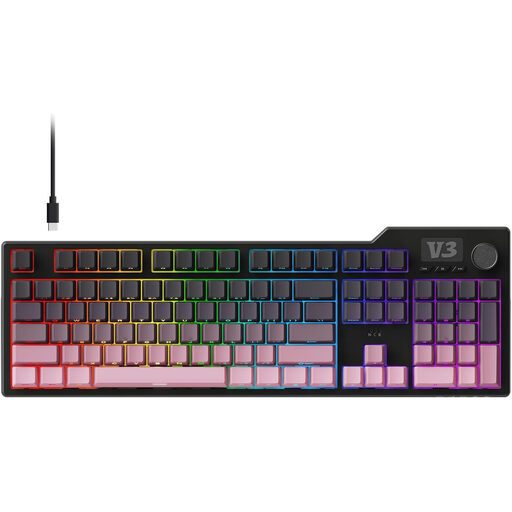
AJAZZ AK35I V3, full-size
If you want to keep the number pad and assign extra in-game commands, this full-size model offers programmable macros.
104 keys; wired USB connection; volume control; the product description lists a gasket design with five sound-dampening layers and linear, pre-lubricated switches. Check the layout of the specific version.
View on Joybuy
 No image available
Redragon RS68, 65%, 68 keys
A compact option if you’re short on desk space and switch between devices or connection types.
65% layout with 68 keys; Bluetooth, 2.4 GHz wireless or wired; detachable wrist rest; linear switches. Check the layout of the specific version.
View on Joybuy
 No image available
AJAZZ AK35I V4, German QWERTZ
If you want German QWERTZ, a number pad and several connection options, this full-size version combines all three.
Bluetooth, 2.4 GHz wireless or USB-C; gasket design; 10000mAh battery; 1.14" TFT colour screen; hot-swappable.
View on Joybuy
 No image available
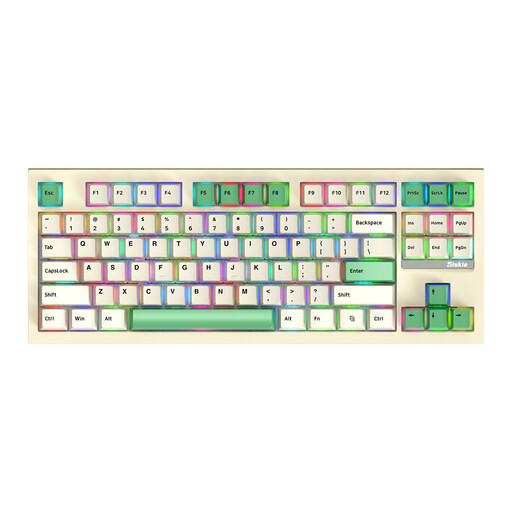
Siukie PL87W, TKL, 87 keys
A TKL option if you’re looking for a more compact format and a choice of connection types. Check that the layout of the specific version suits your everyday work.
Bluetooth, 2.4 GHz wireless or wired; hot-swappable; RGB lighting; the product description lists Anti-Ghosting and N-Key-Rollover.
View on Joybuy
Frequently asked questions
Do I need a particularly high polling rate for survival games?
The manufacturers’ polling-rate information available doesn’t establish an advantage in any particular survival game. First decide whether the layout, accessible keys and feel suit your work and the game.
How do I set up extra gaming keys?
First, compare the key assignments with the options available in the game. Razer lists six macro keys for the BlackWidow V4 X; CORSAIR describes key assignments through iCUE for the K70 CORE. Whether a particular automation is allowed depends on the rules of the game.
What should I know about cleaning and disposal?
Follow the cleaning instructions for your specific model; the Apex 3 TKL’s IP32 rating doesn’t apply to all keyboards. The German Environment Agency advises that old electrical appliances shouldn’t go in household waste, but should be taken to an appropriate collection point.
What are my rights if a new keyboard is faulty?
For consumer purchases in Germany, new faulty goods are generally covered by statutory rights against the seller for two years, as explained by the Verbraucherzentrale consumer advice service. These are separate from a voluntary manufacturer’s guarantee. Depending on the circumstances, you may also have a right to cancel an online purchase.
What applies to CE marking on a wireless keyboard?
The German Federal Network Agency explains that products covered by relevant EU harmonisation legislation must carry a CE mark. CE is the manufacturer’s declaration of conformity, not an independent quality mark. Check the marking and required documentation for the specific wireless version.


