Players who make rapid repeated inputs
If you often practise fast movements or rhythms, adjustable actuation and reset can be important. RTINGS distinguishes keyboard latency from human reaction time.


For frequent, rapid repeated inputs, adjustable actuation and Rapid Trigger are useful features to consider; they won’t automatically improve your human reaction time. If you do a lot of typing on the same keyboard, you’ll also want to consider the key feel, noise, German layout and the keys you need. A compact or particularly sensitive keyboard is only a good fit if its limitations suit your working day.
If you often practise fast movements or rhythms, adjustable actuation and reset can be important. RTINGS distinguishes keyboard latency from human reaction time.
If you write longer pieces after training, consider the key feel, noise and a layout that suits your working day, too. CHERRY describes the MX 3.1 as having a dampening construction, although the noise level at your own desk will still depend on the specific conditions.
A smaller form factor can leave more room for mouse movement. RTINGS also points out that compact layouts may omit features such as the number pad, function row or dedicated arrow keys.
First, decide whether adjustable inputs are important for your training. Then check that the layout, typing feel and connection suit your working-from-home routine.
| Buying consideration | What to check before buying | Who is it important to? |
|---|---|---|
| Repeated inputs | Check that the exact model has Rapid Trigger and an adjustable actuation point; compare latency measurements only when the method and configuration are comparable. | If I practise fast inputs, I want to be able to adjust how the keys actuate and reset. This applies to around 36% of consumers whose main concern is repeated inputs. |
| Typing and noise | Check the switch type and construction; if possible, assess the key feel under the conditions in which you’ll use it. | If I work and play at the same desk, I want a keyboard that’s suitable for longer periods of typing and doesn’t cause unnecessary disruption in the room. Around 29% of consumers prioritise typing feel and noise. |
| Space and keys | Check the German layout and compare your need for arrow, function and number pad keys against the specific version. | If I’m short on desk space, I want more room for my mouse without losing keys I need for work. Around 21% of consumers with this as their main concern feel the same. |
| Connection and setup | Check that the exact model version offers the connection you need and supports your preferred software and operating system. | If I want to set up the keyboard easily and connect it for the way I use it, the right combination of connection options and settings matters to me. Around 14% of consumers prioritise this practical consideration. |
A latency measurement records keyboard input under specific settings. It doesn’t tell you how quickly you notice a situation and react to it; RTINGS describes its latency tests as using defined configurations for each test.
Compare measurements only when the test method and configuration are similar. Choose Rapid Trigger based on your needs, rather than relying on a promoted figure alone.
Compact layouts may omit the number pad, function row or dedicated arrow keys. That can be inconvenient during the working day, even if the smaller form factor saves desk space.
Before choosing, make a note of the keys you use every day and compare them with the layout of the specific version.
A manufacturer’s description of a dampening construction doesn’t guarantee a particular noise level at your own workstation.
Check the switch type and, if possible, assess the key feel in conditions similar to your home office.
Razer lists the Huntsman V3 Pro Tenkeyless and Huntsman V3 Pro Tenkeyless 8KHz as separate versions. The names alone aren’t enough to assume that their features or layouts are the same.
Before ordering, compare the full model name, version, key layout and features you need.
The Apex Pro TKL Gen 3 combines a TKL form factor with adjustable magnetic switches. The Apex 3 range is a different option, with features designed around quieter switches.
The PRO X TKL RAPID is a wired TKL keyboard with magnetic analogue switches and configurable input.
The Huntsman V3 Pro Tenkeyless features analogue optical switches and adjustable actuation.
The 60HE+ is a compact 60% keyboard with analogue input and Rapid Trigger.
The MX 3.1 is a wired mechanical alternative for players who also do a lot of typing and don’t need freely adjustable magnetic actuation.
The Joybuy options below include compact gaming keyboards as well as models with magnetic switches and Rapid Trigger. For each version, check that the layout and key arrangement suit your day-to-day typing.
 No image available
The TKL form factor and listed German layout are worth considering if you want more room for your mouse while still typing in German.
Listed in the product title: wired, mechanical, hot-swappable, RGB and Akko V3 Pro Cream Yellow switches.
 No image available
The magnetic switches and Rapid Trigger mentioned in the title are features to consider if you want to adjust repeated inputs.
The title describes this model as a gaming keyboard with Hall Effect switches.
 No image available
The 75% form factor listed in the title is a compact option; check that the key layout covers the work functions you need.
Listed in the product title: Hall Effect switches, hot-swappable, wired mode and Rapid Trigger.
 No image available
The magnetic switches and Rapid Trigger are worth considering if you want to adjust repeated inputs.
The product title lists a compact 68-key form factor and a US layout. The key arrangement may differ from what you’re used to when typing in German.
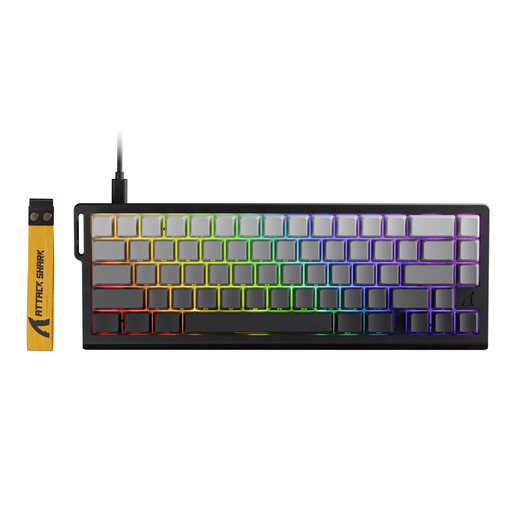 No image available
The product title lists magnetic switches and Rapid Trigger for players who want to adjust repeated gaming inputs.
Before buying, check that the layout of the specific version suits your typing needs.
There’s no evidence of that. Rapid Trigger changes when the keyboard registers a key again after it moves; the feature doesn’t automatically measure or improve your personal reaction time. When comparing keyboards, consider the conditions used for latency measurements, as described by RTINGS for its tests.
Start with an actuation setting you can control, then test repeated key presses separately from everyday typing. CORSAIR explains how to activate and adjust Rapid Trigger in iCUE or Web Hub for specifically supported models with MGX switches; this guidance doesn’t apply to all keyboards.
Your statutory rights against the seller are separate from any voluntary guarantee. According to the Verbraucherzentrale, for distance contracts you generally have a 14-day right to cancel from the date you receive the goods; you must notify the seller that you’re cancelling. Check the specific circumstances of your contract and any exceptions that may apply.
For products covered by the relevant EU harmonisation rules, the manufacturer uses the CE marking to declare conformity; as the Bundesnetzagentur explains, it isn’t an independent quality mark. A discarded keyboard is electrical waste and mustn’t go in household rubbish. The Umweltbundesamt lists recycling centres and suitable collection points.