For city-building games played with headphones, focus on the noise in the room, the keys you need close to hand and the space you need for your mouse. Don’t choose based on general gaming specs alone. If you share the room, check the exact switch variant and how noisy the complete keyboard is: headphones won’t make clicky keys quieter for anyone else. TKL models do away with the separate number pad, while customisable full-size models take up more desk space.
Who are the different keyboards suited to?
Considerate evening gamers
If you wear headphones but share the room with others, check the exact switch variant and how noisy the complete keyboard is. SteelSeries describes the Apex 3 TKL as having Whisper Quiet switches. This is a manufacturer claim, not a comparison of noise levels across different keyboards.
City-builders who use lots of inputs
If you often want certain keys close to hand when building, managing or typing, compare the TKL and full-size layouts, macro and media controls, and the space you have available. Keychron lists a full-size layout and VIA macros for the V6 Max DE-ISO.
Players short on desk space
If you want to leave as much room as possible for your mouse, a TKL model could be a good fit. Check first that you’re happy to go without a separate number pad; the SteelSeries Apex 3 TKL doesn’t have one.
Which buying criteria matter?
Start by deciding what matters most to you during longer building and management sessions. Then compare the switches, layout and extra features of the specific variant with your desk and the way you play.
| Buying criterion |
What to check before buying |
Who is it most important to? |
| Key noise |
Check the exact switch variant and assess the noise of the complete keyboard; a switch type advertised as quiet isn’t a noise-level comparison. |
If I play in a shared room with headphones in the evening, I want to limit the noise others hear, so I look at the whole keyboard. Around 36% of consumers say noise is their top buying priority. |
| Keys close to hand and layout |
Check that the specific variant has a German ISO-DE or QWERTZ layout, a number pad, and the arrow and function keys you need. |
If I often enter numbers or want to reach certain keys without detours, I pay attention to the layout and which keys are included. Around 29% of consumers put easy access and the right key layout first. |
| Desk space and longer sessions |
Check the width of the keyboard and the space available beside your mouse. Also consider your setup and posture for longer gaming sessions. |
If my desk is short on space, I need enough room for my mouse and a setup that works for me. Around 21% of consumers make space and sitting comfort their main buying considerations. |
| Customisation and connectivity |
Check which macro and media features you need, as well as whether you want a wired or wireless connection. |
If I want to assign my own commands or control media directly, I need the right features and compatible software. Around 14% of consumers prioritise customisation and connectivity options. |
Which mistakes should you avoid?
-
Assuming headphones or linear switches make for silent gaming
Headphones don’t change what other people in the room can hear. Manufacturers describe different ways of reducing key noise, which can’t necessarily be compared like for like.
Check the exact switch variant and, where possible, assess the complete keyboard under comparable conditions. Don’t choose a clicky switch just for its other features.
-
Choosing a compact layout without checking which keys are missing
A TKL model leaves out the separate number pad; a full-size model keeps it and takes up more space.
Compare the keys included with the ones you use most often, and check that the keyboard fits your desk.
-
Confusing case dampening with a silent switch
The noise-dampening case structure of the CHERRY XTRFY MX 3.1 and the built-in dampening of the separately sold CHERRY MX Silent Red are different manufacturer claims. This doesn’t mean every MX 3.1 comes with that switch.
Before buying, check the exact switch name and model variant.
Brands worth considering
SteelSeries
The Apex 3 TKL DE is a compact, non-mechanical option with media controls.
- SteelSeries lists Whisper Quiet switches, a volume control and IP32 for this model.
- TKL means there’s no separate number pad. The description ‘quiet’ is a manufacturer claim, not an independent comparison of noise levels.
Razer
The BlackWidow V4 is a standard-size mechanical keyboard with macro and media keys.
- Razer offers a clicky Green switch and a Yellow switch advertised as quiet.
- The standard-size layout takes up more desk space than a TKL model. Check which switch variant is included in the specific listing; ‘quiet’ isn’t a measured value.
Keychron
The V6 Max DE-ISO combines a full-size layout with customisable keys.
- For the ISO range, Keychron lists VIA, hot-swap switches, 2.4 GHz wireless and Bluetooth.
- A full-size keyboard needs enough room on your desk. Check that the DE-ISO variant you want is available.
CHERRY
CHERRY offers both a wired mechanical keyboard with a dampened case structure and the MX Silent Red as a standalone switch.
- CHERRY describes the MX 3.1 as having a noise-dampening structure and the MX Silent Red as having built-in dampening.
- These claims refer to different products. Check the switches fitted to the specific keyboard variant.
Cooler Master
The MK770 is a customisable mechanical keyboard with hot-swap switches, macro software and several connection options.
- Cooler Master describes a gasket construction designed to reduce vibration and noise.
- This doesn’t mean the keyboard is silent, or that switch and layout options are the same in every region.
Keyboards at Joybuy
The Joybuy range includes compact and full-size keyboards with different switches, layouts and customisation features. Before buying, pay particular attention to the exact key layout and switch variant.
 No image available
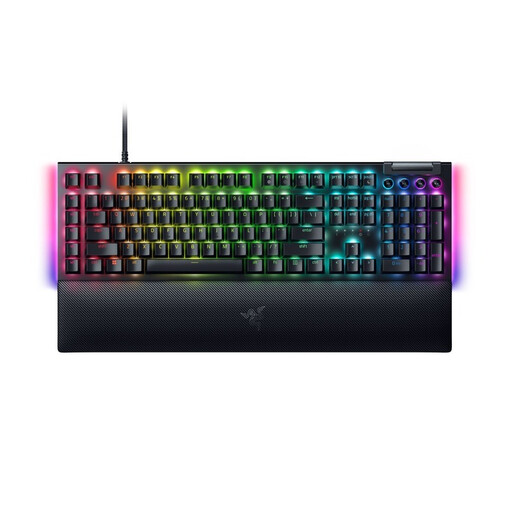
Razer BlackWidow V4 Yellow Switch, German layout
A mechanical option if you’re looking for a German layout and media controls. Razer describes the Yellow switch as quiet, but doesn’t provide a comparative measurement.
Yellow switch; German layout; programmable keys; volume and media keys.
View at Joybuy
 No image available
Akko 5087S V1 TKL, Cream Yellow switches, ISO-DE
The TKL format is a good fit if you want more room beside your keyboard and can do without a separate number pad.
Wired; mechanical; ISO-DE QWERTZ; hot-swap; RGB lighting.
View at Joybuy
 No image available
AJAZZ AK35I V4, German QWERTZ layout
A full-size option if a separate number pad and several connection options are important to you.
Tri-mode connection: Bluetooth, 2.4 GHz and USB-C; hot-swap; German QWERTZ layout; 10,000 mAh; 1.14-inch colour display.
View at Joybuy
 No image available
Logitech MX Mechanical, Tactile Quiet, German QWERTZ
A mechanical keyboard with a German layout, Tactile Quiet switches and more than one connection option.
Tactile Quiet switches; Bluetooth and Logi Bolt; German QWERTZ layout; graphite.
View at Joybuy
 No image available
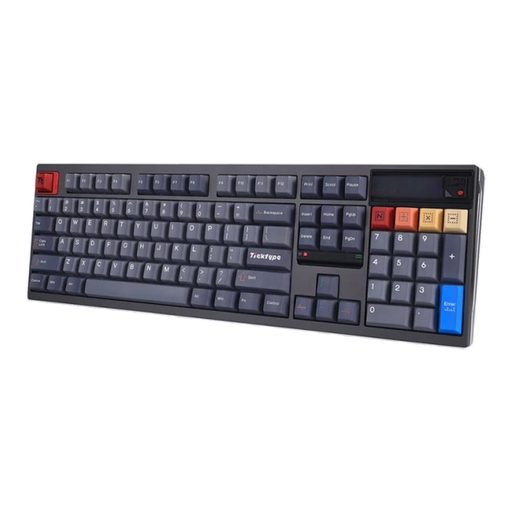
Ticktype DP104, Silent Tactile, US layout
A customisable full-size option; the listed US layout differs from the German key layout.
108 keys; tri-mode connection; hot-swap; Silent Tactile switches. US layout.
View at Joybuy
Frequently asked questions
Do I need a mechanical keyboard for city-building games?
No, a mechanical keyboard isn’t essential for city-building games. Choose one based on the typing feel you prefer and the features you need. SteelSeries also offers the non-mechanical Apex 3 TKL, which the manufacturer describes as having Whisper Quiet switches.
How do I set up macros and media controls?
First, check that your specific model supports the features you want and has compatible software. Keychron lists VIA for key assignments and macros on the V6 Max; SteelSeries lists a volume control and media keys for the Apex 3 TKL.
Can I replace the switches in a mechanical keyboard?
That depends on whether your specific variant supports hot-swap and which switches are compatible with it. Keychron lists replaceable MX switches for the V6 Max ISO; hot-swap isn’t a feature of all mechanical keyboards.


