When reviewing tournament footage on a large screen, choose a keyboard that suits your playback device and viewing distance. First, check whether it supports Bluetooth or a USB receiver, and whether the connection works from where you plan to sit. If you’ll be pausing and rewinding frequently, accessible keys and shortcuts that work with your video software matter more than gaming features that offer no proven advantage for video playback. If you’re sitting right next to your computer, a wired keyboard may also be a good fit.
Which controls suit you?
Reviewing footage from your seat
You control footage from a distance from the connected computer, so you’ll need a supported connection and playback controls that are easy to reach. Corsair and ASUS models offer different wireless connection options.
Analysing footage at your computer
You watch clips repeatedly, rewind and use the keyboard for other tasks at the same time. What matters is whether the shortcuts in your video software suit the way you work.
Reviewing footage in shared spaces
For longer or group viewing sessions, you may also want to consider typing noise and the possibility of having to stop to recharge. For wireless models, check the conditions attached to battery-life claims and the switch type.
What should you look for when buying?
First, work out how far you’ll be sitting from your playback device and which connections it supports. Then check the playback shortcuts you need, the right layout and any potential issues with noise or charging.
| Priority |
What to check |
Who it matters most to |
| Connection from your seat |
Bluetooth support or a compatible USB receiver; test the connection from where you plan to sit. |
If I want to control footage from my seat, the keyboard needs to connect reliably to my playback device. Around 31% of consumers put a suitable connection first. |
| Video controls |
Check that the keys are easy to reach and that the shortcuts work with your video software. |
When pausing and rewinding repeatedly, I want to issue commands without having to search around. Around 25% of consumers prioritise suitable video shortcuts. |
| Playback device and layout |
Check the operating system, connection, keys you need and the exact keyboard layout. |
If I use the keyboard with different devices or type notes while reviewing footage, the connection and layout need to be right. Around 19% of consumers prioritise device and layout compatibility. |
| Typing noise |
Check the switch type and any sound dampening; dampening doesn’t mean a keyboard is silent. |
In a shared space, I want to disturb others as little as possible during longer viewing sessions. Around 13% of consumers put quiet operation first. |
| Power |
For rechargeable models, check charging requirements and whether they can also be used in wired mode. |
If a viewing session runs long, I want to avoid unplanned charging breaks. Around 12% of consumers prioritise uninterrupted power. |
Common misconceptions
-
Gaming speed automatically improves video analysis
Fast gaming inputs don’t prove that playback and navigation will be easier in your video software.
Check which shortcuts you need and whether you can customise them in the software you use.
-
US QWERTY and German layouts are interchangeable
The layout can vary between specific product versions. This matters particularly if you type notes while reviewing footage.
Check the layout listed for the complete product version, not just the model name.
-
A shortened model name always refers to the same version
Similar model names can refer to versions with different layouts or switches.
Check the full model name, layout and switch type before assuming a product is the version you’re looking for.
Brands to consider
The following notes apply to the product lines mentioned and aren’t a general recommendation for an entire brand.
Corsair
The K65 PLUS WIRELESS combines a 75% form factor with Bluetooth, 2.4GHz wireless and USB.
- Corsair says media commands are available via Fn shortcuts.
- This model has no number pad. The stated maximum battery life applies with the lighting switched off.
ASUS ROG
The ROG Strix Scope II 96 Wireless offers a 96% layout with a number pad, plus three connection options.
- The manufacturer’s German product information lists a multifunction dial for media and volume controls.
- The larger layout takes up more desk space than a 75% model. According to ASUS, the keycap material may vary by region.
Logitech G
The G915 X LIGHTSPEED is designed for users looking for low-profile mechanical keys, media keys and customisable controls.
- Logitech G lists KEYCONTROL and media keys among its features.
- The manufacturer’s information doesn’t confirm that every video programme or playback device will support all key assignments.
Razer
The BlackWidow V4 Tenkeyless HyperSpeed combines a layout without a number pad with Bluetooth, 2.4GHz wireless and media controls.
- Razer says the dial and function keys can be remapped.
- Without a number pad, you miss out on keys that may be useful for taking notes. Sound and typing feel depend on the switch type.
SteelSeries
The Apex Pro TKL Wireless Gen 3 is a wireless TKL option for users who want customisable gaming inputs as well as a keyboard for reviewing video.
- The product information lists 2.4GHz wireless and Bluetooth.
- Gaming features alone don’t prove an advantage when playing video files.
Joybuy products for reviewing video
This selection of Joybuy products includes wireless models and wired keyboards for reviewing footage at your computer.
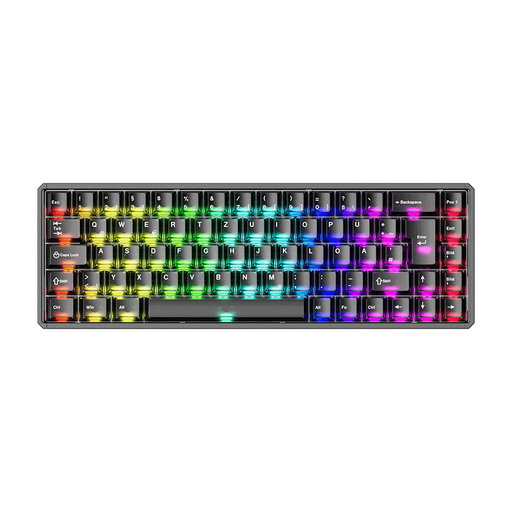 No image available
Akko MOD68-HE Tri-Mode Wireless Mechanical Keyboard
This model could be a good fit for wireless viewing, provided your playback device supports the connection method you choose.
The product name lists Tri-Mode, a CNC aluminium case and AstroAim Magnetic Switches.
View at Joybuy
 No image available
CHERRY MX-LP 2.1 Wireless Gaming Keyboard
If you want to control playback from your seat, check that your playback device supports the intended wireless connection.
65% form factor, German QWERTZ layout, MX Low Profile Speed Switches and Tri-Mode connectivity with 2.4GHz, Bluetooth and USB-C.
View at Joybuy
 No image available
CHERRY XTRFY K4V2 TKL Wired Mechanical Gaming Keyboard
A wired keyboard may suit you if you’re reviewing footage right at your computer, though the cable may limit how far away you can position it.
TKL form factor, German QWERTZ layout, MX2A RED Switches and wired USB-A connection.
View at Joybuy
 No image available
CHERRY XTRFY MX 3.1 Mechanical Gaming Keyboard
If you use playback commands frequently, a programmable media panel could be useful. Check that its controls work with your video software.
Full-size layout, German layout, MX2A Brown Switches, aluminium frame and wired USB connection.
View at Joybuy
 No image available
AJAZZ AK35I V4 Wireless Mechanical Keyboard
For wireless control from your seat, check that your playback device supports this specific model’s connection.
Full-size layout, German QWERTZ layout, Tri-Mode connectivity with Bluetooth, 2.4GHz and USB-C, a 10,000mAh battery and a 1.14-inch TFT colour screen. The Cream-Blue-Pro switches are described as tactile and clicky, so they may be disruptive in shared spaces.
View at Joybuy
Frequently asked questions
Can I use media keys to rewind by a specific amount in any video software?
No, not automatically. VideoLAN’s VLC desktop documentation lists playback commands for VLC. Check the shortcuts and customisation options in the software you actually use.
How do I set up a keyboard to review footage on a large screen?
Connect it to the device playing the video using a connection supported by both. You’ll need a suitable port for a USB receiver; for Bluetooth, the playback device must support Bluetooth keyboards. Then check the playback shortcuts from your seat.
What should I consider when it comes to care and ongoing costs?
If you choose a rechargeable model, plan for charging and check whether you can also use it with a wired connection. The Verbraucherzentrale distinguishes between your statutory rights when goods are faulty and a voluntary guarantee offered by the seller or manufacturer.
Which markings should I check on a wireless keyboard?
Check the product information and accompanying documents for the specific version. The Bundesnetzagentur lists correct CE marking and product identifiability among the points it checks when monitoring the market. One marking alone doesn’t replace checking the rest of the information.
Can I return a keyboard bought online?
In Germany, consumers generally have 14 days from receiving goods to withdraw from an online purchase. The Verbraucherzentrale explains this period; check for possible exceptions and the terms of your specific contract.


