
Lieferung heute & morgen

Qualitätsgarantie

Willkommens-Angebote freischalten: KOSTENLOSE Lieferung | Bis zu 80 % RABATT | Kostenlose 30-Tage-JoyPlus-Testphase
App herunterladen
A gaming keyboard doesn't have to come with lots of lighting effects or an exceptionally high polling rate. What really matters is whether the layout, form factor, switch technology and connection method fit your everyday life. PC gamers often look for quick keystrokes and reliable anti-ghosting, while home office users prefer a familiar layout, quiet typing and handy media controls.
The selection criteria below will help you cut through the marketing claims and avoid a purchase you'll regret.
Some compact models are sold with a QWERTY US layout. The arrangement of Z and Y, special characters and umlauts differs from a German keyboard. If you regularly type in German, you'll need to get used to it or adjust your operating system settings. For the office, university or home office, a model explicitly labelled as a QWERTZ keyboard or "German layout" is usually the simpler choice.
A 60% keyboard saves space, but often lacks a separate function key row, a number pad and sometimes even dedicated arrow keys. These functions are then accessed via an Fn layer. A 75% keyboard or TKL keyboard offers more direct keys while remaining more compact than a full-size model. Before you buy, check whether you regularly need F-keys, arrow keys or navigation keys.
"Mechanical-feel" doesn't necessarily mean a mechanical keyboard. The MageGee TS91, for example, is described as using membrane technology with a mechanical typing feel. A genuine mechanical gaming keyboard, on the other hand, uses individual mechanical switches. With hot-swap models, you should also pay attention to compatibility: some sockets only support certain 3-pin or 5-pin switches.
Linear switches move smoothly without a tactile bump and are often chosen for fast keystrokes. Tactile switches provide a noticeable bump when actuated. Clicky switches produce a distinct clicking sound and are therefore not suitable for every office environment.
A hot-swap keyboard allows you to replace compatible switches without soldering. This makes later adjustments easier, but it doesn't mean every switch will automatically fit. Be sure to check the stated pin compatibility before you buy.
With a Hall-effect keyboard, the key position is detected magnetically. Models like the MageGee 60% Rapid Trigger Gaming Keyboard and the AULA Hero 68 are advertised with an adjustable actuation point and rapid trigger mode. The stated values should be understood as product specifications, not as a general guarantee of better gaming performance.
A wired keyboard doesn't need a battery and offers a direct USB connection. A detachable USB-C cable makes it easier to transport and replace. A wireless keyboard is more flexible, but needs to be charged or powered by batteries. Multi-device models like the RAPOO E9310M are advertised as supporting Bluetooth and 2.4 GHz, as well as switching between up to four devices.
An RGB keyboard offers customisable colours and effects. For daily use, however, brightness control, clearly legible keycaps and easy storage of your settings are also important. A keyboard with a volume control can be more practical for gaming and working than relying on software controls.
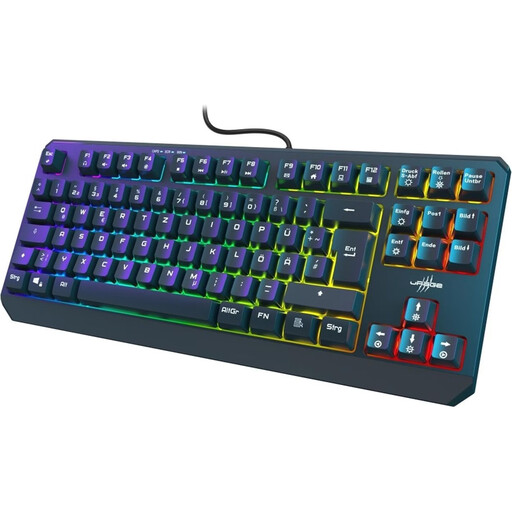
Why this keyboard fits the profile: The German 88-key layout gives you direct arrow and function keys without the extra space a number pad takes up.
The explicitly stated QWERTZ-DE layout reduces confusion when typing in German. The wired USB-C connection requires no battery maintenance.
26-key rollover, WIN lock, seven colour options or gradients and 12 multimedia functions according to the product description.
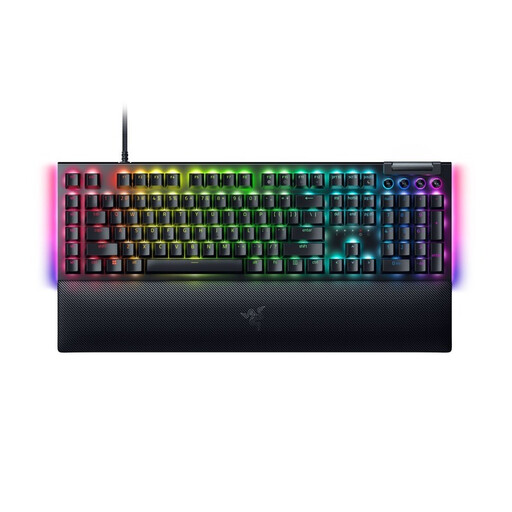
Why this keyboard fits the profile: The full-size format with a German layout is aimed at users who want to combine gaming, media control and productive work.
The German QWERTZ layout is clearly stated. The linear, quiet Yellow switches differ from clicky switches and may be more suitable for shared spaces.
10-zone Razer Chroma RGB, dedicated media keys, multi-function dial, detachable USB-C cable and wrist rest.
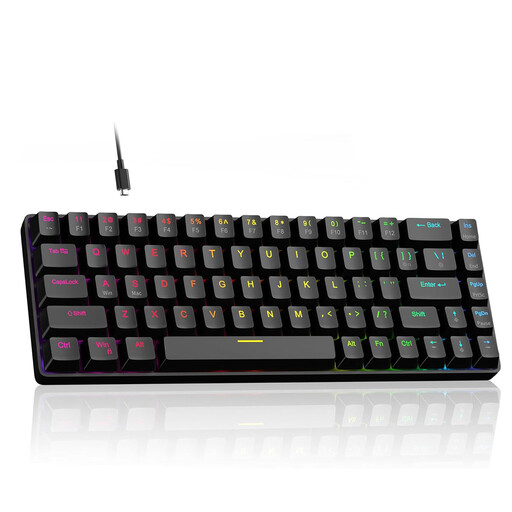
Why this keyboard fits the profile: The compact design with arrow keys is aimed at users who want to save mouse space and configure magnetic switches.
The description mentions Hall-effect switches, an adjustable actuation point, rapid trigger and hot-swap. Still, check software and system compatibility before buying.
According to the product specs: 8,000 Hz polling rate, RGB lighting and adjustable actuation from 0.1 to 4.0 mm.
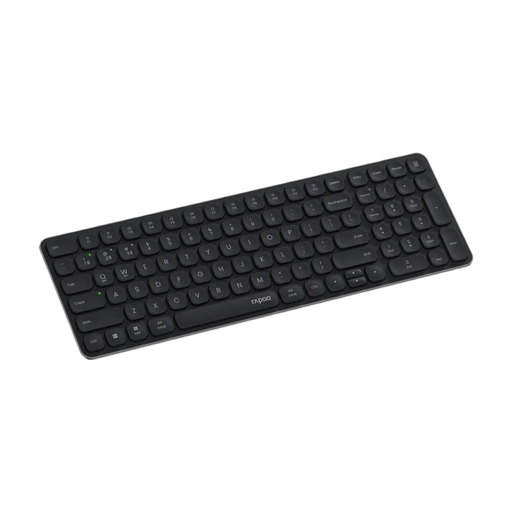
Why this keyboard fits the profile: The slim 99-key format with a number pad is ideal for changing workstations, laptops and up to four connected devices.
Bluetooth, 2.4 GHz and the number of devices are all clearly stated. Before buying, consider the required USB receiver and battery power.
Scissor mechanism, multimedia keys, Windows and Mac support, and a stated battery life of up to twelve months.
In the full selection you'll find various computer keyboards for gaming, home office and productive work. Check the layout, connection type and features of each model there.
For the home office, a German QWERTZ layout, a pleasant typing sound and direct media functions are practical. A full-size keyboard makes sense if you work with numbers a lot. If space is limited, a TKL or 75% keyboard is a good choice.
That depends on how you use it. A wired keyboard doesn't need a battery and is ready to use straight away. A wireless keyboard reduces cables on your desk and can be used with multiple devices. For both options, you should check compatibility, range and power supply.
The lifespan depends on the switches, casing, usage and care. Manufacturer claims such as a certain number of keystrokes are technical guidelines, not a guarantee for every situation. Dust, liquids, pulling hard on the cable and improper switch replacement can shorten its useful life.