What to consider when buying
First, decide which keys you want to reach directly, then work out how much room you need for your mouse. Next, compare the switches and connection options available on each version.
| Consideration |
What to check when buying |
Who should pay particular attention? |
| Room to move your mouse |
Compare the layout with the space available and check which commands are assigned to secondary functions. |
If I need plenty of mouse space on a small desk, I still want to be able to use my most-used commands. Around 24 % of consumers give mouse space top priority. |
| Direct access to commands |
Check the position of frequently used gaming, arrow and function keys on the specific layout. |
If I use gaming and work commands often, I don’t want to keep searching for secondary functions. Around 23 % of consumers prioritise direct access to commands. |
| Typing noise |
Compare the switch type and sound dampening of the exact model, ideally in your own desk and microphone setup. |
If I work or talk in the same room, I want typing to be as unobtrusive as possible. Around 23 % of consumers prioritise quiet typing. |
| Switching between devices |
Check whether your work and gaming devices support the same connections; distinguish between wireless, Bluetooth and wired options. |
If I want to use my keyboard with both my work and gaming devices, the connections need to work with each. Around 18 % of consumers prioritise switching between devices. |
| The right range of features |
Decide whether you want to swap switches or adjust the actuation distance, or whether the right layout and typing feel are enough. |
If I only want to pay for and use features I really need, extra customisation isn’t an end in itself. Around 12 % of consumers prefer a straightforward set of features that suits their needs. |
Joybuy product selection
This selection includes compact keyboards that free up mouse space, models with easy-to-reach commands, and versions with membrane, mecha-membrane or mechanical switches. German layouts and different connection options are also available on some models.
 No image available
Razer Ornata V3 Tenkeyless, German layout
The TKL format without a number pad leaves more room for mouse movement; the listing specifies a German QWERTZ layout.
Mecha-membrane switches and dedicated media keys are listed. The switches are described as clicky, which may be distracting if quiet typing is important to you.
View at Joybuy
 No image available
Exodus 220 TKL, black, QWERTZ DE
The TKL format without a number pad is a compact option if you want more room for your mouse.
The listing specifies membrane switches, a USB-C cable, 26-key rollover, WIN lock and 12 FN multimedia functions.
View at Joybuy
 No image available
Akko 3084B Plus, 75 %, ISO-DE, black and gold
The 75 % layout combines a compact arrangement with a German ISO-DE layout.
V3 Pro Cream Blue Pro switches, hot-swap support, Bluetooth, 2,4-GHz wireless and USB-C are listed. The switches are described as tactile and clicky, so bear this in mind if quiet typing is a priority.
View at Joybuy
 No image available
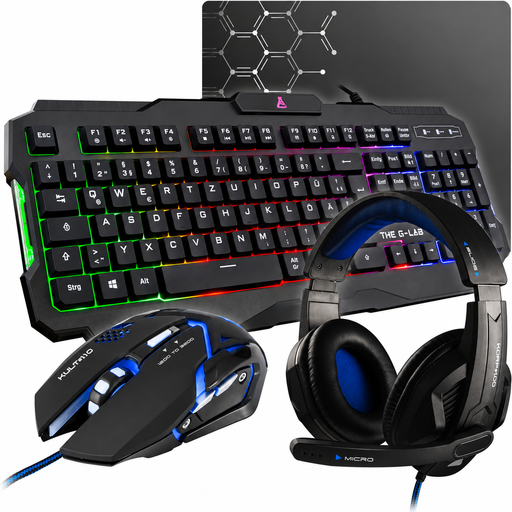
The G-Lab COMBO-ARGON-E/DE, 4-in-1 gaming set
The listing describes a membrane keyboard with a German QWERTZ layout and USB connection for gaming and everyday use.
The keyboard is described as quiet. This is a 4-in-1 set, not a standalone keyboard.
View at Joybuy
 No image available
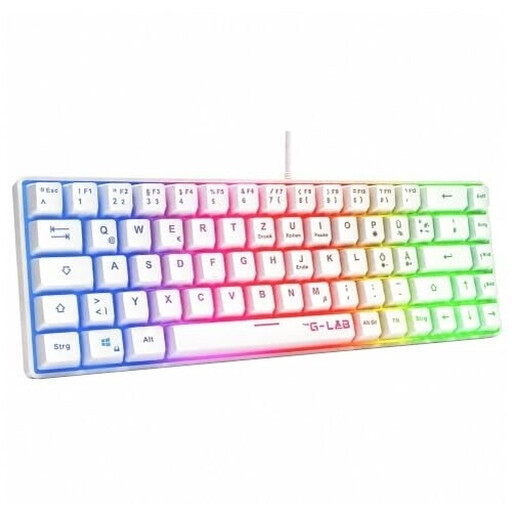
The G-Lab KEYZ-HYDROGEN-W/DE, 60 %, white
The 60 % format is an option if mouse space is your priority on a small desk and the secondary functions suit the commands you use.
The listing specifies membrane switches, a USB connection and a German QWERTZ layout.
View at Joybuy
Frequently asked questions
Should I choose 60 %, 75 % or TKL for frequently used commands?
Choose based on the keys you actually use for gaming and work. The HyperX Alloy Origins 60 marks secondary functions, while the Razer BlackWidow V4 75 % retains arrow and function keys according to Razer. TKL is another option if you’re happy to go without a number pad but don’t want a more compact layout.
What should I check when choosing a keyboard for work and gaming devices?
Compare the connections supported by both devices with those available on the exact model. Logitech G lists wireless, Bluetooth and wired data transfer for the G515 LIGHTSPEED TKL; also check that the key assignments you need work in both setups.
Can I change the switches on the Razer BlackWidow V4 75 %?
According to Razer, the hot-swap PCB supports mechanical switches with 3 or 5 pins. Check which version you’re buying: the barebones model is sold without switches and keycaps.
How can I find a keyboard that’s less disruptive in a home office?
Compare the switch type and sound dampening of the specific model in your own working and microphone setup. Manufacturer descriptions such as “quiet” or “sound-dampening” aren’t comparative measurements taken at your desk.
What are my rights if an online purchase in Germany is faulty or I want to cancel it?
Your statutory rights against the seller are separate from any voluntary guarantee. The Verbraucherzentrale says new goods are generally covered for two years from delivery. Many online purchases also come with a right to cancel, which can usually be exercised within 14 days of receiving the goods. You must notify the seller that you wish to cancel; the specific conditions may depend on the purchase.


