What should you look for when buying?
First decide whether noise, a number pad, custom key assignments or desk space matters most to you. Then check the exact variant and its specifications, rather than relying on the model family or gaming features alone.
| Priority |
What to check |
Who should pay particular attention? |
| Noise and typing feel |
Check the exact switch type and feel; if possible, assess the sound in the conditions you’ll use it in. |
If you work and play at the same desk, the key noise should disturb others in the room as little as possible. Around 36% of consumers prioritise noise and typing feel. |
| Number pad and key layout |
Check the layout of the exact variant for a number pad, arrow keys and function keys. |
If you often enter numbers using the number pad for work or gaming, you’ll want to keep that option. Around 29% of consumers prioritise the number pad. |
| Assigning game commands |
Check the control options in the game, and whether the model has programmable keys and requires specific software. |
If you want quick access to frequently used game commands or to assign them yourself, the actual controls matter more than extra gaming features. Around 21% of consumers prioritise key assignments. |
| Desk space and connectivity |
Check the space required and supported connections; for wireless models, also check whether you’ll need a receiver and how they’re charged. |
If you want to leave space for other work equipment or switch between devices, choose a format that suits your desk. Around 14% of consumers prioritise desk space or connectivity. |
Joybuy products at a glance
The Joybuy products below are mechanical keyboards for different space and key requirements. All the variants listed are specified with a US layout, so don’t assume they have a German QWERTZ layout – check the product details carefully.
 No image available
Ticktype DP104, full-size with 108 keys
An option if you’re looking for a full-size layout and the Silent Tactile switch variant named in the title.
Full-size layout with 108 keys; tri-mode wireless connectivity; hot-swappable switches; US layout; Silent Tactile switches.
If noise is a key consideration, check the sound of the exact variant rather than relying on the switch name alone.
View at Joybuy
 No image available
Redragon RS68, 65% layout with 68 keys
A better fit if you want a compact format and several connectivity options.
65% layout with 68 keys; Bluetooth, 2.4 GHz wireless and wired connectivity; detachable wrist rest.
View at Joybuy
 No image available
AJAZZ AK820 MAX, 75% layout
A compact option if you’re looking for a 75% layout with tri-mode connectivity.
75% layout; tri-mode connectivity; Flying Fish switches; volume control knob; 8.000-mAh battery; US QWERTY layout; hot-swappable switches.
Bear the US QWERTY layout in mind if you need a German QWERTZ layout.
View at Joybuy
 No image available
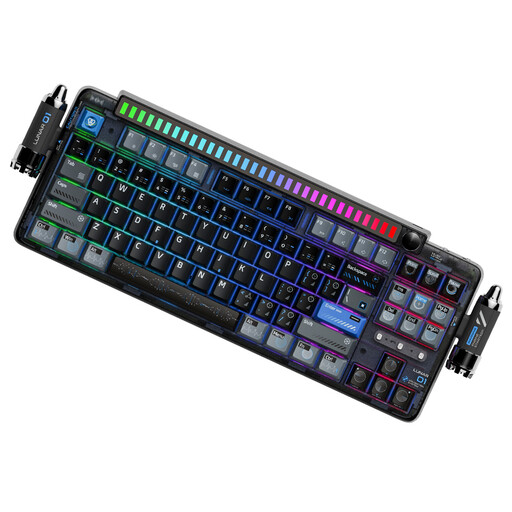
KEYSME Lunar 01, 80% layout
A better fit if you want an 80% layout, several connectivity options and a programmable rotary knob.
Tri-mode connectivity; US QWERTY layout; hot-swappable switches; programmable rotary knob; 4.000-mAh battery.
Check that the US QWERTY layout meets your needs.
View at Joybuy
 No image available
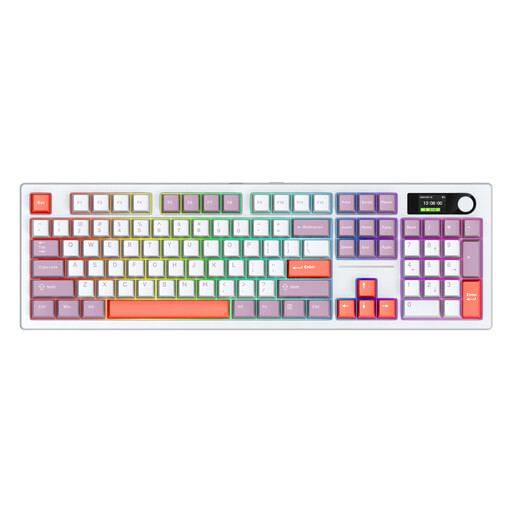
Siukie ACH105, full-size with 104 keys
An option if you’re looking for a full-size layout and Bluetooth, wireless or wired connectivity.
104 keys; hot-swappable switches; Bluetooth, 2.4 GHz wireless and Type-C; US layout; colour display; 8.000-mAh battery made up of two 4.000-mAh batteries.
Check the US layout if you need a German key arrangement.
View at Joybuy
Frequently asked questions
Do I need macro keys for business simulations?
No, not simply because of the genre. According to Ubisoft, you can change mouse and keyboard commands for Anno 1800 in the control options. Check the commands for the games you actually play before making extra keys a requirement.
How do I set up the keyboard for Anno 1800?
Ubisoft says to select ‘Options’ from the main menu, then ‘Controls’. From there, you can select a key or button, reassign it and confirm your choice. These instructions apply to Anno 1800 and don’t guarantee the same steps for other games.
What should I know about compliance for wired and wireless keyboards?
Germany’s Federal Network Agency (Bundesnetzagentur) outlines labelling and information requirements for electrical and electronic equipment sold in Germany, both with and without wireless connectivity. For a wireless variant, the regulations applicable to radio equipment are also relevant. A product description alone doesn’t prove that the specific item is compliant.
Who should I contact if a newly bought keyboard is faulty?
Under Germany’s statutory warranty, the seller – not the manufacturer in the first instance – is responsible. The Verbraucherzentrale (German consumer advice centre) says the period is generally two years from delivery. This is separate from a voluntary manufacturer’s warranty. The Verbraucherzentrale also describes a one-off 12-month extension for purchases made from 31 July 2026 if you choose repair when a fault occurs.
What should I do with my old keyboard?
In Germany, electrical and electronic waste must not be put in household rubbish. The Federal Environment Agency (Umweltbundesamt) lists recycling centres and retailer take-back schemes among the disposal options; removable batteries should be handed in separately.


