What to look for when buying
First, check the switches and the sound of the keys. Then compare your in-game controls with the layout you need, and finally consider the space available and the lighting. Manufacturers’ claims about quiet keystrokes aren’t a like-for-like measurement for a shared bedroom.
| What to consider |
What to look for |
Who it matters most to |
| Sound of the keys |
Check the exact switch type; don’t treat manufacturers’ descriptions as equivalent to testing the noise level in your own room. |
If I play at night and don’t want to disturb the other person in the room, I want to judge the sound of the keys at my own desk. Around 39% of consumers put noise at the top of their list. |
| Access to in-game commands |
Make a note of the shortcuts you use often and check whether you’ll need the game’s key mapping, a number pad or extra macro keys. Ubisoft documents customisable mouse and keyboard controls for Anno 1800. |
If I use the same commands often, I want to be able to reach them using my preferred key mapping before I plan for extra keys. Around 23% of consumers prioritise quick access to commands. |
| Size and desk space |
Measure the space available and, before choosing a TKL model, check whether you need a number pad. |
If I need room for my mouse next to the keyboard, I want to know whether I can do without a number pad. Around 23% of consumers prioritise desk space. |
| Key lighting |
Check whether brightness and effects can be adjusted on the specific model; Logitech G and CORSAIR describe lighting options on certain models. |
If I need to see the keys in low light without disturbing anyone with bright lighting, I need suitable adjustment options. Around 15% of consumers put adjustable lighting at the top of their list. |
Joybuy products
The products below include compact and full-size keyboards with different switch and layout specifications. For a shared bedroom, descriptions of noise levels aren’t measurements; pay particular attention to the exact switch type and layout.
 Image unavailable
Royalaxe X68 gaming keyboard with magnetic switches
The product listing mentions magnetic Hall-effect switches and Rapid Trigger, and specifically refers to FPS games. Check whether these features suit the management games you play.
View at Joybuy
 Image unavailable
Redragon RS68 3-mode wireless gaming keyboard
Described as a compact 65% model with 68 keys; the product description calls its linear switches quiet. This isn’t a measured noise level.
The product name lists Bluetooth, 2.4G and wired connectivity, along with hot-swappable switches and a detachable palm rest.
View at Joybuy
 Image unavailable
Logitech MX Mechanical, German QWERTZ layout
The product specifications list Tactile Quiet switches and a German QWERTZ layout. The described sound profile isn’t a measured noise level.
Bluetooth, Logi Bolt and smart backlighting are also listed.
View at Joybuy
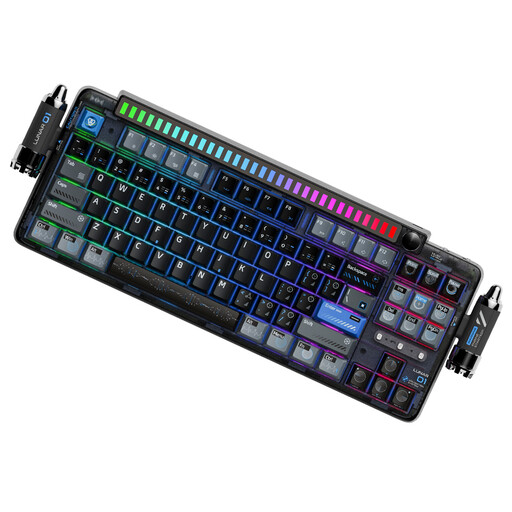 Image unavailable
KEYSME Lunar 01, 80%, US QWERTY layout
The product name lists an 80% layout, hot-swappable switches and a programmable knob. Check that the specified US QWERTY layout meets your needs before buying.
View at Joybuy
 Image unavailable
Ticktype DP104, full-size with 108 keys
The product name lists Silent Tactile switches and a full-size layout with 108 keys; the noise description isn’t a measurement.
Check that the specified US layout meets your needs before buying. Tri-mode connectivity and hot-swap functionality are also listed.
View at Joybuy
Frequently asked questions
Do I need macro keys for management games?
Not necessarily. First, compare the commands you use often with the game’s customisation options: Ubisoft documents customisable mouse and keyboard controls for Anno 1800. Whether extra macro keys will help depends on your key mapping.
How can I tell MX RED and MX SILENT RED apart?
According to CHERRY, MX RED has no click, while MX SILENT RED has sound dampening. So check the full switch name for the specific version; the name MX BOARD 3.0S alone doesn’t confirm that it has the Silent version.
What should I check before setting up a new keyboard?
First, check the layout and the keys mapped in your game. If the lighting is disruptive in the bedroom, you can adjust the brightness on a model with the right settings; Logitech lists different brightness levels for the G213. Clean the keyboard according to the instructions for that specific product.
What are my rights in Germany if a product is faulty or an online purchase isn’t right for me?
If a product is faulty, the seller is generally responsible under the statutory warranty; the Verbraucherzentrale states that this lasts for two years from delivery. For online purchases, you generally have a 14-day right to cancel from the date the contract is made or the goods are received, and you must notify the other party to the contract. Check the terms of your specific purchase.
Can I put an old keyboard in the household rubbish?
No. The Umweltbundesamt advises that old electrical equipment should be collected separately and taken, for example, to a recycling centre or a suitable retailer take-back point.


