What to look for when choosing
First, list the editor commands and keys you use most often. Then compare the layout and typing feel. Wireless convenience only matters if you actually need it at your desk.
| Priority |
What to check before buying |
Who it matters most to |
| Commands and macros |
Check which actions can be assigned within the editor itself, and whether the keyboard software supports macros or profiles for your operating system. |
If I want quick access to recurring editor actions without unnecessary key assignment conflicts, this is my top priority. Around 36% of consumers are likely to share this main concern. |
| Layout and keys within easy reach |
Compare the keys you need with the specific keyboard format, and check that the listing explicitly states DE or ISO-DE. |
If I write in German or use a number pad in my editor, I want the right key legends and the keys I need in front of me. Around 29% of consumers are likely to prioritise layout above all else. |
| Typing feel and noise |
Check the exact switch type rather than assuming a particular noise level based on the model range alone. |
When I’m typing longer texts or scripts, the feel of the keys matters more to me than extra macros or wireless features. Around 21% of consumers are likely to prioritise typing comfort. |
| Wireless use |
Check the listed connectivity options, charging requirements and whether you can use the keyboard while it’s charging. |
If I want to use my desk without a keyboard cable permanently attached, wireless operation is a must for me. Around 14% of consumers are likely to prioritise wireless convenience. |
Joybuy products for map editors and home offices
These Joybuy listings include compact keyboards and full-size wireless models. Layout, switches and connectivity options vary by product.
 No image available
Akko 5087S V1 TKL, ISO-DE-QWERTZ, Black & Gold
A compact, wired keyboard for a workspace where a smaller format and programmable commands are useful.
Listed features include ISO-DE-QWERTZ, TKL, Akko Macro V1.0, hot-swap and Cream Yellow Pro switches.
View at Joybuy
 No image available
AJAZZ AK35I V4, German QWERTZ layout
This full-size keyboard is a good fit if you want a number pad within easy reach and a choice of connectivity options.
Listed features include 104 keys, Bluetooth, 2.4 GHz wireless, USB-C and hot-swap.
View at Joybuy
 No image available
ARZOPA 80%, 87 keys, German layout
The more compact format could suit you if you want to save desk space and change the switches when needed.
The description lists Bluetooth, USB-C and 2.4 GHz wireless, as well as hot-swap for 3- and 5-pin switches.
View at Joybuy
 No image available
Razer Ornata V3 Tenkeyless, German layout
A more compact wired option if programmable inputs and a German TKL layout are important to you.
The description lists programmable keys and Razer Synapse. The switches are described as clicky, which may be distracting when working quietly in a shared home office.
View at Joybuy
 No image available
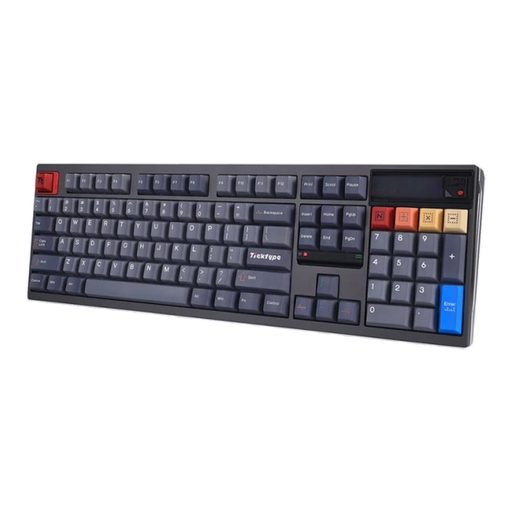
Ticktype DP104, full-size keyboard with US layout
This full-size keyboard gives you direct access to all its keys, including the number pad. Before buying, check that the listed US layout suits your typing needs.
Listed features include 108 keys, hot-swap, Silent-Tactile switches, Bluetooth, 2.4 GHz wireless and USB-C.
View at Joybuy
Frequently asked questions
Do I need macro keys for map editors?
No. Start by checking your editor’s shortcuts: Blender lets you create custom keymaps, while Unity lets you change commands and manage conflicts. Extra keys are most useful if you then want quick access to additional commands.
How do I set up a keyboard for my editor?
First assign your most-used commands in the editor and check for conflicts there. Only then, if needed, assign keyboard keys or macros. Unity supports shortcut profiles, while Blender lets you save custom keymap configurations.
Can I replace the switches on any mechanical gaming keyboard?
No. Hot-swap depends on the specific version. Keychron lists this feature for the K10 Pro ISO; for other keyboards, check the exact version before planning to buy replacement switches.
What are my rights when buying online in Germany if I change my mind or find a fault?
According to the Verbraucherzentrale, consumers buying online generally have a 14-day right to cancel; the period usually starts when the goods arrive. You must notify the retailer that you’re cancelling. Your statutory rights if goods are faulty are separate from any voluntary guarantee.
What should I check when buying a wireless or Bluetooth keyboard in Germany?
Check the manufacturer’s information and documentation for the specific wireless version. For market surveillance, the Bundesnetzagentur checks matters including CE marking, manufacturer details, German-language instructions and the declaration of conformity. The EU Radio Equipment Directive sets the framework for placing radio equipment on the market.


