Repeated map practice
If you practise movement and command inputs regularly, a suitable key layout and controllable actuation may be factors to consider when choosing a keyboard.


For repeated map practice, what matters most is whether you can reach and activate the keys you need with control. Adjustable actuation points are an option, but they don’t prove that you’ll learn faster. If you work at the same desk, space for your mouse, key noise, a German layout and connectivity may matter more than extra customisation features. Manufacturers’ claims about noise or responsiveness describe individual models; they are not a substitute for standardised testing.
If you practise movement and command inputs regularly, a suitable key layout and controllable actuation may be factors to consider when choosing a keyboard.
If you play or work within earshot of other people, consider the feel and sound of the specific keyboard rather than relying on the switch name alone.
If you need room to move your mouse but also want easy access to frequently used work and gaming commands, the layout and key arrangement matter.
First, check which keys you need to reach easily when practising and working. Then compare the layout, key noise and connectivity of the specific version.
| What matters | What to check before buying | Who it matters most to |
|---|---|---|
| Controlled inputs for practice | How easily you can reach and remap the keys you need; the actuation behaviour of the specific version. | If I repeat movement sequences often, I want to reach the keys I need without moving my hands and activate them with control; around 33% of consumers put controlled inputs for practice first. |
| Keyboard noise at your desk | Check the switches supplied as standard and the case construction; don’t assume “quiet” means silent. | If other people are within earshot while I’m playing or working, I want to take the key feel into account without relying on a product description alone; around 25% of consumers prioritise low keyboard noise. |
| Mouse space and office work | Choose a layout based on the arrow, function and number keys you need, as well as the space available on your desk. | If I use the same desk for mouse movement and office tasks, I want to free up space without losing important work keys; around 25% of consumers put this combination first. |
| The right layout and connectivity | Check the German QWERTZ or DE-ISO version, switches and preferred connection type on the product page. | If I switch between gaming and work, I want to type using a familiar key layout and use the right connection; around 17% of consumers prioritise layout and connectivity. |
Adjustable actuation points don’t prove that you’ll learn a map faster. A very sensitive setting can also make accidental inputs more likely.
Choose these settings only if you plan to use them, and take the time to find an actuation feel you can control.
Setup and getting used to the keyboard can take extra time.
A switch name or sound dampening alone doesn’t tell you how loud the keyboard will sound at your desk.
Check the exact switch version and, if possible, try the keyboard in a similar environment.
75% and TKL models don’t have a dedicated number pad. Depending on the layout, some other keys may also be arranged differently or less easy to reach.
Before buying, think about which number, arrow and function keys you use regularly at work.
The Keychron Q1 HE is available in different ISO country variants. Razer also offers a barebones version of the BlackWidow V4 75% that doesn’t include switches or keycaps.
Check the full model name, layout, switches and box contents for the version you’ve selected.
A barebones version may require you to buy switches and keycaps separately.
The Apex Pro TKL Gen 3 - DE is an example of a keyboard with adjustable magnetic switches.
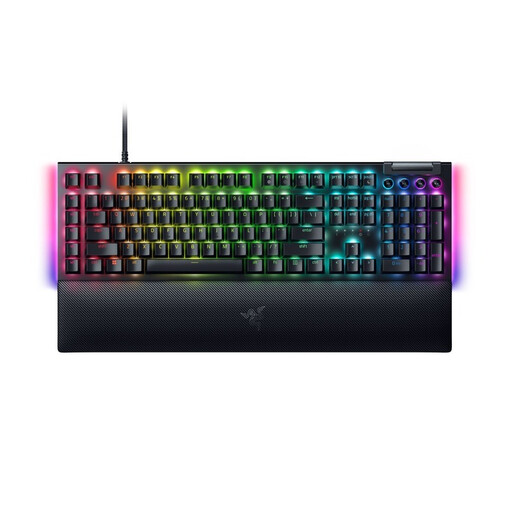
The BlackWidow V4 75% is a compact mechanical model with a function row and arrow keys.
The Q1 HE ISO collection includes a DE-ISO version you can select, with magnetic switches.
The G515 LIGHTSPEED TKL combines a low-profile TKL format with several connection options.
The wired MX 3.1 is an example of a mechanical model with customisable key mapping.
This selection includes compact mechanical keyboards for gaming and work, a full-size option, and a model with magnetic switches and adjustable actuation.
 No image available
The compact layout and German legends make this a good option if you want to consider mouse space and a familiar key layout.
MX Speed low-profile switches; 2.4 GHz wireless, Bluetooth or USB-C; RGB.
 No image available
ISO-DE and the 75% layout are worth considering if you want a more compact keyboard for a shared gaming and work desk.
Tri-mode connectivity; hot-swappable; leaf-spring mount; VIA compatible; quick disassembly.
 No image available
The ISO-DE layout and 75% format are an option if German legends and a more compact arrangement are important to you.
V3 Pro Cream Yellow switches; hot-swappable; Bluetooth, 2.4 GHz or USB-C; RGB.
 No image available
The German layout gives you familiar key positions for work and play; the full-size format takes up more desk space than compact layouts.
Mechanical gaming keyboard; Yellow switch; detachable USB-C cable.
 No image available
The compact layout can free up room for mouse movement; the US layout specified here is different from the German layout.
Hall-effect magnetic switches; adjustable actuation to 0.01 mm; Rapid Trigger; 8K polling rate; wired.
First decide which commands you want to reach without moving your hands, then check the key mapping and actuation behaviour on the specific model. SteelSeries describes saved configurations and adjustable travel for the Apex Pro TKL Gen 3 - DE; CHERRY lists customisable key mapping for the MX 3.1. Also check that the key combinations you want to use are permitted under the rules of the game.
Follow the instructions for your specific version. For general cleaning, SteelSeries recommends using, among other things, a dust blower and a microfibre cloth. Disconnect a wired keyboard before cleaning it, and only remove the keycaps if the model allows it.
For online purchases, Verbraucherzentrale explains that you generally have a 14-day right to cancel from the day you receive the goods, subject to the applicable requirements and exceptions. If a product is faulty, statutory consumer rights against the seller are separate from a voluntary guarantee. For new goods, you may be able to exercise your statutory rights within two years of delivery or receipt.
For market surveillance, the Bundesnetzagentur lists CE marking, manufacturer details, instructions in German and the declaration of conformity among the checks for products with radio functionality. These are points to check for the specific product; they don’t mean that a particular model has already been tested. CE marking alone is not an independent quality assessment.