For focused movement drills on PC, a keyboard with an adjustable actuation point or Rapid Trigger is a suitable option, provided you can configure these features carefully and your game allows them. If you sit further away, a practical wired connection or 2.4 GHz receiver also matters, as does a layout that leaves enough room for your mouse while offering the keys you need. The models listed are examples to consider, not definitive, fully tested buying recommendations; before purchasing, also check the labelling requirements and whether German-language instructions are included.
Who is this selection for?
Players focused on changing direction
If you practise repeated stops and changes of direction on PC, check whether you can adjust how your movement keys actuate and reset. Also bear in mind the rules of the game you play on automated inputs. Wooting, SteelSeries and Razer describe relevant features on the models listed.
Players who sit further from the screen
If you sit further away from your PC, the keyboard’s connection and positioning become more important. Check whether a wired connection will work for you or whether a model with a 2.4 GHz receiver better suits your setup. CHERRY lists these connection options for the MX 8.2 TKL Wireless.
Players with limited mouse space
If you need room for wide mouse movements, check whether a more compact format still gives you the arrow and function keys you want within easy reach. RTINGS notes that extra room for mouse movement can be one potential benefit of a TKL format.
What should you look for when buying?
First, work out which input features you actually want to use and whether your game allows them. Then compare your seating distance, connection and required keys with the space available in your gaming setup.
| Buying priority |
What to check when buying |
Who is this especially important to? |
| Movement and stop inputs |
Check that the exact model offers Rapid Trigger and an adjustable actuation point; don’t confuse these features with automatic directional prioritisation. |
If I need to retrigger movement keys frequently, I want to be able to adjust their actuation and reset carefully. Around 36% of consumers prioritise configurable movement and stop inputs like these. |
| Connection and seating distance |
Check whether a wired connection, 2.4 GHz receiver or Bluetooth is available and which mode suits your setup; if you use wireless, remember to factor in charging. |
If I sit further away from my PC or a cable gets in the way when setting up, I need a connection that works practically in my space. Around 29% of consumers put flexible connection and positioning first. |
| Mouse space and keyboard layout |
Compare the dimensions and check that it has the arrow, function or number-pad keys you need. |
If I want to move my mouse a long way but still need certain keys close to hand, I’m looking for a format that fits both within the space I have. Around 21% of consumers prioritise clear mouse space while retaining the keys they need. |
| Gaming and everyday use |
Check the key layout, switch type and connection options for how you’ll use it; manufacturers’ claims about sound dampening aren’t a standardised measure of noise levels. |
If I also use the same keyboard for longer writing sessions, layout, typing feel and a suitable connection matter just as much to me as gaming features. Around 14% of consumers prioritise versatile everyday and gaming use over extra specialist features. |
Common misconceptions
-
Confusing Rapid Trigger with automatic directional prioritisation
A keyboard may offer both features, even though game rules restrict certain automated inputs. On 19 August 2024, Valve said that certain automated movement and firing inputs, including hardware-assisted counter-strafing, could be detected on official CS2 servers and lead to a match ban.
Configure these features separately and check the rules for the relevant game and server before playing.
Using an input automation feature in breach of the rules can get you banned from the current match on official CS2 servers.
-
Focusing only on the advertised polling rate
RTINGS describes the practical benefit of a higher polling rate on the Wooting model it tested as small. Connection, format and controllable inputs can also be key to your setup.
Start by checking your seating distance, connection and required keys. Then compare the polling rates of the models that meet those needs.
-
Assuming similarly named CHERRY models have identical specifications
CHERRY describes the MX 8.2 TKL Wireless as having mechanical switches and the separate MX 8.2 Pro TMR Wireless as having magnetic switches. Features of one version don’t automatically apply to the other.
Check the full model name, switch type and connection options on the specific product listing.
Key brands at a glance
Wooting
The Wooting 80HE is a wired 80% model for users who want to configure actuation and reset.
- Wooting lists Rapid Trigger and adjustable actuation for the 80HE.
- In its review, RTINGS highlights the low latency but rates the practical benefit of a higher polling rate as small. If you sit further away, check whether a wired connection will work for your setup. The 80HE and 80HE+ are different product versions.
SteelSeries
The Apex Pro TKL Gen 3 - DE combines a German TKL layout with adjustable magnetic switches.
- SteelSeries lists Rapid Trigger and an adjustable actuation distance of 0.1 to 4.0 mm for this wired model.
- These are manufacturer specifications, not independent evidence of better gaming performance. Wireless specifications for other Apex versions don’t automatically apply to the DE version.
Razer
The Huntsman V3 Pro Tenkeyless 8KHz is aimed at players looking for an analogue optical TKL keyboard with configurable inputs.
- Razer lists Rapid Trigger and an adjustable actuation range of 0.1 to 4.0 mm; according to the manufacturer, Snap Tap is disabled by default.
- Manufacturer comparisons of speed don’t prove an independent advantage across an entire gaming setup. On official CS2 servers, follow the restrictions Valve has outlined for certain automated inputs.
CHERRY XTRFY
The MX 8.2 TKL Wireless has mechanical switches and several connection options; the separate MX 8.2 Pro TMR Wireless combines wireless connectivity with magnetic input technology.
- CHERRY lists 2.4 GHz, Bluetooth and wired connectivity for both models. For the Pro TMR Wireless, the manufacturer also lists magnetic switches.
- Claims of particularly low latency come from the manufacturer and can’t automatically be applied across different models or wireless modes. RTINGS considers Bluetooth less suitable for competitive gaming than a wired connection or receiver.
Joybuy keyboards for movement drills
The following Joybuy product options include compact and TKL layouts, as well as wired models with magnetic switches and Rapid Trigger. If you’re buying a keyboard sold in Germany, also check the specific unit being sold: the German Federal Network Agency lists requirements including correct CE marking, device traceability and the necessary instructions in German.
 No image available
Royalaxe E75, 75%, TTC magnetic switches
This wired model lists magnetic switches and an RT mode for configurable movement inputs.
75% layout; Type-C connection; two-tone silver and pink design.
View at Joybuy
 No image available
Royalaxe X68 Esports
The product description lists magnetic switches and Rapid Trigger for repeated inputs.
Aluminium frame; Hall effect switches.
View at Joybuy
 No image available
Redragon M68, 68 keys
The compact layout could be a good fit if you want more room for mouse movements and magnetic switches with Rapid Trigger.
Metal top plate; 8000 Hz polling rate; detachable Type-C cable; US layout.
View at Joybuy
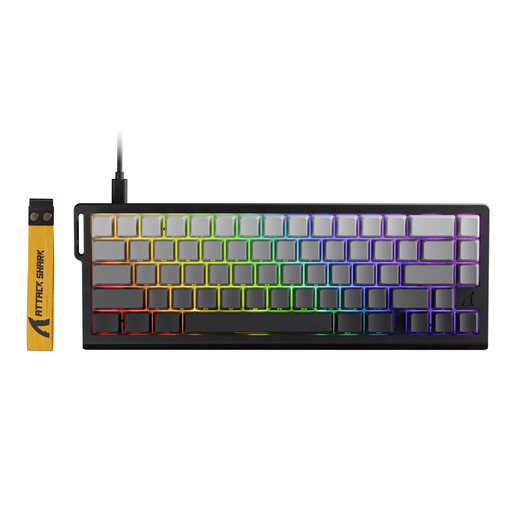 No image available
ATTACK SHARK X68 HE, 66 keys
This compact model lists magnetic switches, adjustable actuation and Rapid Trigger.
66 keys; USB-C wired connection; 8000 Hz polling rate. Use the listed directional prioritisation features only if the rules of the game you play allow them. Valve describes a risk of being banned from official CS2 servers for certain automated inputs.
View at Joybuy
 No image available
Akko 5087S V1 TKL, ISO-DE QWERTZ
This wired TKL model with a German layout could suit you if a familiar key layout matters more than a confirmed Rapid Trigger feature.
Linear Akko V3 Pro Cream Yellow switches; stated pre-travel 2.0 ± 0.6 mm; 1000 Hz polling rate; black and gold.
View at Joybuy
Frequently asked questions
Should I use Bluetooth for competitive movement drills?
If your model offers a wired connection or a wireless receiver, RTINGS considers these better options for competitive gaming. Bluetooth can make it easier to switch between devices, but typically has higher latency; check the modes available on the specific model.
How do I set up Rapid Trigger for WASD?
First check whether the exact model supports Rapid Trigger for these keys. Adjust actuation and reset so you can deliberately repeat inputs, then test the profile in-game. Only use automatic directional features if the rules of the game allow them.
Could Snap Tap cause problems in Counter-Strike 2?
Yes. Certain automated inputs can get you banned from matches on official CS2 servers. On 19 August 2024, Valve said this applied to automated movement and firing inputs, including hardware-assisted counter-strafing. This is a server rule, not a general German ban on keyboards; check the rules of other games separately.
What should I know about faults or buying online in Germany?
The Verbraucherzentrale distinguishes between your statutory rights when goods are faulty and a voluntary guarantee. For online purchases, it generally lists a 14-day right to cancel; you must notify the other party to the contract that you wish to cancel.
What should I check when buying an electronic keyboard sold in Germany?
For relevant electrical and electronic devices, the German Federal Network Agency lists requirements including correct CE marking, information to identify the product and the necessary instructions in German. A CE image or a retailer’s listing alone doesn’t confirm that the specific unit being sold meets all the requirements.


